web
You’re offline. This is a read only version of the page.
close
Skip to main content

Announcements

No record found.

News and Announcements icon
Community site session details

Community site session details

Session Id :
Microsoft Dynamics CRM (Archived)

Exception on Audit History of Workflow

(0) ShareShare
ReportReport
Posted on by

Hi,

We are getting exception while we tried to check Audit History of workflows (not for all, but for most of the wfs). Below is the screenshot of error. We recently migrated from RM 2011 to CRM 2016 with In-place migration approach. We checked with ObjectId and found that audit history records are present in CRM database.
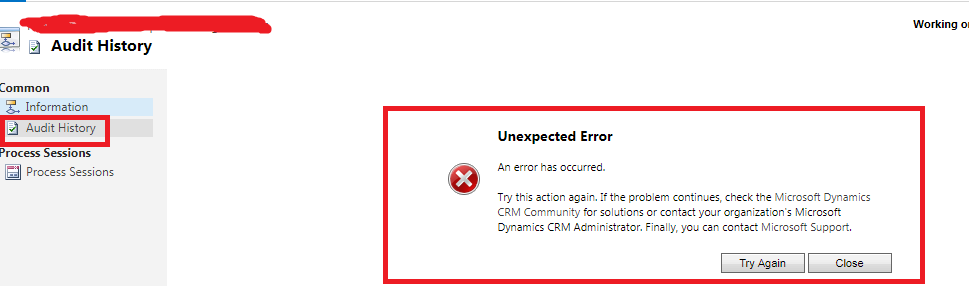
CRM-WF-Isue.png

We checked with logs and found the below issue:

Web Service Plug-in failed in SdkMessageProcessingStepId: {98151A8E-8ED7-4B27-926D-16073AF4C3D3}; EntityName: audit; Stage: 30; MessageName: RetrieveRecordChangeHistory; AssemblyName: Microsoft.Crm.Extensibility.InternalOperationPlugin, Microsoft.Crm.ObjectModel, Version=8.0.0.0, Culture=neutral, PublicKeyToken=31bf3856ad364e35; ClassName: Microsoft.Crm.Extensibility.InternalOperationPlugin; Exception: Unhandled Exception: System.Reflection.TargetInvocationException: Exception has been thrown by the target of an invocation.
at System.RuntimeMethodHandle.InvokeMethod(Object target, Object[] arguments, Signature sig, Boolean constructor)
at System.Reflection.RuntimeMethodInfo.UnsafeInvokeInternal(Object obj, Object[] parameters, Object[] arguments)
at System.Reflection.RuntimeMethodInfo.Invoke(Object obj, BindingFlags invokeAttr, Binder binder, Object[] parameters, CultureInfo culture)
at System.Web.Services.Protocols.LogicalMethodInfo.Invoke(Object target, Object[] values)
at Microsoft.Crm.Extensibility.InternalOperationPlugin.Execute(IServiceProvider serviceProvider)
at Microsoft.Crm.Extensibility.V5PluginProxyStep.ExecuteInternal(PipelineExecutionContext context)
at Microsoft.Crm.Extensibility.VersionedPluginProxyStepBase.Execute(PipelineExecutionContext context)
Inner Exception: System.ArgumentOutOfRangeException: Index was out of range. Must be non-negative and less than the size of the collection.
Parameter name: index
at System.Collections.CollectionBase.System.Collections.IList.get_Item(Int32 index)
at Microsoft.Crm.ObjectModel.AuditService.GetLocalizedAttributeValueFromBusinessDataLocalizedLabelTable(EntityMetadata entityMetadata, Guid objectId, Int32 languageCode, AttributeMetadata attributeMetadata, ExecutionContext context)
at Microsoft.Crm.ObjectModel.AuditService.FillNewValuesInAuditDetails(AttributeAuditDetail auditDetail, BusinessEntity auditEntity, BusinessEntity baseEntity, BusinessEntityCollection beCollection, ExecutionContext context)
at Microsoft.Crm.ObjectModel.AuditService.CreateAuditDetailsForGeneralRecords(BusinessEntity auditEntity, BusinessEntity baseRecord, BusinessEntityCollection beCollection, ExecutionContext context)
at Microsoft.Crm.ObjectModel.AuditService.RetrieveAuditDetailsInternal(BusinessEntity auditEntity, BusinessEntity baseRecord, BusinessEntityCollection beCollection, ExecutionContext context)
at Microsoft.Crm.ObjectModel.AuditService.CreateAuditDetailCollection(BusinessEntityCollection beCollection, Int32 recordsToIgnore, BusinessEntity baseRecord, ExecutionContext context)
at Microsoft.Crm.ObjectModel.AuditService.RetrieveRecordChangeHistory(BusinessEntityMoniker moniker, PagingInfo pageInfo, ExecutionContext context)

Please help us to fix this issue. We are stuck with this one.

*This post is locked for comments

I have the same question (0)
  • Suggested answer
    Radu Chiribelea Profile Picture
    6,667 on at

    Hello,

    Looking at the inner exception & Call Stack, it seems that it is failing when retrieving some LocalizedLabels

    Inner Exception: System.ArgumentOutOfRangeException: Index was out of range. Must be non-negative and less than the size of the collection.

    Parameter name: index

    at System.Collections.CollectionBase.System.Collections.IList.get_Item(Int32 index)

    at Microsoft.Crm.ObjectModel.AuditService.GetLocalizedAttributeValueFromBusinessDataLocalizedLabelTable(EntityMetadata entityMetadata, Guid objectId, Int32 languageCode, AttributeMetadata attributeMetadata, ExecutionContext context)

    From experience, once possible cause is that you might have some duplicate localized labels within the LocalizedLabel Table.

    You could check if you have entries that share the same LocalizedLabelId, LanguageId, ComponentState = 0 and have the OverWriteTime = 1900 in the LocalizedLabel table.

    I'd start from there.

    Hope this helps!

    Radu

  • Community Member Profile Picture
    on at

    Hi Radu,

    Thanks for the reply.

    We tried with the way that you suggested to check with LocalizeLabel table and I found the below result. We have almost 598 record having duplicate LocalizeLabelId and LanguageId. 

    LocalizeLabelTable.png

    Please let us know steps to resolve the issue.

  • Radu Chiribelea Profile Picture
    6,667 on at

    Hello,

    It is expected to have multiple localizedlabels if you have multiple solutions installed.

    localizedLabelsExample.PNG

    You also need to include an additional filtering criteria to search for the ones that have the same OverWriteTime = 1900-01-01 00:00:00.000 - those would be the ones causing issues, as if you have two localizedlabels with the same id and same overwritetime, then this means that you would have two published components (which should not be possible, unless a DB corruption occurred)

    Regards,

    Radu

  • Community Member Profile Picture
    on at

    Hi 

    We checked with OverWriteTime by applying to Where clause and found 40 records.

    Please let us know, do we need to delete the duplicate records or not? Or do we need to delete on record from duplicate records?

    Please confirm.

    1070.LocalizeLabelTable.png

  • Suggested answer
    Radu Chiribelea Profile Picture
    6,667 on at

    Hello,

    Could you please also check the ComponentState against those entries? Is it 0 (Published) for both of the duplicate entries)? What is the SolutionId associated with the components?

    Normally you should remove the faulty duplicate value and leave only one entry - however finding out the entry that you need to remove depends a lot also on the solution layering you have.

    Once the duplicate value is removed, you need to perform an IISReset - to rebuilt the metadata cache and then see if the issue is solved or not.

    However, please keep in mind that performing operations over the CRM DB is not supported nor recommended - unless there is no other option available.

    When making any modifications to the CRM DB, it is mandatory to take  FULL DB copy of the CRM Database to be able to revert the changes.

    Also, it's best to test any script on a non productive instance first (copy of the live environment) and see what the outcome is, so that you don't cause any interruptions.

    My advice at this stage, is to reach out to Microsoft Support, as they have better troubleshooting tools - for the error you see a memory dump might be recommended, to be more accurate and have them assist you with the clean-up script.

    Hope this helps,

    Radu

  • Community Member Profile Picture
    on at

    Hi

    ComponentState have different values for each record. Like 0,1.

    And I checked with 3-4 records. The duplicate record pair have same solution id.

  • Suggested answer
    Radu Chiribelea Profile Picture
    6,667 on at

    Hi Celergo,

    A correctly published component should have ComponentState = 0 and OverwriteTime = 1900-01-01 00:00:00.000

    I think it's best if you reach out to MS Support to have this cleaned up.

    Regards,

    Radu

  • Community Member Profile Picture
    on at

    Ok thanks for you suggestions.

    Really appreciate.

  • Radu Chiribelea Profile Picture
    6,667 on at

    No worries - i hope this gets sorted out fast for you.

    If you can, please keep me updated once you have a solution. I would also be interested in the outcome.

    Regards,

    Radu

Under review

Thank you for your reply! To ensure a great experience for everyone, your content is awaiting approval by our Community Managers. Please check back later.

Helpful resources

Quick Links

Introducing the 2026 Season 1 community Super Users

Congratulations to our 2026 Super Stars!

Meet the Microsoft Dynamics 365 Contact Center Champions

We are thrilled to have these Champions in our Community!

Congratulations to the March Top 10 Community Leaders

These are the community rock stars!

Leaderboard > 🔒一 Microsoft Dynamics CRM (Archived)

#1
JS-09031509-0 Profile Picture

JS-09031509-0 3

#2
AS-17030037-0 Profile Picture

AS-17030037-0 2

#2
Mark Eckert Profile Picture

Mark Eckert 2

Last 30 days Overall leaderboard

Featured topics

Product updates

Dynamics 365 release plans
