Hi All,
On Assign of record to other user/team i am getting below error.and user has BU level privileges on that Entity.
Unhandled exception:
Exception type: System.ServiceModel.FaultException`1[Microsoft.Xrm.Sdk.OrganizationServiceFault]
Message: SecLib::AccessCheckEx2 failed. Entity Name:agreement,OwnershipTypeMask:UserOwned, ObjectId: 20661258-5d04-e911-a96c-000d3af075c4, OwnerId:0fcda679-4604-e911-a968-000d3af06ac5, OwnerIdType:9, OwnerData: teamType=0, privilegeCount=392 and CallingUser:ef01f53c-bf12-e711-810d-c4346bdd2111, CallerBusinessId:f5fc41a4-6114-e711-810f-c4346bdcdd21 PrincipalData: accessMode= 0, roleCount=3, privilegeCount=494. ObjectTypeCode:10013, ObjectBusinessUnitId:50dbd188-b208-e711-810e-c4346bdcdd21, AccessRights: ReadAccess. Computed rightsToCheck=ReadAccess, grantedRights=8, hsmGrantedRights=None, grantedRightsWithHsm=8, Detail:
<OrganizationServiceFault xmlns:i="www.w3.org/.../XMLSchema-instance" xmlns="schemas.microsoft.com/.../Contracts">
<ActivityId>e237e551-3177-4ccc-845d-552abedd71c6</ActivityId>
<ErrorCode>-2147187962</ErrorCode>
<ErrorDetails xmlns:d2p1="schemas.datacontract.org/.../System.Collections.Generic">
<KeyValuePairOfstringanyType>
<d2p1:key>ApiExceptionSourceKey</d2p1:key>
<d2p1:value xmlns:d4p1="www.w3.org/.../XMLSchema" i:type="d4p1:string">Plugin/Microsoft.Crm.ObjectModel.CustomBusinessEntityService</d2p1:value>
</KeyValuePairOfstringanyType>
<KeyValuePairOfstringanyType>
<d2p1:key>ApiOriginalExceptionKey</d2p1:key>
<d2p1:value xmlns:d4p1="www.w3.org/.../XMLSchema" i:type="d4p1:string">Microsoft.Crm.CrmSecurityException: SecLib::AccessCheckEx2 failed. Entity Name:agreement,OwnershipTypeMask:UserOwned, ObjectId: 20661258-5d04-e911-a96c-000d3af075c4, OwnerId:0fcda679-4604-e911-a968-000d3af06ac5, OwnerIdType:9, OwnerData: teamType=0, privilegeCount=392 and CallingUser:ef01f53c-bf12-e711-810d-c4346bdd2111, CallerBusinessId:f5fc41a4-6114-e711-810f-c4346bdcdd21 PrincipalData: accessMode= 0, roleCount=3, privilegeCount=494. ObjectTypeCode:10013, ObjectBusinessUnitId:50dbd188-b208-e711-810e-c4346bdcdd21, AccessRights: ReadAccess. Computed rightsToCheck=ReadAccess, grantedRights=8, hsmGrantedRights=None, grantedRightsWithHsm=8, ---> Microsoft.Crm.CrmSecurityException: SecLib::AccessCheckEx2 failed. Entity Name:agreement,OwnershipTypeMask:UserOwned, ObjectId: 20661258-5d04-e911-a96c-000d3af075c4, OwnerId:0fcda679-4604-e911-a968-000d3af06ac5, OwnerIdType:9, OwnerData: teamType=0, privilegeCount=392 and CallingUser:ef01f53c-bf12-e711-810d-c4346bdd2111, CallerBusinessId:f5fc41a4-6114-e711-810f-c4346bdcdd21 PrincipalData: accessMode= 0, roleCount=3, privilegeCount=494. ObjectTypeCode:10013, ObjectBusinessUnitId:50dbd188-b208-e711-810e-c4346bdcdd21, AccessRights: ReadAccess. Computed rightsToCheck=ReadAccess, grantedRights=8, hsmGrantedRights=None, grantedRightsWithHsm=8,
at Microsoft.Crm.BusinessEntities.SecurityLibrary.AccessCheckEx2(ExecutionContext context, SecurityPrincipal principal, SecurityPrincipal ownerPrincipal, Guid objectId, Int32 objectTypeCode, Guid objectBusinessUnitId, AccessRights rights)
at Microsoft.Crm.BusinessEntities.SecurityLibrary.AccessCheckEx(ExecutionContext context, SecurityAttributes attributes, AccessRights rights)
at Microsoft.Crm.BusinessEntities.SecurityExtension.PostRetrieveHandler(ExtensionEventArgs e)
at Microsoft.Crm.BusinessEntities.BusinessProcessObject.PostRetrieveEventHandler.Invoke(Object sender, ExtensionEventArgs e)
at Microsoft.Crm.BusinessEntities.BusinessProcessObject.<>c__DisplayClass178_0.<TryRetrieve>b__0()
at Microsoft.PowerApps.CoreFramework.ActivityLoggerExtensions.Execute[TResult](ILogger logger, EventId eventId, ActivityType activityType, Func`1 func, IEnumerable`1 additionalCustomProperties)
at Microsoft.Xrm.Telemetry.XrmTelemetryExtensions.Execute[TResult](ILogger logger, XrmTelemetryActivityType activityType, Func`1 func)
at Microsoft.Crm.BusinessEntities.BusinessProcessObject.TryRetrieve(BusinessEntityMoniker moniker, EntityExpression entityExpression, ExecutionContext context, LocalizedEnumLabelCache localizedEnumLabelCache, DatabaseQueryTarget queryTarget, BusinessEntity& businessEntity)
at Microsoft.Crm.BusinessEntities.BusinessProcessObject.Retrieve(BusinessEntityMoniker moniker, EntityExpression entityExpression, ExecutionContext context)
--- End of inner exception stack trace ---
at Microsoft.Crm.Extensibility.VersionedPluginProxyStepBase.Execute(PipelineExecutionContext context)
at Microsoft.Crm.Extensibility.PipelineInstrumentationHelper.Execute(Boolean instrumentationEnabled, String stopwatchName, ExecuteWithInstrumentation action, PipelineExecutionContext context)
at Microsoft.Crm.Extensibility.Pipeline.<>c__DisplayClass2_1.<Execute>b__0()</d2p1:value>
</KeyValuePairOfstringanyType>
<KeyValuePairOfstringanyType>
<d2p1:key>ApiStepKey</d2p1:key>
<d2p1:value xmlns:d4p1="www.w3.org/.../XMLSchema" i:type="d4p1:string">ba798a89-6214-e711-8136-c4346bdd2151</d2p1:value>
</KeyValuePairOfstringanyType>
<KeyValuePairOfstringanyType>
<d2p1:key>ApiDepthKey</d2p1:key>
<d2p1:value xmlns:d4p1="www.w3.org/.../XMLSchema" i:type="d4p1:string">1</d2p1:value>
</KeyValuePairOfstringanyType>
<KeyValuePairOfstringanyType>
<d2p1:key>ApiActivityIdKey</d2p1:key>
<d2p1:value xmlns:d4p1="www.w3.org/.../XMLSchema" i:type="d4p1:string">e237e551-3177-4ccc-845d-552abedd71c6</d2p1:value>
</KeyValuePairOfstringanyType>
<KeyValuePairOfstringanyType>
<d2p1:key>ApiPluginSolutionNameKey</d2p1:key>
<d2p1:value xmlns:d4p1="www.w3.org/.../XMLSchema" i:type="d4p1:string">System</d2p1:value>
</KeyValuePairOfstringanyType>
<KeyValuePairOfstringanyType>
<d2p1:key>ApiStepSolutionNameKey</d2p1:key>
<d2p1:value xmlns:d4p1="www.w3.org/.../XMLSchema" i:type="d4p1:string">System</d2p1:value>
</KeyValuePairOfstringanyType>
</ErrorDetails>
<Message>SecLib::AccessCheckEx2 failed. Entity Name:agreement,OwnershipTypeMask:UserOwned, ObjectId: 20661258-5d04-e911-a96c-000d3af075c4, OwnerId:0fcda679-4604-e911-a968-000d3af06ac5, OwnerIdType:9, OwnerData: teamType=0, privilegeCount=392 and CallingUser:ef01f53c-bf12-e711-810d-c4346bdd2111, CallerBusinessId:f5fc41a4-6114-e711-810f-c4346bdcdd21 PrincipalData: accessMode= 0, roleCount=3, privilegeCount=494. ObjectTypeCode:10013, ObjectBusinessUnitId:50dbd188-b208-e711-810e-c4346bdcdd21, AccessRights: ReadAccess. Computed rightsToCheck=ReadAccess, grantedRights=8, hsmGrantedRights=None, grantedRightsWithHsm=8, </Message>
<Timestamp>2018-12-20T13:44:42.9001522Z</Timestamp>
<ExceptionRetriable>false</ExceptionRetriable>
<ExceptionSource i:nil="true" />
<InnerFault i:nil="true" />
<OriginalException i:nil="true" />
<TraceText i:nil="true" />
</OrganizationServiceFault>
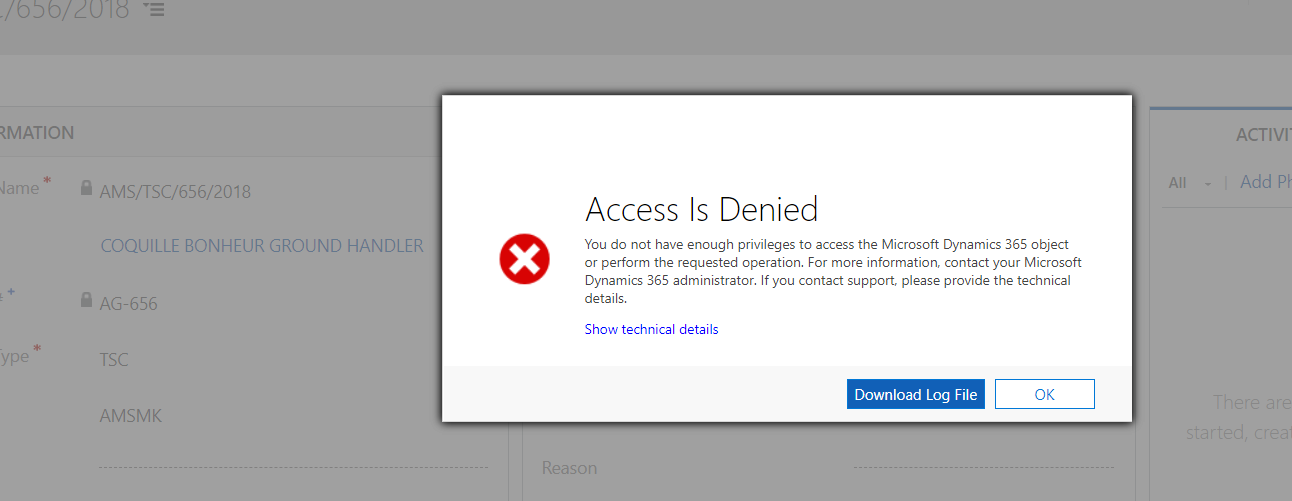
any help would be appreciated?
Thanks
Pillanagrovi


