web
You’re offline. This is a read only version of the page.
close
Skip to main content

Announcements

No record found.

News and Announcements icon
Community site session details

Community site session details

Session Id :
Small and medium business | Business Central, N...
Suggested Answer

Issue importing bank statement

(0) ShareShare
ReportReport
Posted on by 130

Hello everyone - Getting some error while importing bank statement.

Please see attached screen shot.

please suggest Thank you!

2438.Capture.PNG

I have the same question (0)
  • Suggested answer
    JAngle Profile Picture
    157 on at

    The data exchange definition date format may need reviewing judging by the message. The row you have defined for that part of the import will probably need the format dd-MM-yyyy (case sensitive). If the issue persists you could change it to a text type field instead.

  • Suggested answer
    Laeticia Cunha Profile Picture
    Microsoft Employee on at

    Hello Rajendra,

    This error message could be related with the format of the date in the file that is is not accordingly with the one define in the Bank Statement Import.

    To validated the format the the system is prepared to received, could you please check the following steps:

    1. Search for Data Exchange Definition and open the corresponding one, that is associated in your Bank Account:
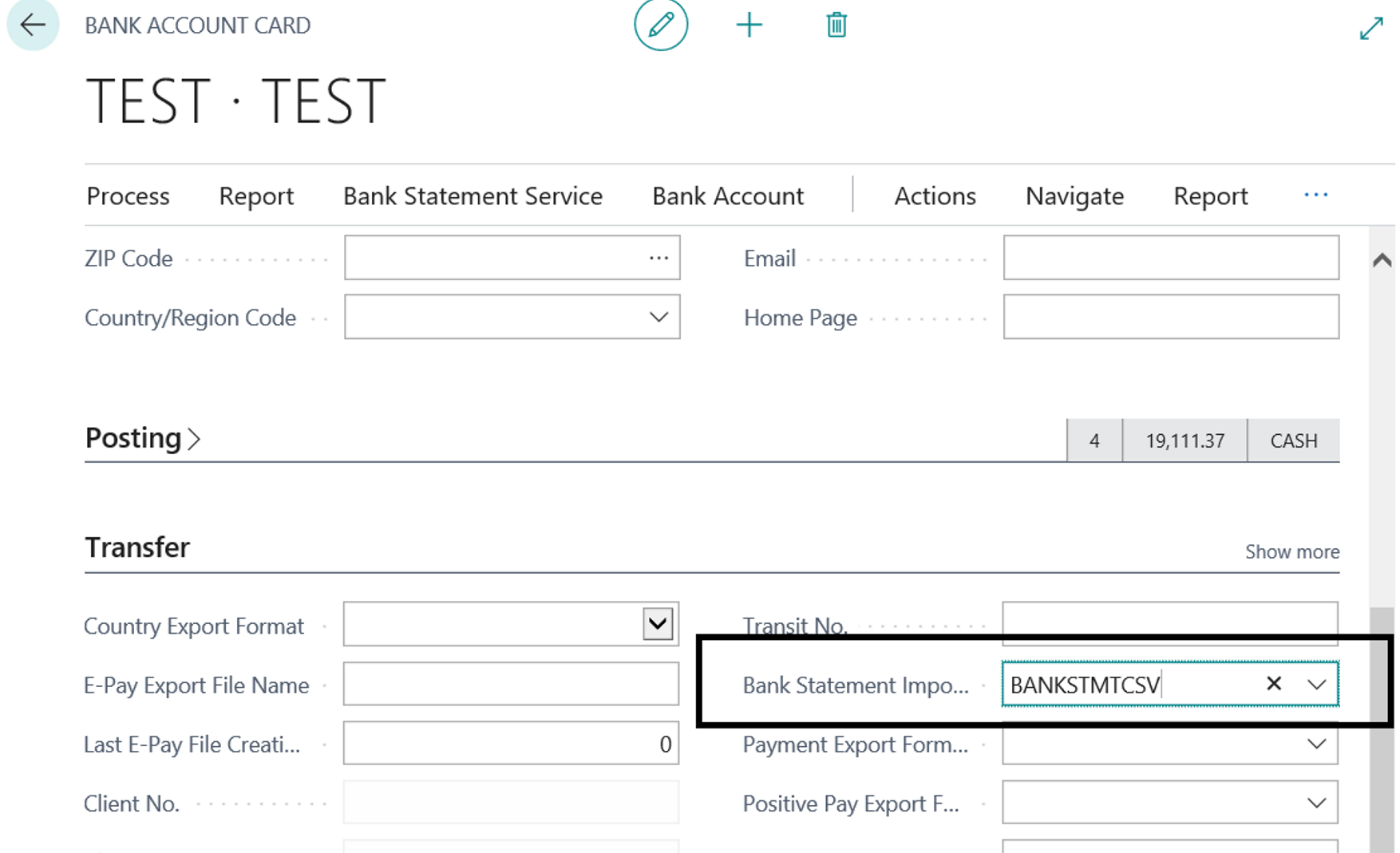
    pastedimage1611333592595v2.png

    2. Go to the Column Definitions Tab and in the column 4,please validate if you have the correct Data Format and Data Formatting Culture
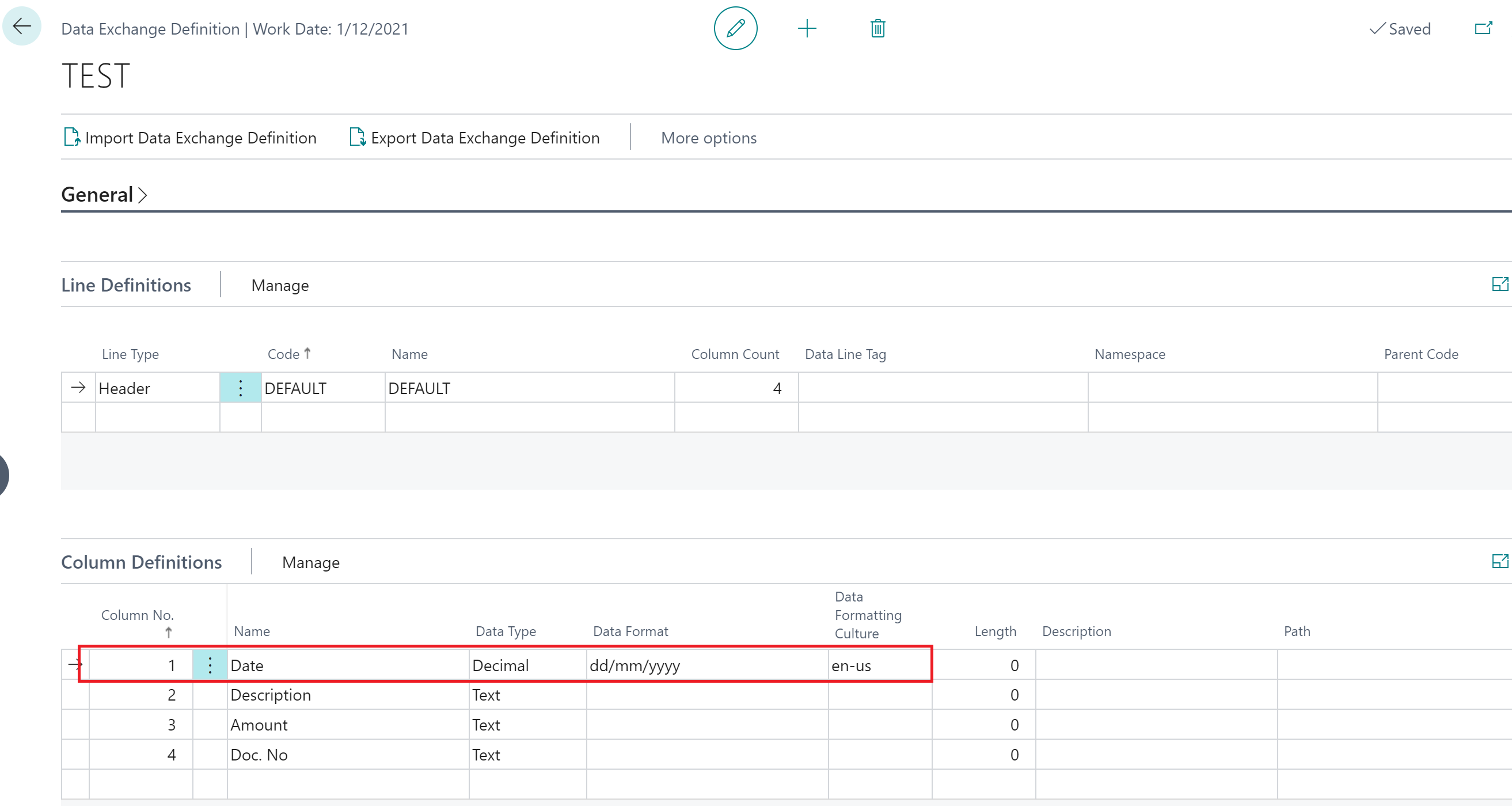
    pastedimage1611334697159v3.png

    Hope this information will help you to move forward.

    Kind regards,


    Laeticia Cunha


    Please see our Dynamics 365 Business Central Support Team Blog for helpful information:

    https://dynamics.microsoft.com/en-us/business-central/capabilities/

    Don't forget to help the community by verifying the answer or at least like the suggestion if it did help in any way. It will let others know that the topic has verified answer and was a beneficial to you.

  • RoshanRafeek Profile Picture
    5 on at

    Hi Rajendra,

    Use m/d/yyyy  for date formatting in the data exchange definition.

Under review

Thank you for your reply! To ensure a great experience for everyone, your content is awaiting approval by our Community Managers. Please check back later.

Helpful resources

Quick Links

Introducing the 2026 Season 1 community Super Users

Congratulations to our 2026 Super Stars!

Meet the Microsoft Dynamics 365 Contact Center Champions

We are thrilled to have these Champions in our Community!

Congratulations to the April Top 10 Community Leaders

These are the community rock stars!

Leaderboard > Small and medium business | Business Central, NAV, RMS

#1
OussamaSabbouh Profile Picture

OussamaSabbouh 2,012 Super User 2026 Season 1

#2
YUN ZHU Profile Picture

YUN ZHU 986 Super User 2026 Season 1

#3
Teagen Boll Profile Picture

Teagen Boll 659 Super User 2026 Season 1

Last 30 days Overall leaderboard

Featured topics

Product updates

Dynamics 365 release plans
