web
You’re offline. This is a read only version of the page.
close
Skip to main content

Announcements

No record found.

News and Announcements icon
Community site session details

Community site session details

Session Id :
Small and medium business | Business Central, N...
Suggested Answer

Should VAT be included on Purchase Orders in Business Central?

(5) ShareShare
ReportReport
Posted on by 104

Hi Community,


I have set up VAT in Dynamics 365 Business Central, and I noticed that when I create a Purchase Order (PO), the system calculates VAT automatically in the background based on the VAT Posting Groups.


My question is:


  •  

    Should VAT amounts be shown on the Purchase Order document (sent to vendors), or is it best practice to keep the PO amounts excluding VAT and only show VAT on the Purchase Invoice?


  •  

    If I want to include VAT on the PO report, is it recommended to customize the standard PO layout, or is there a configuration option that I might be missing?


  •  
 

I want to make sure we are following best practices both in terms of system setup and accounting/legal compliance.


Thanks in advance for your guidance!

I have the same question (1)
  • Suggested answer
    Alex A Profile Picture
    3,083 Super User 2026 Season 1 on at
    It may be two different departments at your vendor(s) for who sees the Purchase Order and who gets the actual Purchase Invoice.
     
    So, I think it's up to whether the vendor(s) needs to see the VAT on the Purchase Order? Usually the system works well in this regard as is, by default (out of the box).
  • Suggested answer
    Sahan Hasitha Profile Picture
    2,683 on at
    hi
     
    VAT is automatically calculated in the background based on the VAT posting groups whenever you create a Purchase Order (PO). However, from both a system and compliance perspective, the Purchase Order is not a tax document but rather a commercial request sent to a vendor. For this reason, the common best practice is to show only net (excluding VAT) amounts on the PO and leave VAT details to appear on the Purchase Invoice, which is the vendor’s official document and the one used for legal reporting. Most companies follow this approach because VAT amounts on the PO may not always reflect the final invoice values, especially if there are changes in prices, discounts, or vendor VAT handling. Business Central’s standard PO report is therefore designed to exclude VAT, and there is no configuration option to automatically display it. If your business process requires VAT to be visible on the PO—for example, in industries or countries where vendors expect to see tax amounts in advance—you would need to customize the standard PO layout (RDLC or Word) to include VAT lines or totals. Unless legally required, the recommendation is to keep POs VAT-exclusive and rely on invoices for compliance.
  • Suggested answer
    DAnny3211 Profile Picture
    11,417 Super User 2026 Season 1 on at
    Hi,
    In Dynamics 365 Business Central, it is standard practice for Purchase Orders (POs) to show amounts **excluding VAT**. The system calculates VAT automatically based on VAT Posting Groups, but the VAT amount is typically not displayed on the PO document sent to vendors. This is because POs are considered commercial requests and not tax documents—VAT details are usually shown on the Purchase Invoice, which is the official document for legal and accounting purposes.
    If your business process or local regulations require VAT to be shown on the PO, you would need to **customize the standard PO layout**. There is no built-in configuration option to display VAT on POs in the standard setup.
    You can find more details in the official documentation on VAT setup and reporting in Business Central.
     
    Please verify if this guidance helps clarify best practices and your options.
    Thanks and best regards,  
    Daniele  
    *Note: This response was prepared with support from Copilot to ensure clarity and completeness.*
  • Suggested answer
    Nimsara Jayathilaka. Profile Picture
    4,950 Super User 2026 Season 1 on at
    Hi
     
    In Dynamics 365 Business Central, VAT is typically calculated automatically on Purchase Orders (POs) based on the VAT Posting Groups configured in the system. Best practice usually recommends that VAT amounts are not shown on the PO document sent to vendors, as a Purchase Order is mainly a request for goods or services and a contractual document, with financial VAT details being finalized and legally recognized on the Purchase Invoice. This helps avoid confusion and aligns with typical accounting and legal requirements where the VAT is confirmed only when invoicing occurs.
     
    If there is a business need to include VAT amounts on the PO report for internal visibility or clarity, it requires customization of the standard PO layout, as there is no out-of-the-box configuration option in Business Central to show VAT on the Purchase Order printout. Such a customization should be done thoughtfully, ensuring it does not conflict with legal requirements or vendor expectations. Staying aligned with system defaults and accounting best practices, showing VAT primarily on Purchase Invoices is generally advised for compliance and clarity in financial reporting
     
    Thanks
    Nimsara
  • Gerardo Rentería García Profile Picture
    25,871 Most Valuable Professional on at
    Hi
    I would think that VAT is usually excluded, mainly because depending on the supplier and the country where they are, the taxes they have are often different
    Best
    GR
  • Suggested answer
    Pallavi Phade Profile Picture
    5,424 Super User 2026 Season 1 on at
    Namaste ,
     
    Please find the answers 
     
    Should VAT amounts be shown on the Purchase Order document (sent to vendors), or is it best practice to keep the PO amounts excluding VAT and only show VAT on the Purchase Invoice?
     
    VAT configuration and to be shown to Vendors in PO or not this is pure Business Call or you can consult Auditor .
     
    If I want to include VAT on the PO report, is it recommended to customize the standard PO layout, or is there a configuration option that I might be missing?
     
    Standard Report do have VAT components as shown in below PO Report . Please find the below sample output 
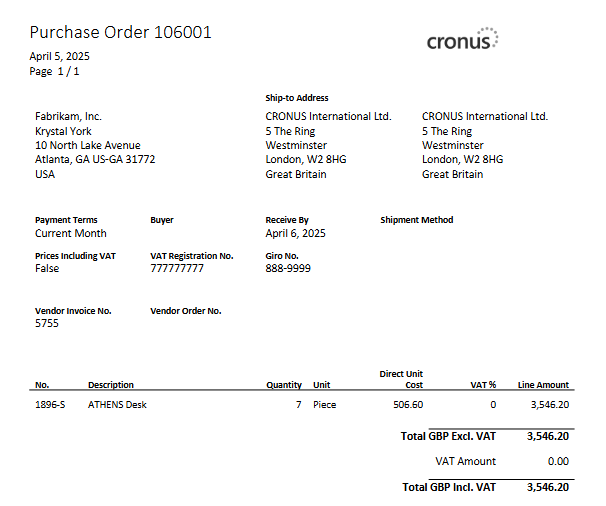
     
    If you still dont see the VAT Components in PO report  ,Below might be reasons 
    1) VAT is calculated in PO 
    2) VAt business posting group in Vendor card and flown into PO
    3) VAt product posting group in Item or GL account and flow into PO lines 
    4)Check VAT Posting Setup in place 
     
     
    In Report Layouts , You can see the RDLC layout . As per this Layout already covers VAT components.
    If you still feel the output is not coming in layout change the rdlc file as per your need . Replace Layout.
     
    If you feel i have answered , Please verify the answer 
     
    Regards
    Pallavi Phade
  • Suggested answer
    Andrés Arias Profile Picture
    5,166 Super User 2026 Season 1 on at
    Hello,

    By default, it should not appear on purchase orders; it should only appear on invoices.

    If required, the PO format must be customized.
     
    Regards,
     
    Andrés
  • Suggested answer
    Rishabh Kanaskar Profile Picture
    6,219 Super User 2026 Season 1 on at
    Hi
     
    By default, Purchase Orders in Business Central show amounts excluding VAT, this is considered best practice in most regions.
     
    A PO is a request to the vendor and usually lists net amounts (excluding VAT), because VAT is only legally recognized once the vendor issues their invoice.
    Including VAT on the PO may confuse vendors since the actual VAT amount is determined by the vendor’s tax setup and may differ.
     
    If you have a business requirement to show VAT on the PO document (for internal reference or local practice):
    > There is no configuration switch to include VAT automatically in the standard PO report layout.
    > You would need to customize the Word or RDLC layout to display the VAT amount and total including VAT.

    Best practice > keep PO excluding VAT and rely on Purchase Invoice for VAT confirmation.
    If required > customize PO layout (no standard setting available).
     
    Thanks
    Rishabh
  • Suggested answer
    Sahan Hasitha Profile Picture
    2,683 on at
    hi
     
    the best practice is to keep Purchase Orders (POs) net of VAT, since a PO is only a commercial document and not a legal tax document. VAT compliance applies to invoices, not POs, so the VAT is correctly handled and shown on the Purchase Invoice from the vendor. However, some businesses prefer to display VAT on the PO for clarity and alignment with vendors. By default, the standard PO report in Business Central does not show VAT, and there is no configuration option to switch it on. If you want VAT amounts and totals to appear on the PO, the recommended approach is to customize the PO layout (Word or RDLC) to include VAT fields. This way, you remain compliant while also meeting your business communication needs.

Under review

Thank you for your reply! To ensure a great experience for everyone, your content is awaiting approval by our Community Managers. Please check back later.

Helpful resources

Quick Links

Introducing the 2026 Season 1 community Super Users

Congratulations to our 2026 Super Stars!

Meet the Microsoft Dynamics 365 Contact Center Champions

We are thrilled to have these Champions in our Community!

Congratulations to the March Top 10 Community Leaders

These are the community rock stars!

Leaderboard > Small and medium business | Business Central, NAV, RMS

#1
OussamaSabbouh Profile Picture

OussamaSabbouh 1,933 Super User 2026 Season 1

#2
YUN ZHU Profile Picture

YUN ZHU 1,055 Super User 2026 Season 1

#3
Teagen Boll Profile Picture

Teagen Boll 640 Super User 2026 Season 1

Last 30 days Overall leaderboard

Featured topics

Product updates

Dynamics 365 release plans
