web
You’re offline. This is a read only version of the page.
close
Skip to main content

Announcements

No record found.

News and Announcements icon
Community site session details

Community site session details

Session Id :
Supply chain | Supply Chain Management, Commerce
Unanswered

Activate Store Commerce Getting Device Configuration failed.

(0) ShareShare
ReportReport
Posted on by 4

pastedimage1686558530928v1.png

I have the same question (0)
  • Danial47 Profile Picture
    142 on at

    Hi,

    Check device setting and assign right store and commerce package to that.

    Send 9999 full job after that.

    Regards

    Danial

  • Sarrab Profile Picture
    4 on at

    I checked device setting, assign right store and commerce package to that and Send 9999 full job after

    but is still same error

  • Shafeeque P. Profile Picture
    6,533 Moderator on at

    I would recommend following the same steps mentioned by other members. I see it is failing in the first step itself. Make sure that you follow the correct format Commerce Server URL as below. 
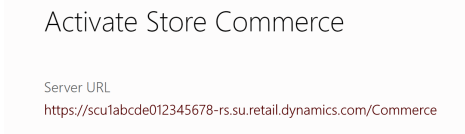
    If it doesnt help have a look at CSU logs on LCS, which might provide you little more insights.

  • Sarrab Profile Picture
    4 on at

    same error

  • Paulo Leite BR Profile Picture
    Microsoft Employee on at

    I experienced the same issue and was able to resolve it after several attempts. Based on my testing, the resolution was mainly related to two key actions:


    1. Populate the Live channel database field in the store configuration

      (Retail and Commerce > Stores > All stores > General > Profiles).

    2. Assign the worker to a position within the same company that is configured for the store. In my case, using test data, this was the USRT company

      (Retail and Commerce > Employees > Workers > Personnel actions > Change position).

Under review

Thank you for your reply! To ensure a great experience for everyone, your content is awaiting approval by our Community Managers. Please check back later.

Helpful resources

Quick Links

Introducing the 2026 Season 1 community Super Users

Congratulations to our 2026 Super Stars!

Congratulations to our 2025 Community Spotlights

Thanks to all of our 2025 Community Spotlight stars!

Leaderboard > Supply chain | Supply Chain Management, Commerce

#1
Mallesh Deshapaga Profile Picture

Mallesh Deshapaga 254

#2
Laurens vd Tang Profile Picture

Laurens vd Tang 192 Super User 2026 Season 1

#3
Syed Haris Shah Profile Picture

Syed Haris Shah 137 Super User 2026 Season 1

Last 30 days Overall leaderboard

Product updates

Dynamics 365 release plans
