web
You’re offline. This is a read only version of the page.
close
Skip to main content

Announcements

No record found.

News and Announcements icon
Community site session details

Community site session details

Session Id :
Microsoft Dynamics GP (Archived)

purchase order customizations

(0) ShareShare
ReportReport
Posted on by 805

Dear All,

Peace be upon you all,

I have customization in PO window as the following and it is not in the "Customization Maintenance" window so how can I know how it was made and how to export it.
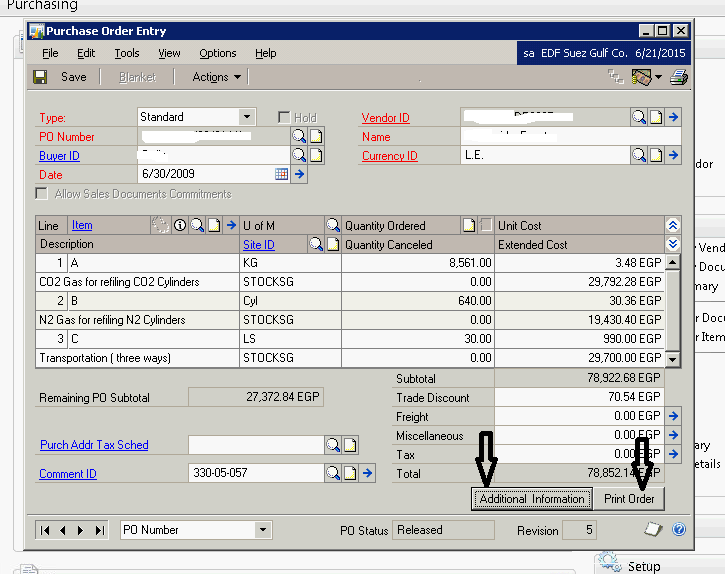
Customization001.png

and this screen opens when the first button clicked.
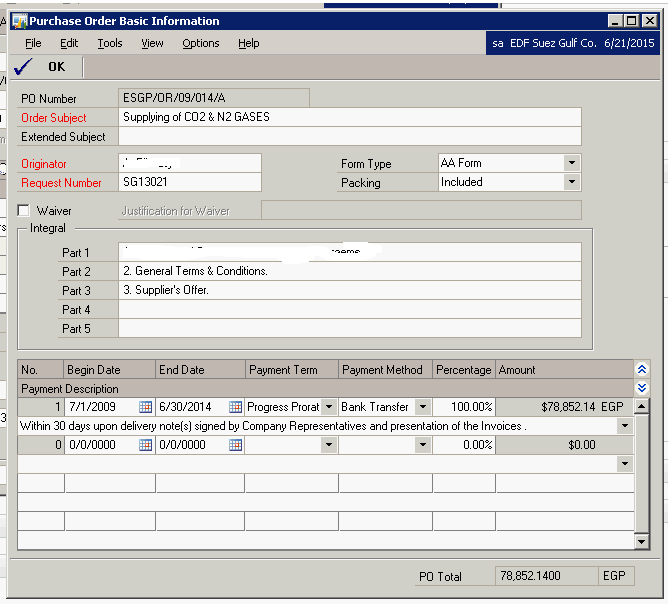
Customization002.png

I opened customizations maintenance window but it is not found there. 

so how it could be done and how to export it to be used in other environment.

Thank you.

*This post is locked for comments

I have the same question (0)
  • Suggested answer
    Redbeard Profile Picture
    12,931 on at

    Mahmoud,

    And upon you.

    This customization may have been created with Dexterity, and not Modifier. If so, you will need to obtain the installation code to be able to install it on other machines, this is usually an msi or cnk file.

  • Suggested answer
    Mahmoud Saadi Profile Picture
    32,738 on at

    Hello Mahmoud

    Nothing more valuable to add up to what's mentioned by Harry, he's cleared the way

    I would like to add up two points which would help you determine the current customization running in your environment. Initially, check the Dynamics.SET file in your Dynamics GP folder, dexterity modifications could be checked in this file

    dEX.png

    Additionally, you may check the customization "status" not maintenance window for any enabled ISV solutions that is dexterity-based.

    Furthermore, all the above would help you only in determining the current dexterity customization running in your GP environment. In order to obtain the original code, you need to proceed with Harry's assistance.

    Your feedback is highly appreciated,

  • Suggested answer
    soma Profile Picture
    24,410 on at

    Yes. Its should be a Dexterity customization. If you want to install this customization to any other machine, paste the chunk file to GP installed folder of other machine (If you have chunk file). Otherwise, copy and replace the GP installed folder from this workstation to other machine.

    Note: Before pasting anything on the new machine, take a backup of GP installed folder from that machine.

    Hope this helps!!!

Under review

Thank you for your reply! To ensure a great experience for everyone, your content is awaiting approval by our Community Managers. Please check back later.

Helpful resources

Quick Links

Introducing the 2026 Season 1 community Super Users

Congratulations to our 2026 Super Stars!

Meet the Microsoft Dynamics 365 Contact Center Champions

We are thrilled to have these Champions in our Community!

Congratulations to the April Top 10 Community Leaders

These are the community rock stars!

Leaderboard > 🔒一 Microsoft Dynamics GP (Archived)

#1
Shravan Attelli Profile Picture

Shravan Attelli 1

Last 30 days Overall leaderboard

Featured topics

Product updates

Dynamics 365 release plans
