web
You’re offline. This is a read only version of the page.
close
Skip to main content

Announcements

No record found.

News and Announcements icon
Community site session details

Community site session details

Session Id :
Microsoft Dynamics CRM (Archived)

Duplicate Detection not showing all entities

(0) ShareShare
ReportReport
Posted on by

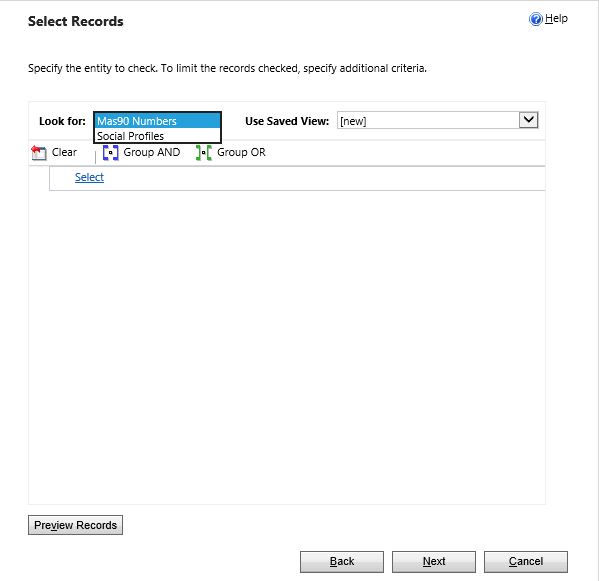
I am trying to run duplicate detection. I have done this successfully in the past. However, now I go in there and I only have the ability to run it against a custom entity. Accounts, contacts and leads are not there. This is all I get:
1754.CRm.png

We are on CRM 2016 on-premise with SP1 installed.

*This post is locked for comments

I have the same question (0)
  • Suggested answer
    sandeepstw Profile Picture
    4,601 on at

    Just confirm you are using these steps:

    1. Click Settings > Data Management > Duplicate Detection Rules
    2. On the Duplicate Detection Rules grid, click New
    3. On the new Duplicate Detection Rule form, select a Base Record Type (by default, the Base Record Type is null and when an option is selected the Matching Record Type updates to the same option)
    4. Then configure your duplicate detection parameters
  • Community Member Profile Picture
    on at

    Sorry, I should have clarified. Making a new detection rule correctly shows all the entities. This is when I want to do a Duplicate Detection "search". So I go to Settings->Data Management->Duplicate Detection Jobs->New. That is where I'm only seeing a custom entity and Social Profiles.

  • Community Member Profile Picture
    on at

    Any ideas?

  • Verified answer
    Wouter Madou Profile Picture
    3,392 on at

    It sounds to me like you only have 2 published detection rules in your system.

    One on leads and one on social profiles.

    Can you try to create a new rule via: settings > data management > duplicate detection rules

    After saving (or select another unpublished one) make sure it is published and try again.

    Also make sure the rule is not for one of the two entities you already see in the list.

    You should now see a third one.

  • Community Member Profile Picture
    on at

    That was it, so simple. Thanks!

Under review

Thank you for your reply! To ensure a great experience for everyone, your content is awaiting approval by our Community Managers. Please check back later.

Helpful resources

Quick Links

Introducing the 2026 Season 1 community Super Users

Congratulations to our 2026 Super Stars!

Meet the Microsoft Dynamics 365 Contact Center Champions

We are thrilled to have these Champions in our Community!

Congratulations to the April Top 10 Community Leaders

These are the community rock stars!

Leaderboard > 🔒一 Microsoft Dynamics CRM (Archived)

Last 30 days Overall leaderboard

Featured topics

Product updates

Dynamics 365 release plans
