web
You’re offline. This is a read only version of the page.
close
Skip to main content

Announcements

No record found.

News and Announcements icon
Community site session details

Community site session details

Session Id :
Microsoft Dynamics CRM (Archived)

Workflow, email conditions without field 'Contains'

(0) ShareShare
ReportReport
Posted on by

Hi,

we lost an important function on our dynamics crm 2016 onpremise installation - version 8.0

In the ‘conditional brach’ of the workflow section is not possible to select ‘contains’ field when we test the cc email
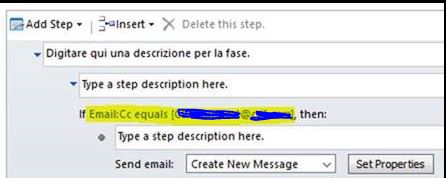
 3582.2.jpg

We can display only these fields: Equals, Does Not Equal, Contains Data, Does Not Contain Data

and we cannot display a fundamental fields named ‘Contains’
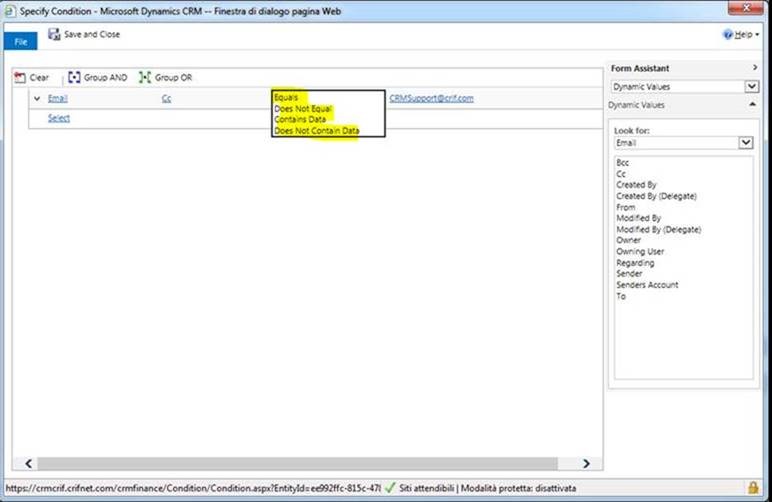
4657.1.jpg
 Please see attachments

Thanks.

*This post is locked for comments

I have the same question (0)
  • Verified answer
    Nithya Gopinath Profile Picture
    17,078 on at

    Hi,

    It is the out of the box behaviour. In the workflow, CC field only shows these four conditions.

  • Community Member Profile Picture
    on at

    Hi Nithya,

    thank you for the answer!

    on the dynamics crm 2011 this field was present,

    and after migration to dynamics crm 2016 the old processes maintain this field.

    The problem it's that when i create new workflow i cannot see the field.

    2577.3.JPG

    Stefano

  • Suggested answer
    Nithya Gopinath Profile Picture
    17,078 on at

    In my Dynamics 365 version also, it is not present. So I believe it must have changed the behaviour in the latest update.

  • Community Member Profile Picture
    on at

    Do you know any workaround to solve our problem?

    Thanks,

    Stefano.

  • ChanTo Profile Picture
    85 on at

    Hi Stefano,

    We are facing the same issue on a workflow were we critically need the "Contains" condition on the email "TO" field. Just wondering, have you found any workaround on this?

  • Peter Wouda Profile Picture
    104 on at

    Hello Stefano,

    I don't know if you entered this on the Microsoft idea website. I couldn't find anything there related so I entered a new idea there.

    You can give it a thumbs up if you still have this problem by following this link:

    experience.dynamics.com/.../idea

Under review

Thank you for your reply! To ensure a great experience for everyone, your content is awaiting approval by our Community Managers. Please check back later.

Helpful resources

Quick Links

Introducing the 2026 Season 1 community Super Users

Congratulations to our 2026 Super Stars!

Congratulations to our 2025 Community Spotlights

Thanks to all of our 2025 Community Spotlight stars!

Leaderboard > 🔒一 Microsoft Dynamics CRM (Archived)

#1
JS-09031509-0 Profile Picture

JS-09031509-0 3

#2
AS-17030037-0 Profile Picture

AS-17030037-0 2

#2
Mark Eckert Profile Picture

Mark Eckert 2

Last 30 days Overall leaderboard

Featured topics

Product updates

Dynamics 365 release plans
