web
You’re offline. This is a read only version of the page.
close
Skip to main content

Announcements

No record found.

News and Announcements icon
Community site session details

Community site session details

Session Id :
Microsoft Dynamics 365 | Integration, Dataverse...
Suggested Answer

How We can stop workflow if User Next Manager Level Position is open.

(1) ShareShare
ReportReport
Posted on by 271
Scenerio:
 
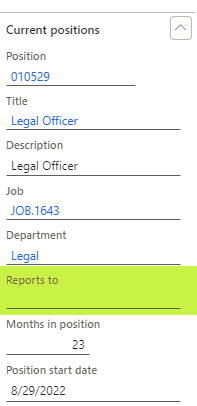
User A is reporting to Level 1 but in HR hirarchy Level 1 Position is open. In Worklfow Condition is define User managerial Hirarchy which is level 1, but worklfow is moving to level 3 if position is opn in level 1 and level 2.
 
  Reports To Hirarchy Levels
  Level 1 Level 2 Level 3
User A (Reports TO) Open Position Open Position User XYZ
 
Ref: 
 
Requirement:
 
How we can setup that workflow should be stopped if User reports to Line Manager Level 1 Position is open. ?
 
Ref:


I have the same question (0)
  • Suggested answer
    Ramit Paul Profile Picture
    22,809 Most Valuable Professional on at
    Hi,
     
    I dont think this is possible by framework with hierarchical option as it goes to next level and does not support "If open" position option.
     
     
  • Suggested answer
    Manikanda_Gopal Profile Picture
    111 on at
    Hi,
     
    As far as I know, standard functionality doesn't support this feature. However, it might be possible through customization. We could add a custom field like 'Employee Position' and set workflow stop conditions based on it. (Ex employee. Position = blank or open.) So that system will stop the workflow from further processing. Please consult your technical team for customization.
     
    Here's a reference for adding custom fields to workflow conditions.
     
     
    Note: Adding the custom field to workflow conditions is possible, but I'm unsure if it will fully solve your problem. It's best to assess feasibility on your end. I'll try to do this when I have time and share the results.
     
    Regards,
    Manikanda Gopal

Under review

Thank you for your reply! To ensure a great experience for everyone, your content is awaiting approval by our Community Managers. Please check back later.

Helpful resources

Quick Links

Introducing the 2026 Season 1 community Super Users

Congratulations to our 2026 Super Stars!

Meet the Microsoft Dynamics 365 Contact Center Champions

We are thrilled to have these Champions in our Community!

Congratulations to the April Top 10 Community Leaders

These are the community rock stars!

Leaderboard > Microsoft Dynamics 365 | Integration, Dataverse, and general topics

#1
11manish Profile Picture

11manish 91

#2
André Arnaud de Calavon Profile Picture

André Arnaud de Cal... 78 Super User 2026 Season 1

#3
Martin Dráb Profile Picture

Martin Dráb 55 Most Valuable Professional

Last 30 days Overall leaderboard

Product updates

Dynamics 365 release plans
