web
You’re offline. This is a read only version of the page.
close
Skip to main content

Notifications

Announcements

No record found.

Community site session details

Community site session details

Session Id :
Small and medium business | Business Central, N...
Answered

BC Multi Tenant Issue

(0) ShareShare
ReportReport
Posted on by


Hi All,


We have Business central on premises development environment. We need to configure an instance as multi-tenant. We created the instance as Multi-tenant and mounted the tenant using PowerShell commands. Once we are done with the mounting using PowerShell commands, we cannot see the mounted tenant in Business central Administration tool. After that when we try to select the instance which we mounted we are facing this below issue,
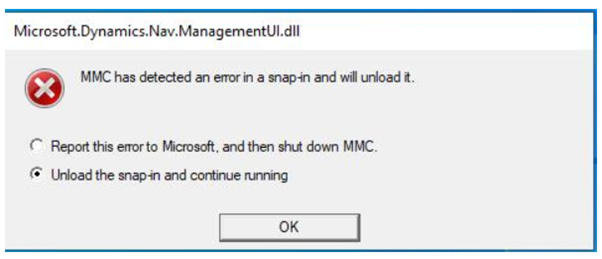
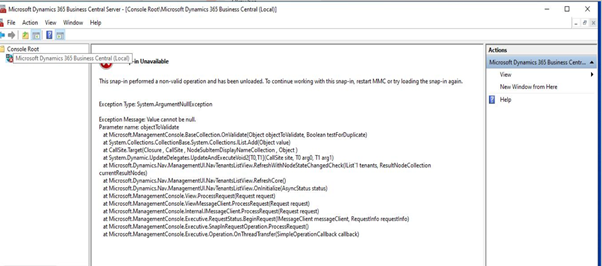
 

 pastedimage1624369722814v1.png

pastedimage1624369745344v2.png

Kindly share your thoughts on the above issue

Thanks!


I have the same question (0)
  • Suggested answer
    Community Member Profile Picture
    on at

    Hi,

    Make sure you have followed all the steps to configure the Multi-Tenancy Architecture. Yon also need to Split the Database into two Parts through PowerShell command (one will be the Application DB and other one will be the Tenant Databases).

    I am attaching here the Multitenancy deployment guide from NAV 2013 R2 for detailed explanation of each steps involved in Multitenancy.
    Dynaimcs-NAV-2013-R2-_2D00_-Multitenant.docx

  • Suggested answer
    Marco Mels Profile Picture
    on at

    Hello,

    Is there an error in the application event log file related  this. What release of BC is this and what cumulative update?

    Thanks.

  • Congruent Infotech Profile Picture
    on at

    Hi Marco,

    There is no error logged out in event log. We installed Business central on-premises 2020 release wave 2.

    Thanks!

  • Congruent Infotech Profile Picture
    on at

    Hi Naveen,

    We tried mounting the tenants as per the document, when we mount the tenant the status turning out to the state Operational and it is not available in BC Administration and still the above error persists.

    Thanks!

  • Suggested answer
    Marco Mels Profile Picture
    on at

    Hello,

    Could you please run via PowerShell Get-NavTenant with some parameters and post it here? Could you also verify if the files are not blocked. E.g.:

    pastedimage1624478025909v1.png

    Thanks.

  • Community Member Profile Picture
    on at

    Hi,

    Can you please provide the details as asked by Marco.

  • Congruent Infotech Profile Picture
    on at

    Hi All,

    The files are not blocked, Below is the state after we mount the tenant,

    Capture_5F00_2.png

    7485.Capture_5F00_1.PNG

    Thanks!

  • Congruent Infotech Profile Picture
    on at

    Hi All,

    FYI  upgraded to Business central 2021 wave1 to fix the issue, tenants got mounted and the issue resolved.

    Thanks!

  • Verified answer
    Marco Mels Profile Picture
    on at

    Great to hear this.

    We will probably never find out what did happen with the other environment.

    Thanks.

  • Community Member Profile Picture
    on at

    Hi,

    Happy to hear that..Fantastic!!

Under review

Thank you for your reply! To ensure a great experience for everyone, your content is awaiting approval by our Community Managers. Please check back later.

Helpful resources

Quick Links

Responsible AI policies

As AI tools become more common, we’re introducing a Responsible AI Use…

Neeraj Kumar – Community Spotlight

We are honored to recognize Neeraj Kumar as our Community Spotlight honoree for…

Leaderboard > Small and medium business | Business Central, NAV, RMS

#1
OussamaSabbouh Profile Picture

OussamaSabbouh 3,229

#2
Jainam M. Kothari Profile Picture

Jainam M. Kothari 1,867 Super User 2025 Season 2

#3
YUN ZHU Profile Picture

YUN ZHU 1,257 Super User 2025 Season 2

Last 30 days Overall leaderboard

Featured topics

Product updates

Dynamics 365 release plans
