web
You’re offline. This is a read only version of the page.
close
Skip to main content

Announcements

No record found.

News and Announcements icon
Community site session details

Community site session details

Session Id :
Supply chain | Supply Chain Management, Commerce
Suggested Answer

Delete incorrect set-up location name and delete onhand

(0) ShareShare
ReportReport
Posted on by 545

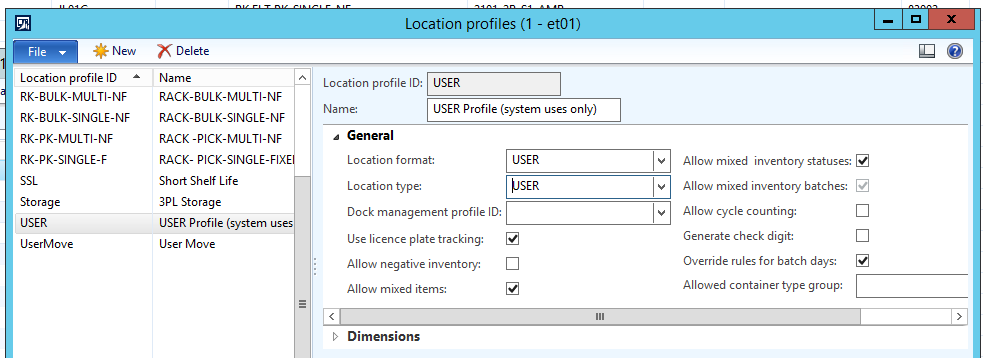
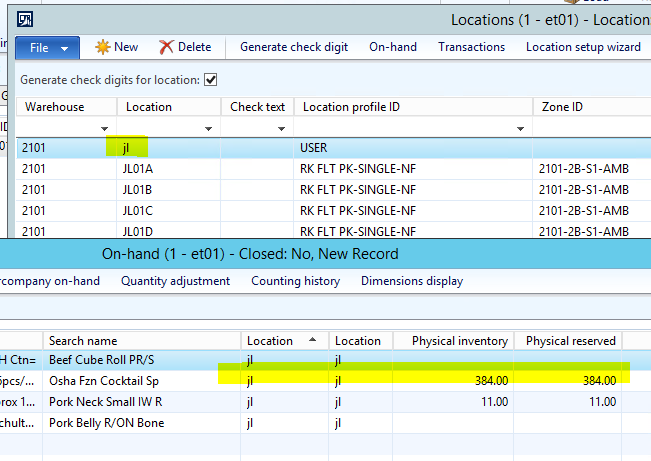
We have some invalid location name with on-hand inventory (but orders cannot release to WH due to wrong location setup).  I wonder thatHow can I delete this location? and how can I deal with current onhand? 
pastedimage1574656897710v2.pngpastedimage1574656938071v3.png

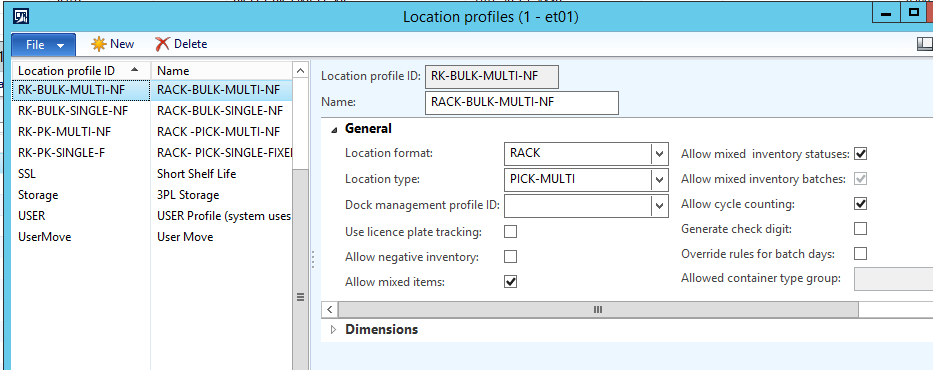
The correct location setup should be:
pastedimage1574657016965v4.png

I am looking forward to seeing your feedback. Appreciated.

Thanks 

Kylie

I have the same question (0)
  • Suggested answer
    Zain Mehmood Profile Picture
    4,311 Most Valuable Professional on at

    Hi Ett,

    You need to transfer from the current location to the location that you desire, you can do that by either creating a transfer journal or create a transfer order. You need to make sure the picking criteria is subjective to the location profiles mentioned above.

    Please check the location profile for the Sales order picking and transfer order picking.

    Thanks,

    Zain

  • Zain Mehmood Profile Picture
    4,311 Most Valuable Professional on at

    Hi Ett,

    Were you able to complete this process? 

    Warm Regards,

    Zain 

  • Suggested answer
    Rahul Mohta Profile Picture
    21,046 on at

    ensure no inventory (on hand or any open transactions) exists on the location

    move out anything which may exists  and then should be able to delete it could mark it non-operation and stopped it from being used.

  • Guy Terry Profile Picture
    28,981 Moderator on at

    Are you sure that you should not have a USER location called jl? If you have a Warehouse Worker (Warehouse management -> Setup -> Worker) who has the User Id jl who has worked in the 2101 warehouse, it is quite likely that you should have a USER location called jl.

    I notice the inventory on that location is Physically reserved. If that is a USER location, this can happen when there is In progress Work.

  • Suggested answer
    Rahul Mohta Profile Picture
    21,046 on at

    once the location is releived all inventory and any open transactions (e.g. work, PO, SO....) it should allow to delete

    pls suggest

  • Ett Profile Picture
    545 on at

    Yes we have User location, that is worker name. Although we have physical inventory and physcial reserved at this location,  system cannot create work to this location at Load planning workbench.

    Could you please have any solution?

    Thanks

  • Ett Profile Picture
    545 on at

    pastedimage1575517116611v1.png

    I cannot use transfer journal to transfer "Movemenr not valid on user location excepts by the system. 

  • Ett Profile Picture
    545 on at

    7737.pastedimage1575517116611v1.png

    I cannot use transfer journal to transfer "Movemenr not valid on user location excepts by the system. 

  • Ett Profile Picture
    545 on at

    pastedimage1575517259373v1.png

    I cannot use transfer journal to transfer "Movemenr not valid on user location excepts by the system. 

  • Ett Profile Picture
    545 on at

    7853.pastedimage1575517259373v1.png

    I cannot use transfer journal to transfer "Movemenr not valid on user location excepts by the system. 

Under review

Thank you for your reply! To ensure a great experience for everyone, your content is awaiting approval by our Community Managers. Please check back later.

Helpful resources

Quick Links

Introducing the 2026 Season 1 community Super Users

Congratulations to our 2026 Super Stars!

Meet the Microsoft Dynamics 365 Contact Center Champions

We are thrilled to have these Champions in our Community!

Congratulations to the April Top 10 Community Leaders

These are the community rock stars!

Leaderboard > Supply chain | Supply Chain Management, Commerce

#1
André Arnaud de Calavon Profile Picture

André Arnaud de Cal... 164 Super User 2026 Season 1

#2
Laurens vd Tang Profile Picture

Laurens vd Tang 106 Super User 2026 Season 1

#3
Zain Mehmood Profile Picture

Zain Mehmood 89 Most Valuable Professional

Last 30 days Overall leaderboard

Product updates

Dynamics 365 release plans