web
You’re offline. This is a read only version of the page.
close
Skip to main content

Announcements

No record found.

News and Announcements icon
Community site session details

Community site session details

Session Id :
Microsoft Dynamics CRM (Archived)

Dynamics portal action button configuration

(0) ShareShare
ReportReport
Posted on by

Hope someone can help, i am trying to generate a 'create' action button.

on the entity form i have configured for related record:
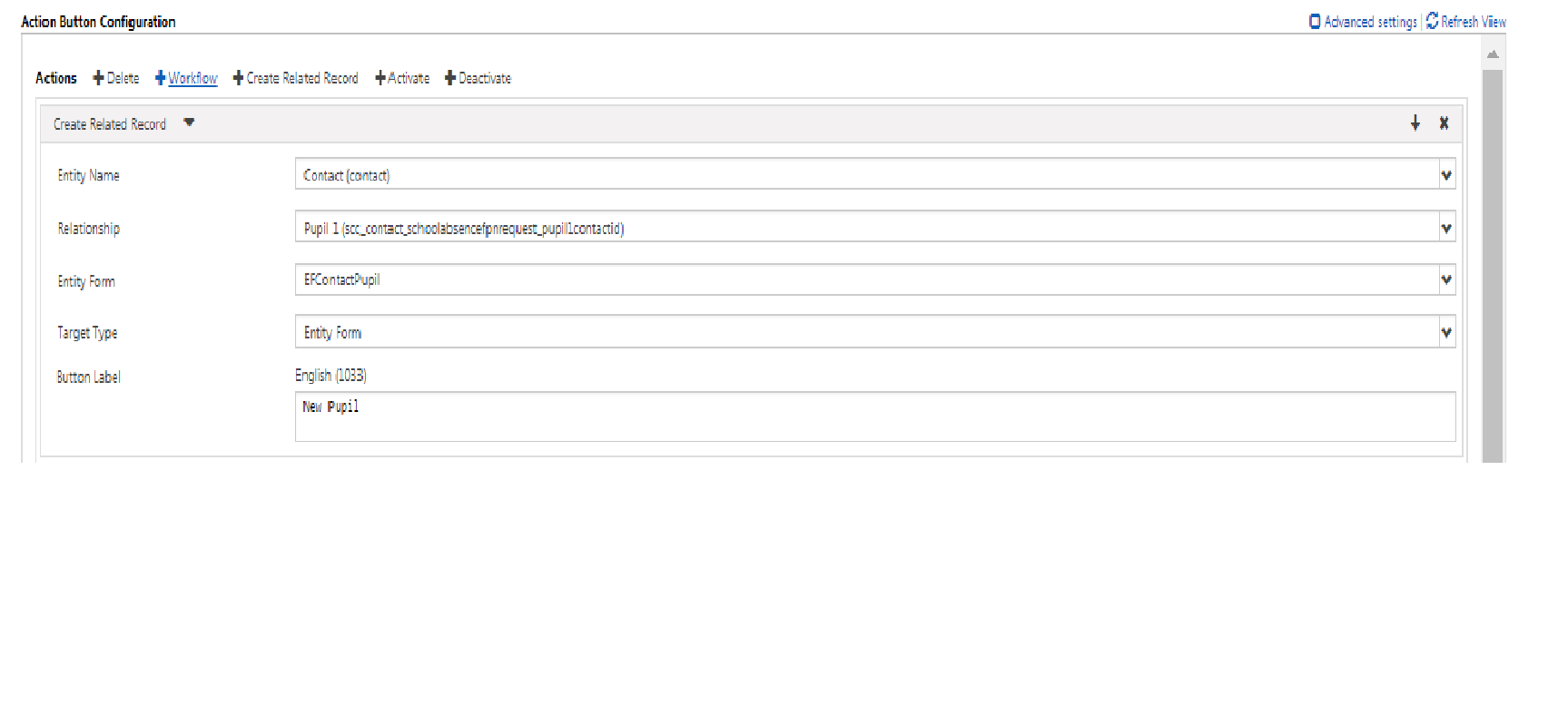
373520.1.png

The entity permissions have been set and its not caching. Any ideas?

Many thanks

*This post is locked for comments

I have the same question (0)
  • Community Member Profile Picture
    on at

    Hi

    Is it the button that never shows up on the form? or is it that the button isn't working?

    You could try and restart portal through the Dynamics 365 portal actions.

    You could try and tick the advanced settings on the top right of your picture and see if something is missing.

  • Kevin Damen Profile Picture
    on at

    I am having the same problem, the button appears very briefly and then disappears.

    Not sure why

    The issue appears to be related to the the javascript adding a Display: None; onto the custom actions 

    <div id="EntityFormControl">
    __<div class="crmEntityFormView" id="EntityFormPanel" role="main" aria-label="Article">
    ____<div class="row form-custom-actions" style="display: none;">
    ____<div class="col-sm-6 clearfix">
    ______<div class="form-action-container-left">

    ______</div>
    ____</div>

    ____<div class="col-sm-6 clearfix">
    ______<div class="form-action-container-right">
    ________<button class="create-related-record-link btn-default btn" type="button">Add to My Articles</button>

    ______</div>
    ____</div>

  • Community Member Profile Picture
    on at

    I have the same issue with the portal hiding buttons, did you ever solve this?  It's weird because you can unhide and use the buttons fine so it doesn't seem like a permissions issue

  • Suggested answer
    Arpit Shrivastava Profile Picture
    7,518 User Group Leader on at

    HI,

    Seems a bug in Portal Web form. Nice observation. I am also able to replicate on my end.

    For the time being, you can fix it by writing your own JS and CSS on the webpage (Localized Content).

    Custom JavaScript:

    $(window).load(function() { $('.form-custom-actions').removeAttr('style'); });

    Custom CSS:

    #NextButton { display: block !important; } #PreviousButton { display: block !important; }

    If my answer helped to resolve your issue, kindly verify it by clicking 'Yes'. It would be helpful to the other community members seeking to resolve a similar issue.


    Cheers
    Arpit
    https://arpitmscrmhunt.blogspot.in


Under review

Thank you for your reply! To ensure a great experience for everyone, your content is awaiting approval by our Community Managers. Please check back later.

Helpful resources

Quick Links

Introducing the 2026 Season 1 community Super Users

Congratulations to our 2026 Super Stars!

Meet the Microsoft Dynamics 365 Contact Center Champions

We are thrilled to have these Champions in our Community!

Congratulations to the April Top 10 Community Leaders

These are the community rock stars!

Leaderboard > 🔒一 Microsoft Dynamics CRM (Archived)

Last 30 days Overall leaderboard

Featured topics

Product updates

Dynamics 365 release plans
