web
You’re offline. This is a read only version of the page.
close
Skip to main content

Announcements

No record found.

News and Announcements icon
Community site session details

Community site session details

Session Id :
Small and medium business | Business Central, N...
Unanswered

Over-Receipt Codes

(0) ShareShare
ReportReport
Posted on by 5

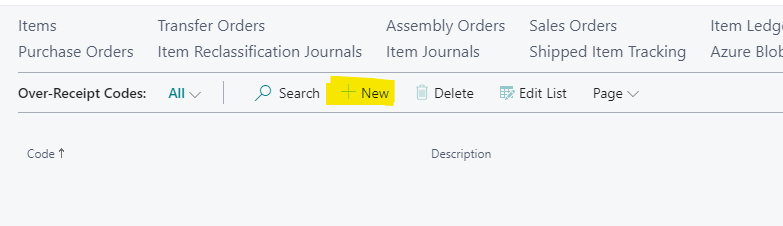
I am attempting to set up Over-Receipt Codes and attach to items or vendors. When setting up a new code, I have been unable to access the "+New" selection within the form. 

Is there an additional setting needed in order to add Over-Receipt Codes? Is it a security access restriction? I am using a Business Manager role, but have tried others to no avail.

I am new to Business Central, so maybe there is an easy solution I am missing?
pastedimage1608324996107v1.png

I have the same question (0)
  • Community Member Profile Picture
    on at

    MCM64,

    We need to look at your Permissions. The Table for Over-Receipt appears in the permission set = Dynamics 365 Full access. Do you know who set your User up in BC? Can you ask your IT Department what permissions you have? In most cases you need to add the correct permission to allow you to ADD/INSERT/DELETE/MODIFY Over-Receipt setup table.

    You can see your permission by searching for Users and Viewing your name. Under User Permission Set section you will see the assigned permissions.

    Thanks,

    Steve

  • MCM64 Profile Picture
    5 on at

    Perfect, thanks Steve. I was able to find my User Permission Set and I am not set up with Dynamics 365 Full access. I will contact my IT department to resolve.

    Thanks for the quick help!

    Mike

Under review

Thank you for your reply! To ensure a great experience for everyone, your content is awaiting approval by our Community Managers. Please check back later.

Helpful resources

Quick Links

Introducing the 2026 Season 1 community Super Users

Congratulations to our 2026 Super Stars!

Congratulations to our 2025 Community Spotlights

Thanks to all of our 2025 Community Spotlight stars!

Leaderboard > Small and medium business | Business Central, NAV, RMS

#1
OussamaSabbouh Profile Picture

OussamaSabbouh 1,821 Super User 2026 Season 1

#2
YUN ZHU Profile Picture

YUN ZHU 1,122 Super User 2026 Season 1

#3
Dhiren Nagar Profile Picture

Dhiren Nagar 959 Super User 2026 Season 1

Last 30 days Overall leaderboard

Featured topics

Product updates

Dynamics 365 release plans
