web
You’re offline. This is a read only version of the page.
close
Skip to main content

Notifications

Announcements

No record found.

Community site session details

Community site session details

Session Id :
Microsoft Dynamics CRM (Archived)

I set a Hierarchy security by using Position but it doesn't work

(0) ShareShare
ReportReport
Posted on by

I created two position, one is child one is parent, add users under them.

the user(with the user permission for the entity) under parent position should access to the child's records, right?

but it doesn't work, could someone advice which step is wrong here.

I have enabled the Hierarchy security, and selected custom position hierarchy.
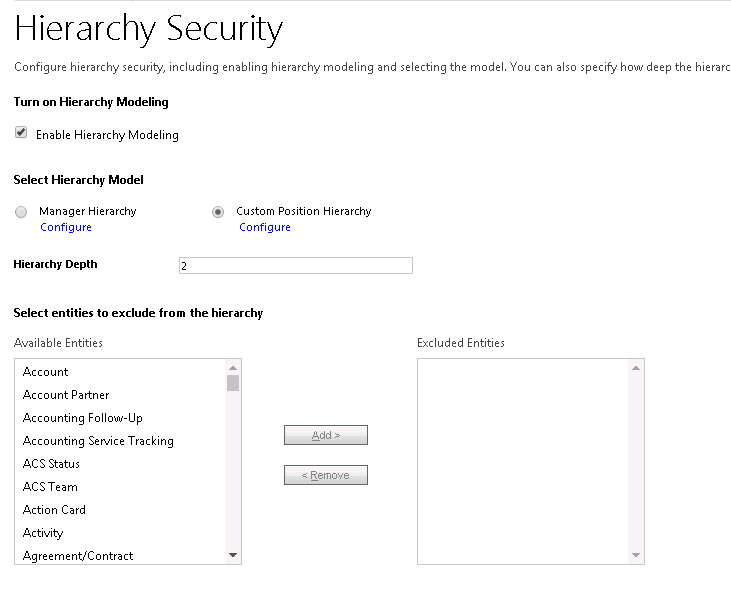
hierarchy-security.png

*This post is locked for comments

I have the same question (0)
  • Suggested answer
    ashlega Profile Picture
    34,477 on at

    Hi,

      it sounds like everything has been set up correctly, but I'm wondering how did you check if a user has access or not? If you send that user a link to the record, will they be able to open that record or will they get a permissions error? If they can open the record, maybe there is something with the filter used for the view they are looking at.

  • Suggested answer
    Mahendar Pal Profile Picture
    45,095 on at

    Hi,

    Keep in mind the user who is on higher level position should have at least user level read access to the entity which want to access. Also as Alex pointed make sure you are using Active view not starting from 'My....'

  • Verified answer
    Community Member Profile Picture
    on at

    thanks for the help, I have figured out this, it is a browser problem, my setting didn't take effect due to I used Chrome browser

  • Suggested answer
    CRMJetty Profile Picture
    3,512 on at

    The Dynamics 365 security model follows a hierarchical role-based security  framework. Users are assigned security roles that define their duties
    and access privileges. For instance, if a data field is marked as highly  confidential, only high-level users such as the user with admin
    role will be able to access it.

    Enable User
    I have enabled the Hierarchy security, and selected custom position hierarchy.


    Screenshot-_2800_83_2900_.png

    Also, You can refer this thread,
    https://learn.microsoft.com/en-us/dynamics365/customerengagement/on-premises/developer/security-dev/hierarchical-security-control-access-entities?view=op-
    9-1

  • Suggested answer
    CRMJetty Profile Picture
    3,512 on at

    Hello Jiao,

    Users' managers will automatically create a hierarchy between them, similar to your company's organizational chart.

    By selecting the Manager Hierarchy option, you can extend your security model based on your organization's structure.

    To set a Hierarchy security by using Position, you can refer this Blog

  • FidelMartin Profile Picture
    128 on at
    Here is the step by step process of Hierarchy security by using Position.
     

    Step 1: Select an environment and go to Settings > Users + Permissions > Hierarchy Security.

    Hierarchysecurity
     

    Step 2: Choose Hierarchy Security and select Enable Hierarchy Modeling.

    Choose Hierarchy Security
     

    Step 3: Choose the specific model by selecting the Manager Hierarchy or Custom Position Hierarchy.

    Step 4: Set the Depth to a desired value.

    Step 5: To setup Manager Hierarchy, use the Manager (ParentsystemuserID) lookup field to specify the manager of the user.

    Step 6: To Setup Position Hierarchy.

    1. Go to Settings > Security.

    2. Choose Positions.

    Choose Positions
     

    3. For each position, provide the name of the position, the parent of the position, and the description.

    Newposition
     

    4. Add users to this position by using the lookup field called Users in this position.

    I hope this step will help you to Hierarchy security by using Position. If you get more details regarding this please refer this blog

Under review

Thank you for your reply! To ensure a great experience for everyone, your content is awaiting approval by our Community Managers. Please check back later.

Helpful resources

Quick Links

Responsible AI policies

As AI tools become more common, we’re introducing a Responsible AI Use…

Neeraj Kumar – Community Spotlight

We are honored to recognize Neeraj Kumar as our Community Spotlight honoree for…

Leaderboard > 🔒一 Microsoft Dynamics CRM (Archived)

#1
SA-08121319-0 Profile Picture

SA-08121319-0 4

#1
Calum MacFarlane Profile Picture

Calum MacFarlane 4

#3
Alex Fun Wei Jie Profile Picture

Alex Fun Wei Jie 2

Last 30 days Overall leaderboard

Featured topics

Product updates

Dynamics 365 release plans
