web
You’re offline. This is a read only version of the page.
close
Skip to main content

Announcements

No record found.

News and Announcements icon
Community site session details

Community site session details

Session Id :
Supply chain | Supply Chain Management, Commerce
Answered

Location Stocking doesn't work for Purchase order receiving

(0) ShareShare
ReportReport
Posted on by 920 Moderator

I have location profile setup which doesn't have LP enabled. I am setting up Location stocking limit for same location profile (so that i don't have to define stocking limit for all locations).

pastedimage1671262262504v1.png

For mentioned location profile, I have defined 4 location. Expectation is when - When I created a PO for quantity 750 ea then system should give PUT for 4 locations.

PUT Location 1-200 ea

PUT Location 2-200 ea

PUT Location 3-200 ea

PUT Location 4-150 ea.

But, I tried to receive PO then work generated doesn't give me PUT location. It is always blank. 
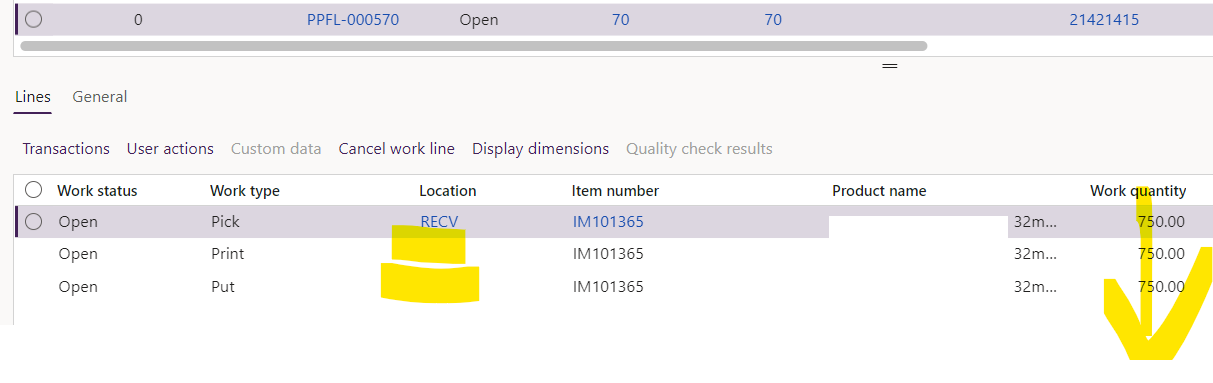
pastedimage1671277409631v3.png

work creation history log says 

pastedimage1671277009533v2.png

I have the same question (0)
  • sagar_patil Profile Picture
    920 Moderator on at

    On location directive action, I have used strategy as 'Empty location with no incoming work'

  • Verified answer
    Sneha M Profile Picture
    Microsoft Employee on at

    Try enabling the 'Split' on the location directive for PO. Issue is that D365 is trying to put everything in a single location and not splitting based on the limit which has been specified.

  • sagar_patil Profile Picture
    920 Moderator on at

    This is working now. Just need to enable 'allow split' on location directive lines.

    pastedimage1671427087969v1.png

    work created for multiple Put locations.

    pastedimage1671427115803v2.png

  • Suggested answer
    Charlotte X Profile Picture
    Microsoft Employee on at

    Hi sagar_patil,

    Please make sure that the location profile of the location on which you are having the inventory for the item is selected in the location directive actions edit query.

    Set up a location directive for purchase order put-away - Supply Chain Management | Dynamics 365 | Microsoft Learn

Under review

Thank you for your reply! To ensure a great experience for everyone, your content is awaiting approval by our Community Managers. Please check back later.

Helpful resources

Quick Links

Introducing the 2026 Season 1 community Super Users

Congratulations to our 2026 Super Stars!

Congratulations to our 2025 Community Spotlights

Thanks to all of our 2025 Community Spotlight stars!

Leaderboard > Supply chain | Supply Chain Management, Commerce

#1
Mallesh Deshapaga Profile Picture

Mallesh Deshapaga 254

#2
Laurens vd Tang Profile Picture

Laurens vd Tang 188 Super User 2026 Season 1

#3
André Arnaud de Calavon Profile Picture

André Arnaud de Cal... 131 Super User 2026 Season 1

Last 30 days Overall leaderboard

Product updates

Dynamics 365 release plans

