web
You’re offline. This is a read only version of the page.
close
Skip to main content

Notifications

Announcements

No record found.

Community site session details

Community site session details

Session Id :
Small and medium business | Business Central, N...
Answered

All related Company Contact Interactions are appearing under Person type Contact

(0) ShareShare
ReportReport
Posted on by 45

Hello BC Community,

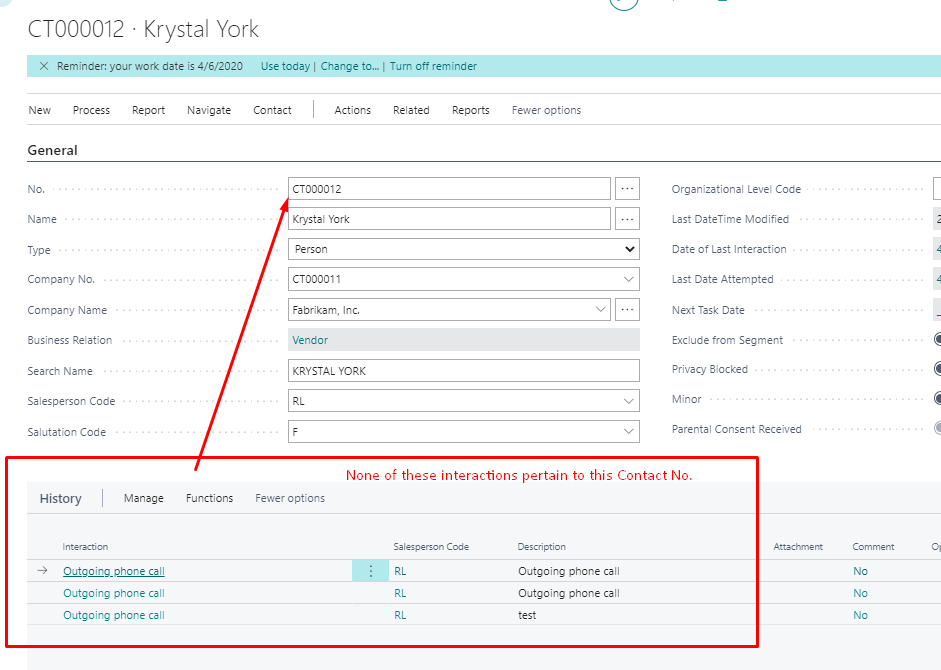
When working with Contacts in BC we have added numerous Interactions for Person type Contacts.  However, when displaying the Contact Card for a Person all Interactions for other Person type Contacts related by the same Company No Contact are appearing in the Interaction History page part.  It does not appear as if the filter is working properly.  You cannot distinguish the Interactions for the particular Person vs the all the other related Person Contacts. 

Additionally, when you open the Interaction Log Entries page (from Contact Card-> Related/History/Interaction Log Entries) the same issue appears to be occurring here.  We've created extensions to customize the Contact Card, however when I check the Cronus environment where no changes have been made the same thing occurs.   

Now my questions:  A) is this happening for others  B) if this is a bug - where can I report to MS?   

Thank you for any insight into this issue.  
1777.error.png

I have the same question (0)
  • Suggested answer
    Bilal Haider Profile Picture
    412 on at

    Hi,

    1. When you are saying you are running on Cronus environment does it mean that you are running on a different tenant than the one where you have deployed your extension or do you mean on same tenant but different company. Deploying an extension in any company will install it for all companies on the tenant.

    2. Assuming if you are getting this on a standard business central then yes its behaviour is different than hat it should do.

    What it should do and what is happening on my environment is:   If you open Interaction Log Entries from a contact of type person then it should show interactions related to contact person and its company contact no. If you open Interaction Log entries from a contact of type company then it should show interactions related to company contact no.

    3. Also make sure your interactions table is filled with correct data. Means its field contact and company contact are filled properly. Also check if you have contact of type company and person with same contact no.

    4. If everything is fine then please share your version I will check there.

  • MCJordan Profile Picture
    45 on at

    1) Unaltered Cronus Production environment on different tenant.   2) When I open Interaction Log and also on the Interaction page part for a particular Person type Contact (as shown in image I posted) it shows Interactions for other Person Contacts with same Company No relationship.  This particular Person has no Interactions, yet it shows three.  3) This example is from the unaltered tenant/Cronus and the entries were made manually i.e. Create Interaction and not inserted in any other manner.  The Contact No and the Company No are correct in the table.  4) Version 18.2.26217.26331.  There was same issue in previous version.  

  • Suggested answer
    Bilal Haider Profile Picture
    412 on at

    Hi MCJordan,

    I have seen it in detail and I have found why is it doing this.

    The interaction log sub page on contact card page has link to contact based on Current Contact Company No and Current Contact Lookup Contact No. For some reasons few contact records in CRONUS company are missing this Lookup Contact No.

    Lookup contact no field has same value as of No in contact table and it is generated automatically at the time of creation of contacts but only for persons not for companies.

    You can get your results correctly by doing one thing. Just rename those contacts where interactions are not coming correct like rename by addition of 1 at end and after that revert it back to original. You will see the interaction log entries will now only appear for correct contacts.

    Actually when you rename the field Lookup contact no will be populated again.

    Let me know if you still have confusion.

  • MCJordan Profile Picture
    45 on at

    Thank you, Bilal.  This did fix my issue.  We inserted many contacts using config package and did not populate the Lookup Contact No. field.  It is odd, however, that there were also some records in Cronus that have same issue.  

  • Bilal Haider Profile Picture
    412 on at

    Its great if your issue is resolved. You are most welcome to ask another interesting query here. :)

Under review

Thank you for your reply! To ensure a great experience for everyone, your content is awaiting approval by our Community Managers. Please check back later.

Helpful resources

Quick Links

Responsible AI policies

As AI tools become more common, we’re introducing a Responsible AI Use…

Neeraj Kumar – Community Spotlight

We are honored to recognize Neeraj Kumar as our Community Spotlight honoree for…

Leaderboard > Small and medium business | Business Central, NAV, RMS

#1
OussamaSabbouh Profile Picture

OussamaSabbouh 3,143

#2
Jainam M. Kothari Profile Picture

Jainam M. Kothari 1,694 Super User 2025 Season 2

#3
YUN ZHU Profile Picture

YUN ZHU 1,067 Super User 2025 Season 2

Last 30 days Overall leaderboard

Featured topics

Product updates

Dynamics 365 release plans
