web
You’re offline. This is a read only version of the page.
close
Skip to main content

Notifications

Announcements

No record found.

Community site session details

Community site session details

Session Id :
Microsoft Dynamics CRM (Archived)

Not able to set "within the next X days" when configuring a filter for view

(0) ShareShare
ReportReport
Posted on by 803

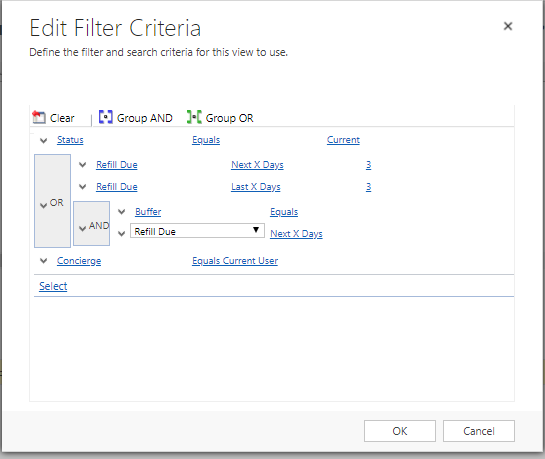
Attaching a screenshot. I cannot set the amount of days for the second, "within the next X days." The option doesn't come up. I have been using within the next 7 days, but I'd like to set a custom day amount.

I am wondering if it's because I've already used "within the next X days" once, and so it's not letting me use it again. Hope I'm being clear enough. EDIT-FILTER-PROB.PNG
*This post is locked for comments

I have the same question (0)
  • Aric Levin - MVP Profile Picture
    30,190 Moderator on at

    That is a weird behavior.

    Can you try and save the query, close advanced find, reopen the query and try to modify it?

    Also if you can try doing this with a different browser.

    Not sure if this will help, but worth a try.

  • Verified answer
    gdas Profile Picture
    50,091 Moderator on at

    Hi Ben,

    I am not sure how you have created , just now I have tried with chrome browser  in my trial and its working.

    First select all attributes and values , then select child record to make AND and then make OR condition , its working for me.

    Could you please try once and let me know. Hope this helps.

    view2.JPG

  • ashlega Profile Picture
    34,477 on at

    Maybe you just used scaling in that browser?(like over 100%)

  • Suggested answer
    Ben T Profile Picture
    803 on at

    Thank you! What was happening, was that the "And" clause was actually pushing things too far to the right, so when I ungrouped them, I was able to see what I needed to see to set the days.

  • Ben T Profile Picture
    803 on at

    That was close, but not quite. Thanks for the thought though!

Under review

Thank you for your reply! To ensure a great experience for everyone, your content is awaiting approval by our Community Managers. Please check back later.

Helpful resources

Quick Links

Responsible AI policies

As AI tools become more common, we’re introducing a Responsible AI Use…

Neeraj Kumar – Community Spotlight

We are honored to recognize Neeraj Kumar as our Community Spotlight honoree for…

Leaderboard > 🔒一 Microsoft Dynamics CRM (Archived)

#1
SA-08121319-0 Profile Picture

SA-08121319-0 4

#1
Calum MacFarlane Profile Picture

Calum MacFarlane 4

#3
Alex Fun Wei Jie Profile Picture

Alex Fun Wei Jie 2

Last 30 days Overall leaderboard

Featured topics

Product updates

Dynamics 365 release plans
