web
You’re offline. This is a read only version of the page.
close
Skip to main content

Announcements

No record found.

News and Announcements icon
Community site session details

Community site session details

Session Id :
Microsoft Dynamics CRM (Archived)

Campaign Responses - Update Contacts by Workflow

(0) ShareShare
ReportReport
Posted on by

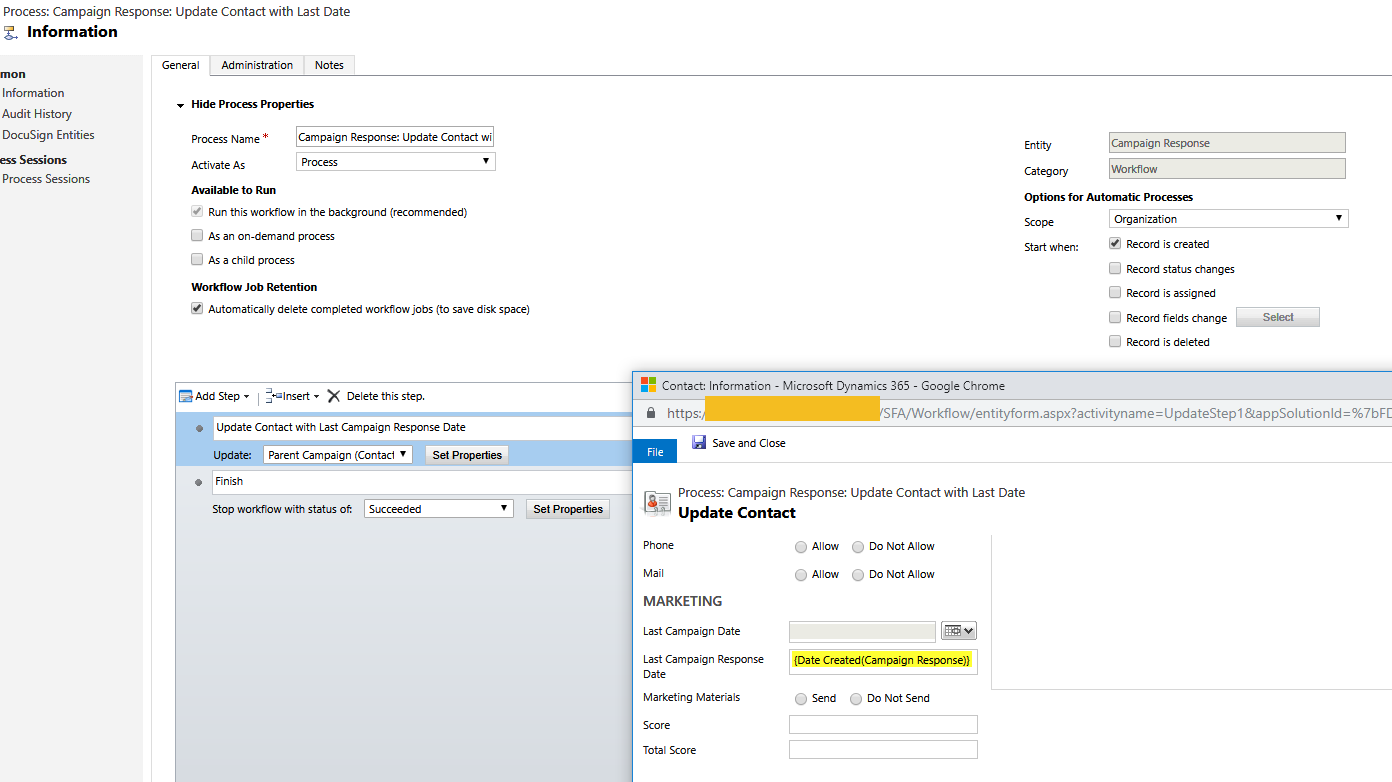
When creating a campaign response I want to update a custom date field on the contact record.

I have created a workflow to try and achieve this
6840.screenshot1.png

However when the workflow runs it errors "A record required by this process could not be found"

Plugin Trace:

[Microsoft.Xrm.Sdk.Workflow: Microsoft.Xrm.Sdk.Workflow.Activities.UpdateEntity]
[UpdateStep1]

Error Message:

Unhandled Exception: Microsoft.Crm.CrmException: Cannot find record to be updated
at Microsoft.Crm.Workflow.Services.UpdateActivityService.Execute(ActivityContext executionContext, UpdateEntity updateEntity)
at System.Activities.CodeActivity.InternalExecute(ActivityInstance instance, ActivityExecutor executor, BookmarkManager bookmarkManager)
at System.Activities.Runtime.ActivityExecutor.ExecuteActivityWorkItem.ExecuteBody(ActivityExecutor executor, BookmarkManager bookmarkManager, Location resultLocation)

Is this possible to update a contact record in this way?

*This post is locked for comments

I have the same question (0)
  • RajatSharmaRaj Profile Picture
    on at

    Hi,

    Did you checked if contact lookup on campaign is missing a value. It must have value else the given error will come. You should in fact make contact mandatory or handle this situation in workflow by adding conditional clause.

    Thanks,

    Raj

  • Community Member Profile Picture
    on at

    What sort of value would it be missing?  The out of the box config has not changed - all that has been added is the date field on the contact form.

  • Verified answer
    Alex Fun Wei Jie Profile Picture
    33,628 on at

    Hi,

    You cant do it like this. because you are using Parent Campaign(contact).

    18452.1.PNG

    18452.1.PNG

    344104.3.PNG

    as you can see the relationship from above fetchxml, it is using parent campaign as a key to find contactid, this is why the workflow cannot find a record to update. You also can take a look the relationship.

    Solution

    You have to create plugin or custom workflow to achieve it and remember you have to put a condition to check if the customer field is a contact or account or lead, if it is account wor lead then skip else continue your logic.

Under review

Thank you for your reply! To ensure a great experience for everyone, your content is awaiting approval by our Community Managers. Please check back later.

Helpful resources

Quick Links

Introducing the 2026 Season 1 community Super Users

Congratulations to our 2026 Super Stars!

Meet the Microsoft Dynamics 365 Contact Center Champions

We are thrilled to have these Champions in our Community!

Congratulations to the March Top 10 Community Leaders

These are the community rock stars!

Leaderboard > 🔒一 Microsoft Dynamics CRM (Archived)

Last 30 days Overall leaderboard

Featured topics

Product updates

Dynamics 365 release plans
