web
You’re offline. This is a read only version of the page.
close
Skip to main content

Announcements

No record found.

News and Announcements icon
Community site session details

Community site session details

Session Id :
Microsoft Dynamics CRM (Archived)

One user suddenly gets 503 error when configuring CRM for Outlook

(0) ShareShare
ReportReport
Posted on by

Hello all,

Having an issue with an outlook CRM client for only one user.

The Outlook client on this particular computer had previously been working fine but it suddenly stopped working and when clicking anything CRM related in Outlook it would not work.  I uninstalled the client and have tried running the configuration wizard again but now I get errors on that.  

The server will ping and trace from the users laptop without issue and going through the web CRM works fine. It has been tried in local intranet and trusted sites.

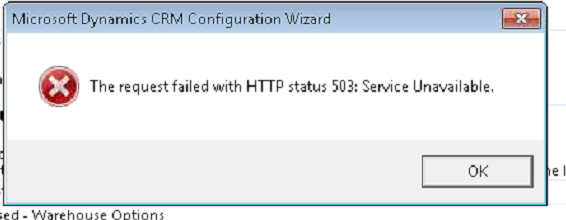
I removed the CRM client and re-installed but it fails with a 503 error when configuring. I set the user up on one of our spare laptops this morning to see if he still got the error and he does.

I have also tried setting up CRM on my local PC and it works fine so I think it is definitely something to do with the users profile.

I created a new Outlook profile as it is definitely his user that only has the issues but the new Outlook profile has not resolved this.
*This post is locked for comments

I have the same question (0)
  • Community Member Profile Picture
    on at

    Yep, not an easy one..

  • Community Member Profile Picture
    on at

    Does anybody know if this could be an issue with a corrupt Windows profile or a group policy, such as the user belonging to a group that others are not in? Is there a simple way for me to identify this?

  • Verified answer
    Community Member Profile Picture
    on at

    Hi 1984,

    Thanks for using the CRM forums.

    -Can you please confirm if you are able to access the CRM discovery service from the same machine?

    Discovery service is a Web service that provides information about the organizations that are available on the Microsoft Dynamics CRM server using the SOAP protocol.

    You can get your discovery service by looking into the developer resources in CRM.

    -It would also be a good idea capture the fiddler traces to understand the CRM server response to the outlook

    -You can also try creating a new windows user profile on a machine and configure the CRM outlook client.

  • Verified answer
    Community Member Profile Picture
    on at

    Thanks for the advice. Funny how this one was resolved. When running Fiddler at the same time as configuring the CRM client, it worked. The only reason this must have happened is due to Fiddler acting as a proxy to bypass a firewall, or anti-virus or re-route through another port or something...

Under review

Thank you for your reply! To ensure a great experience for everyone, your content is awaiting approval by our Community Managers. Please check back later.

Helpful resources

Quick Links

Introducing the 2026 Season 1 community Super Users

Congratulations to our 2026 Super Stars!

Congratulations to our 2025 Community Spotlights

Thanks to all of our 2025 Community Spotlight stars!

Leaderboard > 🔒一 Microsoft Dynamics CRM (Archived)

#1
JS-09031509-0 Profile Picture

JS-09031509-0 3

#2
AS-17030037-0 Profile Picture

AS-17030037-0 2

#2
Mark Eckert Profile Picture

Mark Eckert 2

Last 30 days Overall leaderboard

Featured topics

Product updates

Dynamics 365 release plans
