web
You’re offline. This is a read only version of the page.
close
Skip to main content

Notifications

Announcements

No record found.

Community site session details

Community site session details

Session Id :
Microsoft Dynamics CRM (Archived)

Question regarding business units setup

(0) ShareShare
ReportReport
Posted on by 4,930

Hi,

I have to setup a new CRM Organisation and I am thinking about how to properly setup the business units in CRM?

The CRM will be used by multiple business units in our group (company) and the data needs to be "separated".

I have one business unit (lets call it x), which has multiple child business units.  And then there are some other business units (lets call them y and z) with no child business units, that shouldn't see the data from the other business units.
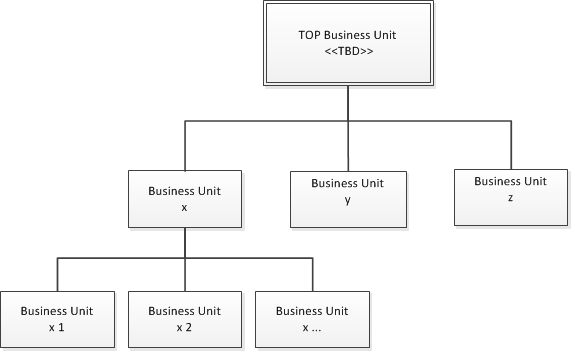
Business_5F00_Units.jpg

However in business unit x I have the requirement, that all employees of business unit x or any child business unit should be able to see all accounts and contacts owned by business unit x or any child BU.

I am not sure, how to best achieve that:

- If I would set the security roles to "business unit", the users would only see the accounts and contacts of their Business unit. But setting the security roles to "organisation" wouldn't be an option, because the users shouldn't see accounts and contacts of business units y and z.

- I could skip the child BUs and just setup a BU x. But this would then be harder for reporting purposes, like how many opportunites have been closed in child BU x1, x2, a.s.o.

Any advise on this, or any information on the net, which would bring me closer to a solution?

thx a lot in advance

Thomas

*This post is locked for comments

I have the same question (0)
  • David Jennaway Profile Picture
    14,065 on at

    The BusinessUnit hierarchy is the most effective way to apply security, and that should drive your design. Based on your scenario, that would lead to just having BU x, and no BU x1, x2 etc.

    You could use other approaches for reporting - using Territories would be one option

  • Verified answer
    Daniel Wikell Profile Picture
    2,360 on at

    This sounds like a scenario where you could use teams to group people internally within Business Unit X.

    One scenario would be to skip the child BUs and replace them with 3 teams (or your needed amount) in Business Unit X and have the security role access set to business unit. Depending on your reporting needs, this grouping might be enough for you.

    If you really do need the child BUs, then another scenario would be to have all users within their respective child BU for X and then create 1 owner team in X where you also add all the users of the child BUs to. Assign a separate security role for this team that grants parent child access to accounts and contacts but nothing else. This privilege will be added to the user's rights already definied by their own security role. You should now have access to all child BUs without the need for setting organisation access.

  • tpeschat Profile Picture
    4,930 on at

    Thx for your replies.

    I guess I'll go for just one BU x and setup teams for each child BU. Then I'll assign the accounts/contacts to a team as owner. And the "account manager" I'll define as sales Manager.

    This should be fine for reporting purposes, as well as for defining the views like All clients, My teams clients, My clients.

    The security role for accounts/contacts can then be set on BU Level. And if required activities a.s.o. could be set to user, so that they are only visible to the team taking care of the client and not the complete BU.

    br Thomas

Under review

Thank you for your reply! To ensure a great experience for everyone, your content is awaiting approval by our Community Managers. Please check back later.

Helpful resources

Quick Links

Responsible AI policies

As AI tools become more common, we’re introducing a Responsible AI Use…

Neeraj Kumar – Community Spotlight

We are honored to recognize Neeraj Kumar as our Community Spotlight honoree for…

Leaderboard > 🔒一 Microsoft Dynamics CRM (Archived)

#1
SA-08121319-0 Profile Picture

SA-08121319-0 4

#1
Calum MacFarlane Profile Picture

Calum MacFarlane 4

#3
Alex Fun Wei Jie Profile Picture

Alex Fun Wei Jie 2

Last 30 days Overall leaderboard

Featured topics

Product updates

Dynamics 365 release plans
