web
You’re offline. This is a read only version of the page.
close
Skip to main content

Announcements

No record found.

News and Announcements icon
Community site session details

Community site session details

Session Id :
Microsoft Dynamics CRM (Archived)

CRM App for Outlook not recognizing contacts and user

(0) ShareShare
ReportReport
Posted on by

Hello,

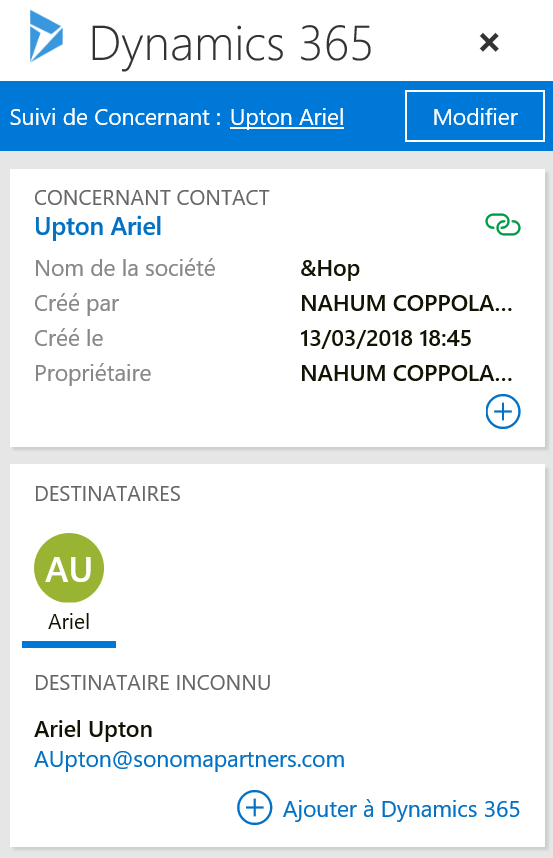
We currently have a problem on our Dynamics CRM App for Outlook.

The app allows us to create contacts into CRM but it doesn't recognize the email recipients as contacts of our CRM (so it always propose us to create the contact again).

Do you know the reason of the problem ?

As you can see on the screenshot below > my email has Ariel Upton (contact) as regarding but the recipient is still unkown (i just created it yesterday).
8662.Dynamics-365.png

*This post is locked for comments

I have the same question (0)
  • Radu Chiribelea Profile Picture
    6,667 on at

    Hi Simon,

    Is the email address duplicated in CRM?

    Also, can you please check that the format of the email field is Email and not Text? See following blog article if it applies to you as well: blogs.msdn.microsoft.com/.../during-upgrade-from-crm-4-0-to-crm-2011-the-emailaddress-field-format-may-change-from-email-to-text (I know it's for CRM 4.0 to 2011, however the principle can be applied to newer versions as well)

    Regards,

    Radu

  • Community Member Profile Picture
    on at

    Hi Radu,

    Thank you for your quick answer.

    I'm not sure to understand your first question but there are 3 email fields (I thought they were Out Of the Bow)4265.email-1.png

    All the 3 fields have the correct types ...

    4265.email-1.png

    However our email field is not required in our CRM, can this have an impact ?

    Best regards,

    Simon

  • Radu Chiribelea Profile Picture
    6,667 on at

    Hi Simon,

    The format looks OK.

    It shouldn't have an impact if the email field is required or not. If you want, you can make it required and see if it makes a difference.

  • Community Member Profile Picture
    on at

    Unfortunately the mandatory field had no effect.

    And when I create the contact again within the same account, I get a duplicate in the CRM...
    Duplicate-emails.png

Under review

Thank you for your reply! To ensure a great experience for everyone, your content is awaiting approval by our Community Managers. Please check back later.

Helpful resources

Quick Links

Introducing the 2026 Season 1 community Super Users

Congratulations to our 2026 Super Stars!

Meet the Microsoft Dynamics 365 Contact Center Champions

We are thrilled to have these Champions in our Community!

Congratulations to the April Top 10 Community Leaders

These are the community rock stars!

Leaderboard > 🔒一 Microsoft Dynamics CRM (Archived)

#1
ScottDurow Profile Picture

ScottDurow 2

#2
GJones Profile Picture

GJones 1

Last 30 days Overall leaderboard

Featured topics

Product updates

Dynamics 365 release plans
