web
You’re offline. This is a read only version of the page.
close
Skip to main content

Notifications

Announcements

No record found.

Community site session details

Community site session details

Session Id :
Microsoft Dynamics 365 | Integration, Dataverse...
Answered

Time Format 24 hours in Unified Interface

(0) ShareShare
ReportReport
Posted on by 35

Hello,

In classic interface time format is 24 h, in Unified Interface 12 am/pm.

Version on Premise 9.0.11

Is it bug ? Has anyone found solution.

Thanks,

I have the same question (0)
  • Fabio Branco Profile Picture
    on at

    Hello Olegof,

    Thank you for your question

    There's a few factors to take in cosideration which it migth help you answer,  or overcome this behaviour.

    The behaviour of the Time migth change depending on the Time format: docs.microsoft.com/.../behavior-format-date-time-field

    Do you have this behaviour on diferent Time set including English - US format?

    pastedimage1586177063881v1.png

  • Olegof Profile Picture
    35 on at

    Hello Fabio,

    In the System Settings the settings are ok, as we need 24H format.

    As I mentioned in classis interface it works fine, only in UI it is 12 h format.

  • Verified answer
    Soluzione IT Profile Picture
    80 on at

    Hi Olegof,

    I have tried on Online CRM and got no issue regarding the time format.

    Could you please make sure that you have set the correct format (HH: mm) in the settings.

    The steps to check is below:

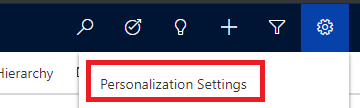
    1) Click on the Settings button in the top menu as shown in the screenshot below

     pastedimage1586177598732v2.png

    2) Go to Personalization Settings

    pastedimage1586177741934v3.png

    3) A new window will appear, go to the Format tab and click on Customization.

    pastedimage1586177795372v4.png

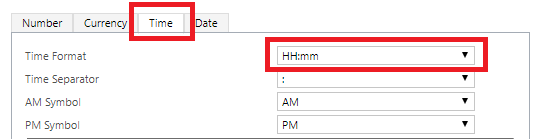
    4) Again a window open, go to Time tab and check the Time format. If it is not set as HH: mm then choose from the dropdown list and save changes by clicking on the Apply button at the bottom of the page and then click Ok.
    pastedimage1586177857004v5.png

    It will reload the page and now you can see the time format based on your selection.

    Please mark my answer verified if it helps.

    Warm Regards,

    Kirti Singh | Soluzione IT Services.

  • Olegof Profile Picture
    35 on at

    Hello Kirti,

    Yes I did it all and the problem is the same.

    At online I don't have problems also, only on Premise.

    May be it is a bug ?

  • Verified answer
    Soluzione IT Profile Picture
    80 on at

    Ahh, I see, then I think you should raise a ticket with Microsoft to get it resolved.

    Most probably it is a bug I guess.

    Please mark my answer verified if it helps.

    Warm Regards,

    Kirti Singh | Soluzione IT Services

  • a.lozinskyi Profile Picture
    15 on at

    Did anybody manage to solve this issue?

  • Joe Furlinger Profile Picture
    10 on at

    Hi Olegof,

    were you able to fix that strange behaviour?

    Thanks,
    Joe

Under review

Thank you for your reply! To ensure a great experience for everyone, your content is awaiting approval by our Community Managers. Please check back later.

Helpful resources

Quick Links

Responsible AI policies

As AI tools become more common, we’re introducing a Responsible AI Use…

Neeraj Kumar – Community Spotlight

We are honored to recognize Neeraj Kumar as our Community Spotlight honoree for…

Leaderboard > Microsoft Dynamics 365 | Integration, Dataverse, and general topics

#1
iampranjal Profile Picture

iampranjal 51

#2
Martin Dráb Profile Picture

Martin Dráb 39 Most Valuable Professional

#3
André Arnaud de Calavon Profile Picture

André Arnaud de Cal... 26 Super User 2025 Season 2

Last 30 days Overall leaderboard

Product updates

Dynamics 365 release plans