web
You’re offline. This is a read only version of the page.
close
Skip to main content

Announcements

No record found.

News and Announcements icon
Community site session details

Community site session details

Session Id :
Small and medium business | Business Central, N...
Answered

Is there a way to create fixed allocation account to distribute the cost automatically with the same way of dynamics GP?

(0) ShareShare
ReportReport
Posted on by

In Dynamics GP we used to have a fixed allocation account whenever any transaction posted to that account, immediately it will be distributed in two or more accounts, can we have the functionality in Business Central

6675.Untitled.png

I have the same question (0)
  • Suggested answer
    JAngle Profile Picture
    150 on at

    Closet thing in standard would be a recurring journal and you set it so the balance of a specific account moves to another. docs.microsoft.com/.../ui-work-general-journals

    To make it have an element of automation this might help: joshanglesea.wordpress.com/.../

    Good one to put on the ideas site if it hasn’t been added already: experience.dynamics.com/.../

  • Community Member Profile Picture
    on at

    Hi Josh, I look into your suggestion and it seems to be fine but I just want to inquire about which method I should use? Is it (Balance) if yes.. the system will check the account balance and distribute it?

    I think in this case I should manually identify the Debit or the credit amount inside the Recurring journal which will be distributed. however, I would like the system to take care of this task.

  • Suggested answer
    Community Member Profile Picture
    on at

    Mohammed,

    Yes, you will select Recurring Method = BALANCE. Here is a simple example:

    I chose 1 GL Account and used Process/Allocations to define where the amounts will be posted too. This allocation reflects the same GL Account but different Dimensions and percentages. 

    pastedimage1610991114963v1.png

    pastedimage1610991150424v2.png

    Preview Posting:

    pastedimage1610991176236v3.png

    Hope this helps.

    Thanks,

    Steve

  • Community Member Profile Picture
    on at

    Hello Steven,

    I follow your instructions I use 'Balance' Method, I allocate the other accounts, and I didn't put an amount inside the journal itself, I was expecting the system to check the account balance and distribute it,

    but unfortunately when I post I got an error (there is nothing to post) as you can see the account has a balance of (-150.000) it should distribute automatically

    4571.png

    2388.png

    1106.png

    3276.png

  • Verified answer
    Community Member Profile Picture
    on at

    Mohammed,

    I took your example and ran this test:

    Created Recurring Journal for Balance against my Revenue Account:
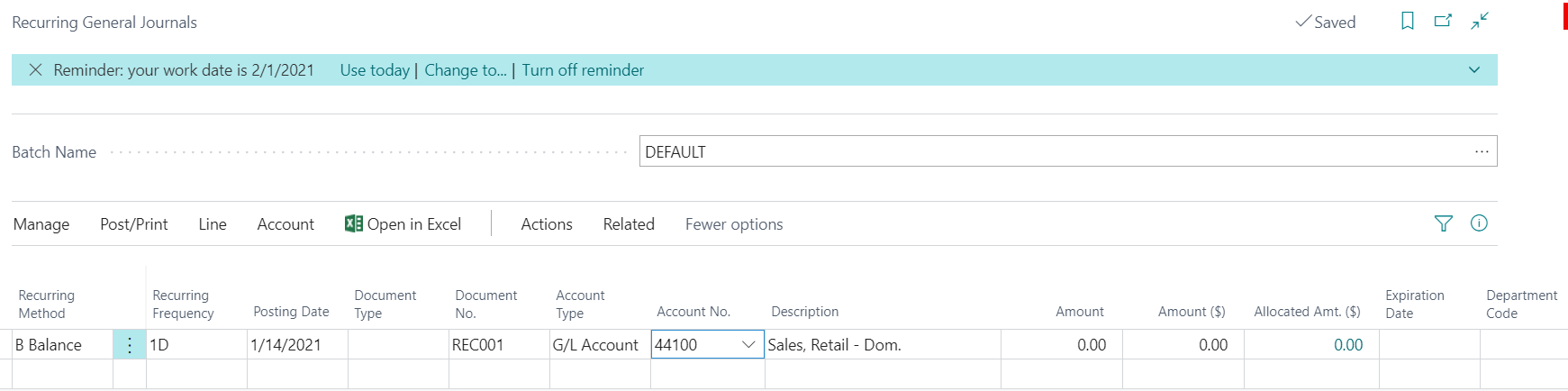
    pastedimage1611080748239v1.png

    Next added the Allocation on the Line:

    pastedimage1611080775291v2.png

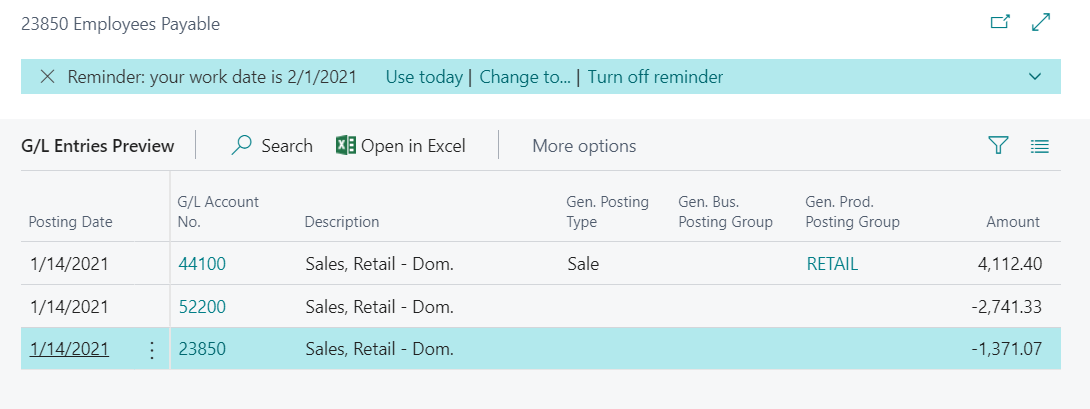
    Next ran Action/Posting/Preview, to see results:
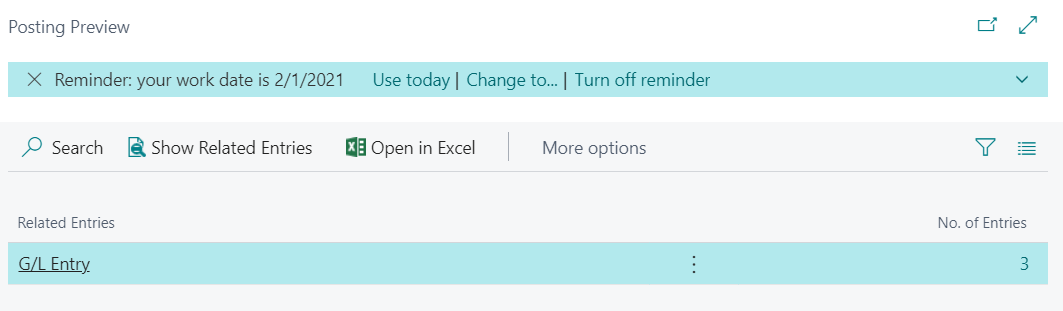
    pastedimage1611080813248v3.pngpastedimage1611080832153v4.png

    The Balance in the account, in your pic, is thru 1/14/21, yes? 

    Thanks,

    Steve

  • Community Member Profile Picture
    on at

    "The Balance in the account, in your pic, is thru 1/14/21, yes?

    "this statement solve my problem  :) :)

    thank you so much

Under review

Thank you for your reply! To ensure a great experience for everyone, your content is awaiting approval by our Community Managers. Please check back later.

Helpful resources

Quick Links

Introducing the 2026 Season 1 community Super Users

Congratulations to our 2026 Super Stars!

Congratulations to our 2025 Community Spotlights

Thanks to all of our 2025 Community Spotlight stars!

Leaderboard > Small and medium business | Business Central, NAV, RMS

#1
OussamaSabbouh Profile Picture

OussamaSabbouh 1,965 Super User 2026 Season 1

#2
YUN ZHU Profile Picture

YUN ZHU 1,125 Super User 2026 Season 1

#3
Dhiren Nagar Profile Picture

Dhiren Nagar 961 Super User 2026 Season 1

Last 30 days Overall leaderboard

Featured topics

Product updates

Dynamics 365 release plans