web
You’re offline. This is a read only version of the page.
close
Skip to main content

Notifications

Announcements

No record found.

Community site session details

Community site session details

Session Id :
Small and medium business | Business Central, N...
Suggested Answer

NAV Server Administrator - No Instances

(0) ShareShare
ReportReport
Posted on by 5

I have recently taken over the management of a NAV Dynamics Server and am unable to connect to any instances from within Administrator. When I open it up it just displays "There are no items to show in this view". Connecting to Administrator Shell has no issues.

NAV Dynamics is installed on this particular server and the database is hosted on another server.

pastedimage1636413856925v1.png

I have the same question (0)
  • Suggested answer
    Marco Mels Profile Picture
    on at

    Hello,

    You mean that Get-NavServerInstance shows the locally installed NST instances while the management console does not show it? It does not matter that the NST is installed on one server while the other is installed on another.

    Are there any unexpected errors in application event log file that shows that the console.exe is crashing or something else that you cannot explain which may give us a hint?

    Thanks.

  • Grant_ Profile Picture
    25 on at

    Running Get-NavServerInstance does not return any information:

    pastedimage1636494988677v2.png

    If I run Get-NavServerConfiguration DynamicsNAV100 it returns the following:

    pastedimage1636495146274v3.png

    I can also see the service is running:

    pastedimage1636495201520v4.png

  • Suggested answer
    RockwithNav Profile Picture
    8,637 Super User 2025 Season 2 on at

    Which Version of NAV is it?

    Try changing the Service Account with your Username and give sufficient rights to your user and then check.

  • Suggested answer
    YUN ZHU Profile Picture
    95,748 Super User 2025 Season 2 on at

    Hi, This is a bit strange, no matter what the version is, you should be able to see the instances here.

    For example:
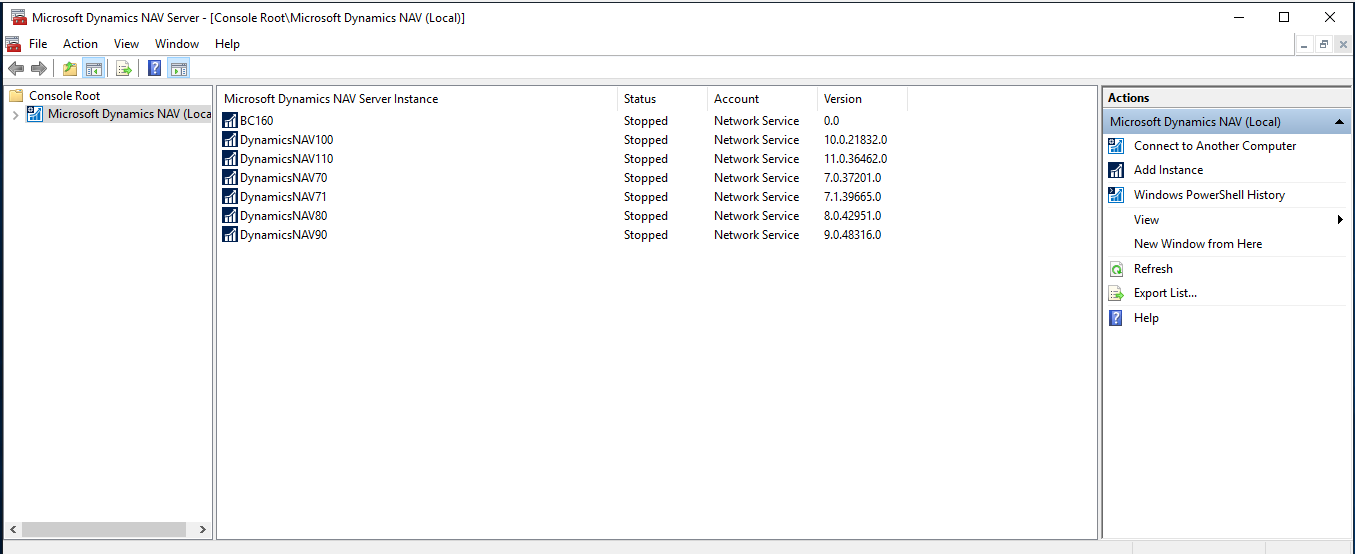
    pastedimage1636588807421v1.png

    Can you see them in Task Manager -> Services? If you just need to restart it, you can do it here. But if you need to modify the settings, you need to use Command.
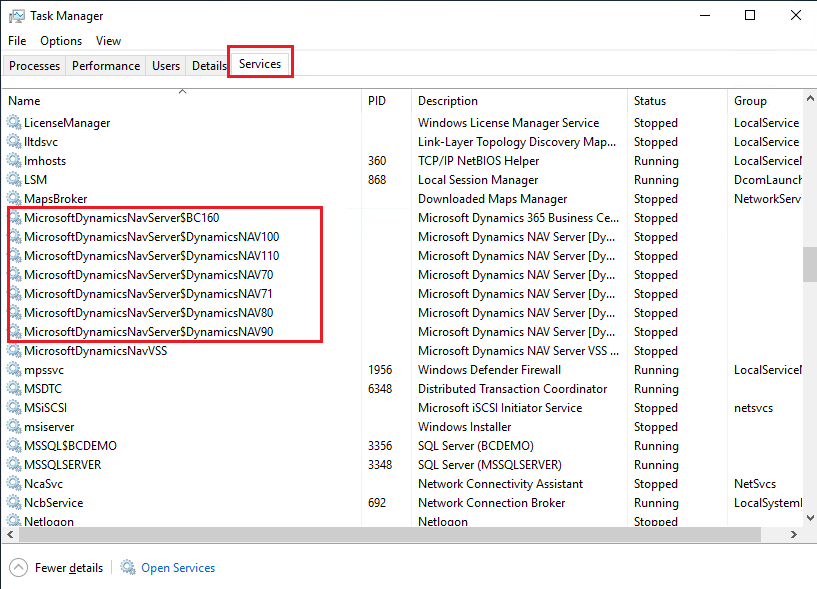
    pastedimage1636588850335v2.png

    If there is no user permission problem, I recommend you to reinstall it.

    Hope this will help.

    Thanks.

    ZHU

  • Grant_ Profile Picture
    25 on at

    I can see all the services are running from Task Manager:

    pastedimage1636604838965v2.png

    I'm also running as a Domain Administrator, so I don't believe there would be any permission issues.

    I tested installing the administrator tool on another server, then connecting to a different server which shows the same issue - no instances running.

    Also just not that users are able to log in and work with the application itself, so I know that it is working correctly.

  • Grant_ Profile Picture
    25 on at

    Version is 2017. Do you mean running the service with the domain admin account?

  • RockwithNav Profile Picture
    8,637 Super User 2025 Season 2 on at

    Yes setup the Service Tier with your Windows User Account, Restart it and see if the instance appears in your dev environment and you able to connect to the RTC. There has been instances where in still if sometimes service is running is never appears but doing so does the Job.

  • Grant_ Profile Picture
    25 on at

    Still no luck with that unfortunately.

    I checked the logs after running the service as the domain admin, then restarting with the service account and saw some errors in the logs:

    pastedimage1636927139625v1.png

    pastedimage1636927166791v2.png

  • Kolitha_Dissanayake Profile Picture
    230 on at

    Hi Mitchell,

    Add Navision service running user to the SQL server with db_owner roll then restart the service and check.

    Thanks,

    Kolitha

Under review

Thank you for your reply! To ensure a great experience for everyone, your content is awaiting approval by our Community Managers. Please check back later.

Helpful resources

Quick Links

Responsible AI policies

As AI tools become more common, we’re introducing a Responsible AI Use…

Neeraj Kumar – Community Spotlight

We are honored to recognize Neeraj Kumar as our Community Spotlight honoree for…

Leaderboard > Small and medium business | Business Central, NAV, RMS

#1
OussamaSabbouh Profile Picture

OussamaSabbouh 2,092

#2
YUN ZHU Profile Picture

YUN ZHU 663 Super User 2025 Season 2

#3
Sumit Singh Profile Picture

Sumit Singh 515

Last 30 days Overall leaderboard

Featured topics

Product updates

Dynamics 365 release plans
