web
You’re offline. This is a read only version of the page.
close
Skip to main content

Announcements

No record found.

News and Announcements icon
Community site session details

Community site session details

Session Id :
Microsoft Dynamics CRM (Archived)

Server-based SharePoint integration yields error

(0) ShareShare
ReportReport
Posted on by

Hello,

I just activated server-based SharePoint-integration between SharePoint 2013 and CRM Online. The two were already connected using the List Component, which worked properly. There were a number of accounts with folders already created through the existing integration.

After activating the New, server-based SharePoint-integration, I am met by an error where the Iframe would normally be located;
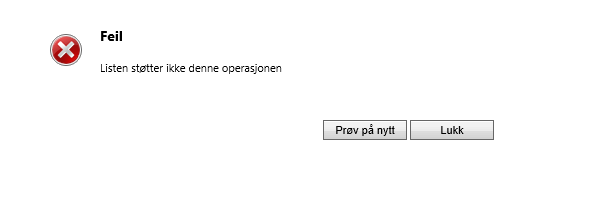
This error code translates into English as: Error. List does not support this operation. Retry/Close

I have downloaded the new SDK and searched for an explaination for this error, but all I can find are the following two lines:

ErrorMessages.Add(SPOperationNotSupportedErrorCode, "List does not support this operation");

Public const int SPOperationNotSupportedErrorCode = unchecked((int)0x80060715); // -2147088619

This tells me nothing other than that the error codes were added to the SDK in a recent update, as I couldn't find this error message in my old SDK package downloaded in January. The error code prefix "SP" also indicates that it is a SharePoint-specific error, which makes it sound to me like it is specifically added for the server-based SP integration.

The folder creation prompt comes up like it should when navigating to "Documents" on an account without an existing library, and the folder is created in SharePoint upon clicking OK. *.Dynamics.com and *.SharePoint.com are added to my local intranet zone, and mixed content is enabled.


Any ideas?

*This post is locked for comments

I have the same question (0)
  • Community Member Profile Picture
    on at

    One of my customers does have the same issue.

    Would be also very interested to find out what the cause is.

  • Rhett Clinton Profile Picture
    Moderator on at

    Did you find an answer to this?

  • kerryburn Profile Picture
    on at

    Hey Christian, we have the same problem too!

    Kerry  

  • Verified answer
    Rhett Clinton Profile Picture
    Moderator on at

    The problem we found was that the entity display name was different to the related SharePoint Document library. Review and align your SharePoint document library display name with the current entity name and test it again.

  • Rhett Clinton Profile Picture
    Moderator on at

    Also be aware that any custom security roles will not have been updated with the Document button privileges so you will need to export amend import your affected roles to ensure the Document button shows. crmandcoffee.wordpress.com/.../crm-2013-leo-lost-documents-button-after-enabling-server-based-sharepoint-integration

  • Rasmus R. Aardal Profile Picture
    on at

    Hello RhettClinton,

    Thanks for the reply!

    The way I read your post, you want me to make sure that the display name for the CRM entity Account  is identical to the part of the SharePoint path that specifies that it is a library of Accounts (x.sharepoint.com/account/TestAccount_1234ABCD123)

    In other words make sure that the Account entity in CRM is actually displayed as "Account", in stead of my Norwegian language pack translation "Forretningsforbindelse".

    I have tried aligning these two names by changing the display name of the Account entity in CRM to "Account" without Luck.

    The complete path to the document library has been checked and verified from both ends as "x.sharepoint.com/sales/customers/account/TestAccount_1234ABCD123". The iframe src is set to "<OrgName>.crm4.dynamics.com/userdefined/areas.aspx?formid=<GUID>&inlineEdit=1&navItemName=Documents&oId=%7b<AccountGUID>%7d&oType=1&pagemode=iframe&rof=true&security=<Six Digits>&tabSet=areaSPDocuments&theme=Outlook15White" which makes little sense to my non-developer mind as I would assume this src to point to somewhere on the SharePoint server.

    I have tried overriding this URL with dev tools to point to the customer's SharePoint folder with the same parameters, but that just produces a 404. Guess that was a long shot.

  • Rhett Clinton Profile Picture
    Moderator on at

    Strangely enough it is the document library name (displayed) not its location (url) I am referring to. Goto to the SP site where your doc libraries are for CRM and you will see there names in the list.

  • Juan Ribes Profile Picture
    1,014 on at

    Microsoft published this workaround at support.microsoft.com/.../2975782

    Error message when using the new server-based SharePoint integration for Microsoft Dynamics CRM Online and SharePoint Online: "List Does Not Support This Operation"

    The Name of the SharePoint document library and the Display Name of the CRM entity MUST match.

Under review

Thank you for your reply! To ensure a great experience for everyone, your content is awaiting approval by our Community Managers. Please check back later.

Helpful resources

Quick Links

Introducing the 2026 Season 1 community Super Users

Congratulations to our 2026 Super Stars!

Congratulations to our 2025 Community Spotlights

Thanks to all of our 2025 Community Spotlight stars!

Leaderboard > 🔒一 Microsoft Dynamics CRM (Archived)

#1
Varsha deshpande Profile Picture

Varsha deshpande 5

#2
JS-09031509-0 Profile Picture

JS-09031509-0 3

#3
Ciprian  P Profile Picture

Ciprian P 2

Last 30 days Overall leaderboard

Featured topics

Product updates

Dynamics 365 release plans
