web
You’re offline. This is a read only version of the page.
close
Skip to main content

Announcements

No record found.

News and Announcements icon
Community site session details

Community site session details

Session Id :
Microsoft Dynamics GP (Archived)

Posted payment applied to invoice with duplicate line items

(0) ShareShare
ReportReport
Posted on by

Hi folks,

I have a posted payment applied against an invoice. Somehow the line items were duplicated accidently.

How can I solve this error? 

Would I void both the invoice and the payment?

Many thanks for your help.
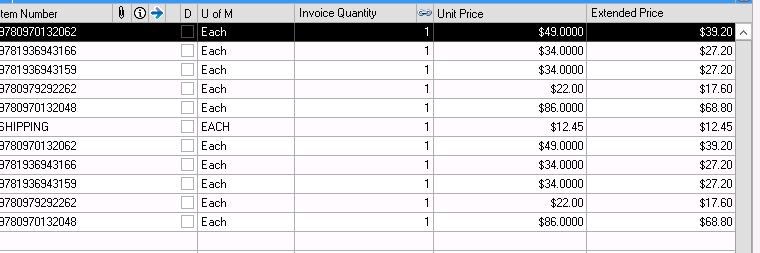
8547.Capture.JPG

2262.Capture1.JPG

6076.Capture2.JPG

*This post is locked for comments

I have the same question (0)
  • Suggested answer
    Mahmoud Saadi Profile Picture
    32,738 on at

    If voiding the payment gets you settled, then proceed with voiding the payment and re-entering it again.

    If you still have issues with the invoice, then void the invoice as well. Make sure to check the balance accordingly

    Let us know if you need any further assistance,

  • Nhi Nguyen Profile Picture
    on at

    Hi Mahmoud,

    The payment is correct. The line items invoice have been erroneously duplicated.

    Thanks,

  • Suggested answer
    Bill Campbell Profile Picture
    12 on at

    Nhi, if the payment is correct but the invoice that you have paid is incorrect, then the only way to fix the invoice is to (1) void the payment and (2) void the invoice and re-enter the invoice correctly.

    This is the only way I can think of that will work.  You need to return inventory items, you need to reduce the amount of the invoice and there are no shortcuts that I can think of that will make that happen any other way.

    Sorry for that, but sometimes that long is the only way.

  • Verified answer
    soma Profile Picture
    24,410 on at

    I think you are talking about Receivable Payment (Cash Receipt). If so, then you can unapply the invoice from Apply Sales Document window if you not moved the completed document to history(Paid Transaction Removal). Open the Apply the Sales Document window and Unapply the invoice and create a sales return with particular one item and apply this return against the original invoice which you have posted with wrong quantity. Then invoice remaining amount will reduced. So, you can apply the same invoice to same payment again.

    Hope this helps!!!

  • Nhi Nguyen Profile Picture
    on at

    Hi Soma,

    I will process as you suggest then.

    Thank you so much.

  • Nhi Nguyen Profile Picture
    on at

    Hi Bill,

    Thank you for your suggestion. I will  create a return with extra items and apply it against the invoice. Then I will apply the payment  against the invoice again.

Under review

Thank you for your reply! To ensure a great experience for everyone, your content is awaiting approval by our Community Managers. Please check back later.

Helpful resources

Quick Links

Introducing the 2026 Season 1 community Super Users

Congratulations to our 2026 Super Stars!

Meet the Microsoft Dynamics 365 Contact Center Champions

We are thrilled to have these Champions in our Community!

Congratulations to the April Top 10 Community Leaders

These are the community rock stars!

Leaderboard > 🔒一 Microsoft Dynamics GP (Archived)

#1
talty09 Profile Picture

talty09 2

#1
Anthony Beatty Profile Picture

Anthony Beatty 2

#3
CP04-islander Profile Picture

CP04-islander 1

Last 30 days Overall leaderboard

Featured topics

Product updates

Dynamics 365 release plans


