web
You’re offline. This is a read only version of the page.
close
Skip to main content

Announcements

No record found.

News and Announcements icon
Community site session details

Community site session details

Session Id :
Supply chain | Supply Chain Management, Commerce
Suggested Answer

Parameter "Arrival Journal Name" need to be setup.

(0) ShareShare
ReportReport
Posted on by 22

hi All,

I got this error message when I open Procurement and Sourcing > Shipment details then click "Generate Arrival Journal" :Parameter "Arrival Journal Name" need to be setup.
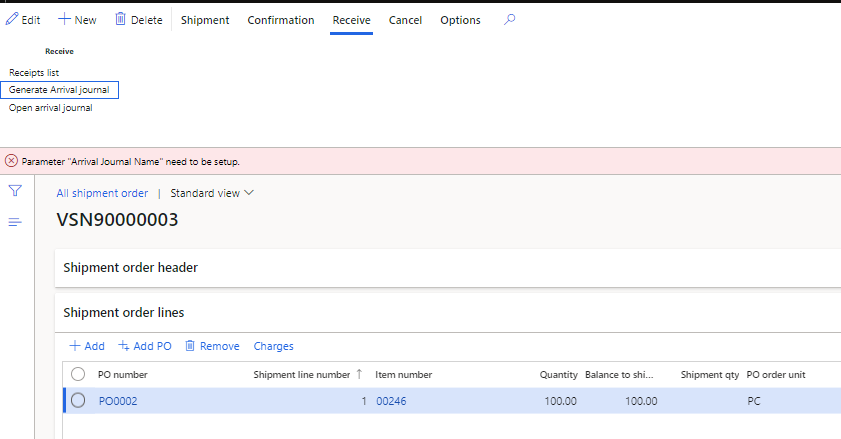
pastedimage1617198654556v1.png

I did already setup journal name for Item Arrival in inventory Management parameter. 

I checked all the Parameter setup like "Procurement & Sourcing parameter", , "WH Management parameter" , "AP parameter" but didn't found that "Arrival Journal Name".

Does anybody here please let me know which setup I need to check & update for this case?

Thank you in advance.

I have the same question (0)
  • Suggested answer
    AR-01121610-0 Profile Picture
    4,973 Moderator on at

    Dear Hang,

    Sure, take a look to the Invemtory parameters:

    4743.pastedimage1617207007675v1.png

  • HangNguyen Profile Picture
    22 on at

    Thank you, Andreas. I have done all those setup in the Inventory Management Parameter > Journal tab but still get that issue.

  • Suggested answer
    AR-01121610-0 Profile Picture
    4,973 Moderator on at

    Hy Hang,

    if you are using Warehouse Management (not just Inventoy management) may be you need to setup your arrival journal to also "Check picking location" which I saw just in Contoso.

    May be this is missing?

  • HangNguyen Profile Picture
    22 on at

    hi Andreas,

    I had checked Picking location is YES for this journal already. I searched but didn't find any missing setup that related to Journal name in Warehouse Management module. 

    pastedimage1617263683985v1.png

  • AR-01121610-0 Profile Picture
    4,973 Moderator on at

    What should this screenshot tell me for this case?

  • Suggested answer
    Sumit Loya Profile Picture
    2,230 on at

    Hi Hang Nguyen,

    On closer look of the screen shot, looks like the entire All shipment order form is custom, looking at buttons etc. I can concur this is a customized form (Ex: A button is there called Add PO. MS standard forms will never have such labels). Also looking at the error Parameter "Arrival Journal Name" need to be setup. Also looks customized. As MS uses camel notation for labels so it would have been Arrival journal name. I am assuming the validation is customized and probably a custom field on some parameters form is missing.

    It would be better if you can check with a developer to check and let you know where the missing setup is.

  • HangNguyen Profile Picture
    22 on at

    Hi Andreas,

    Sorry, I did upload incorrect screen shot for this case.

    This issue was resolved by IT team, there was missing some setup.

    Thank you for your suggestion. 

Under review

Thank you for your reply! To ensure a great experience for everyone, your content is awaiting approval by our Community Managers. Please check back later.

Helpful resources

Quick Links

Introducing the 2026 Season 1 community Super Users

Congratulations to our 2026 Super Stars!

Meet the Microsoft Dynamics 365 Contact Center Champions

We are thrilled to have these Champions in our Community!

Congratulations to the April Top 10 Community Leaders

These are the community rock stars!

Leaderboard > Supply chain | Supply Chain Management, Commerce

#1
André Arnaud de Calavon Profile Picture

André Arnaud de Cal... 141 Super User 2026 Season 1

#2
Laurens vd Tang Profile Picture

Laurens vd Tang 116 Super User 2026 Season 1

#3
Zain Mehmood Profile Picture

Zain Mehmood 89 Most Valuable Professional

Last 30 days Overall leaderboard

Product updates

Dynamics 365 release plans
