web
You’re offline. This is a read only version of the page.
close
Skip to main content

Notifications

Announcements

No record found.

Community site session details

Community site session details

Session Id :
Supply chain | Supply Chain Management, Commerce
Suggested Answer

Is there any data entity for Average Unit cost in D365 FO?

(0) ShareShare
ReportReport
Posted on by 10

I am looking for any data entity that can be used to export Average Unit Cost for FIFO model. If there is no any particular data entity can anyone help me with the logic on Average Unit Cost calculation used in inventory ageing report for FIFO model.

I have the same question (0)
  • Suggested answer
    Siv Sagar Profile Picture
    5,277 Super User 2025 Season 2 on at

    Hi Suresh,

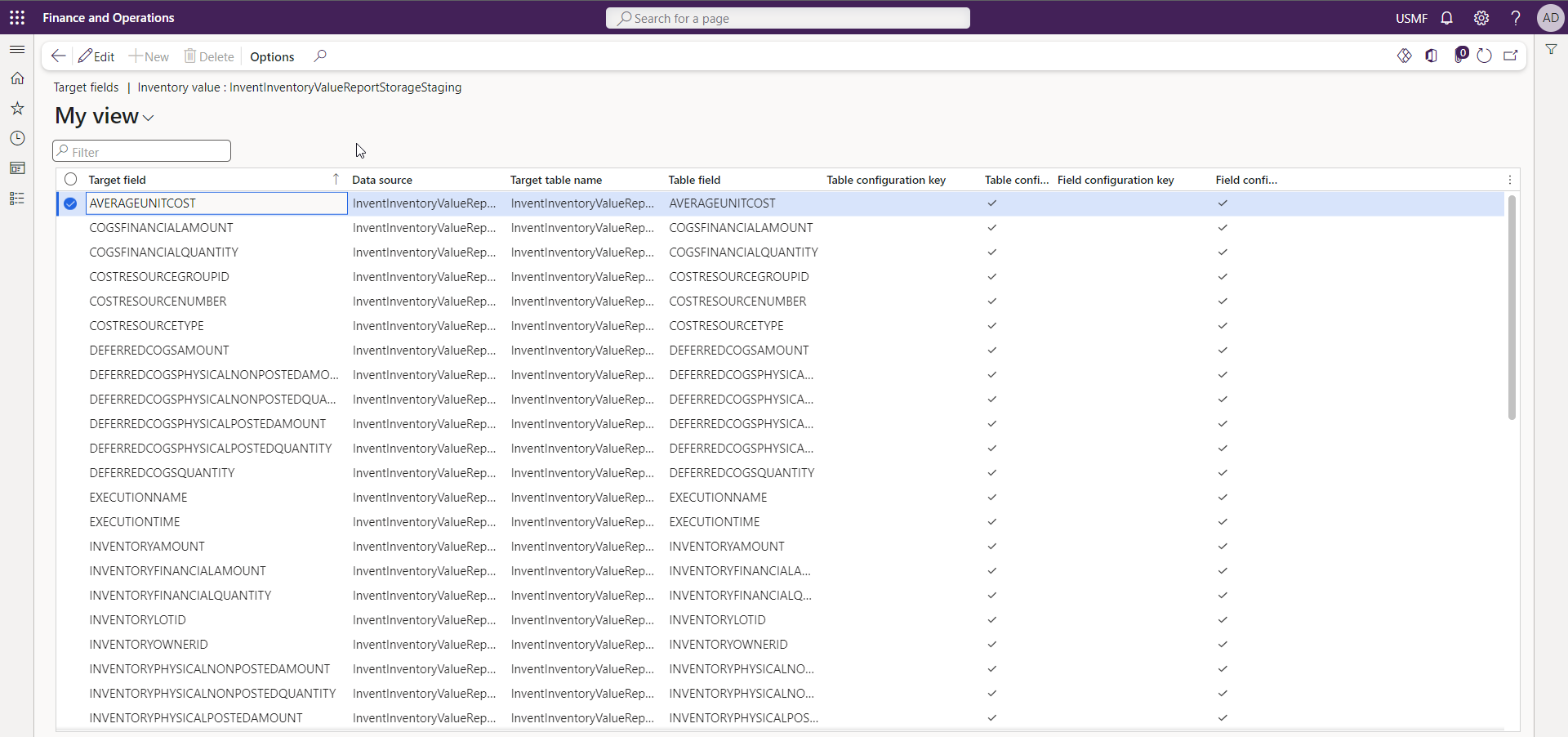
    I am not sure, If I got this correctly. To export Average Unit Cost for the FIFO (First-In, First-Out) model in D365, you can utilize the "InventInventoryValueReportStorageStaging" data entity, which contains inventory summary information. The key fields in this entity include the item number, warehouse, and financial dimensions.
    Regards

    Siv Sagar

    This post is my own opinion and does not necessarily reflect the opinion or view of my company.

    Please mark as verified if the answer is helpful. Welcome to join hot discussions in Dynamics 365 Forums.

  • Suggested answer
    saurabh bharti Profile Picture
    15,039 Moderator on at

    Hi,

    There is no data entity to get you real time Avg cost because this is dynamically calculated based on different dimensions (Site, WH etc...).

    Inventory value report storage gives you data based on point in time calculation not real time

  • Suggested answer
    Bill Ngo Profile Picture
    372 on at

    Hi Suresh,

    There is one data entity as Sagar suggested that can be used to export Average Unit Cost for FIFO model. But I am not sure it can be worked as your expectation.

    I have another particular data way can help you with the logic on Average Unit Cost calculation used in Excel which is exported from On-hand.

    In On-hand list of D365FO

    1. Insert column > select and field "Financial cost amount" into form.

    2. Filter items that you want to see the Avgcost.

    3. Filter Inventory Dimensions according to the calculation cost of items (check more inf. in the Tracking dimension Group and Storage dimension groups)

    4. Export the result to Excel.

    5. Add one more column in excel for AVG cost calculation (N column/C column)

    Then you can see current AVG cost of items immediately, very fast way. 

    Regards

    Bill

    This post is my own opinion and does not necessarily reflect the opinion or view of my company.

    Please mark as verified if the answer is helpful. Welcome to join hot discussions in Dynamics 365 Forums.

Under review

Thank you for your reply! To ensure a great experience for everyone, your content is awaiting approval by our Community Managers. Please check back later.

Helpful resources

Quick Links

Responsible AI policies

As AI tools become more common, we’re introducing a Responsible AI Use…

Neeraj Kumar – Community Spotlight

We are honored to recognize Neeraj Kumar as our Community Spotlight honoree for…

Leaderboard > Supply chain | Supply Chain Management, Commerce

#1
Laurens vd Tang Profile Picture

Laurens vd Tang 298 Super User 2025 Season 2

#2
Siv Sagar Profile Picture

Siv Sagar 179 Super User 2025 Season 2

#3
André Arnaud de Calavon Profile Picture

André Arnaud de Cal... 121 Super User 2025 Season 2

Last 30 days Overall leaderboard

Featured topics

Product updates

Dynamics 365 release plans
