web
You’re offline. This is a read only version of the page.
close
Skip to main content

Notifications

Announcements

Community site session details

Community site session details

Session Id :
Small and medium business | Business Central, N...
Suggested Answer

Error when publish an extension to Business Central

(0) ShareShare
ReportReport
Posted on by 5

Created an Extension months ago. Extension is creating Web Service from the Type "Query" to connect Power BI to Business Central. Worked well until the new BC update. Get this error now. 

The request for path /v2.0/sandbox/dev/apps?SchemaUpdateMode=synchronize&DependencyPublishingOption=default failed with code UnprocessableEntity. Reason: Sie verfügen nicht über die folgenden Berechtigungen für TableData Published Application: IndirectInsert. 

Translating the german message in english says "You do not have the following permissions for TableData Published Application: IndirectInsert."

Please help
Best
Andreas
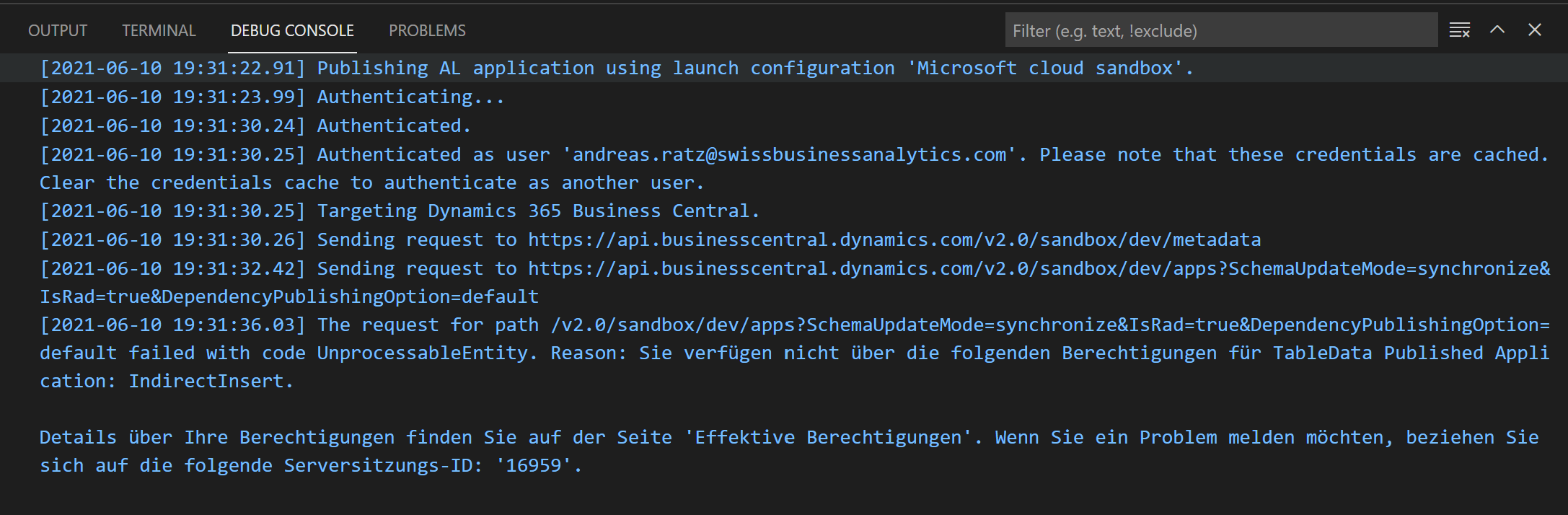
Screenshot-2021_2D00_06_2D00_10-194035.png

I have the same question (0)
  • Suggested answer
    JAngle Profile Picture
    135 on at

    The user account you’re deploying the app with needs specific permissions. This article shows what you need: docs.microsoft.com/.../ui-extensions

  • Swiss Business Analytics GmbH Profile Picture
    5 on at

    Have added both permissions

    pastedimage1623353071980v1.png

    pastedimage1623353082101v2.png

    Still have the same error

    pastedimage1623353214696v3.png

  • Suggested answer
    Suresh Kulla Profile Picture
    50,251 Super User 2025 Season 2 on at

    Looks like this is an issue with license, I have seen other post reporting this same kind of error. Please contact MS.

  • tanya07 Profile Picture
    1,638 on at

    Hello,

    Please check under Effective permissions for that user which is trying to publish.

    The reason of this error is caused by missing permission set as well as entitlement (license).

    Thanks,

    Tanya

    Please verify if this answers your query.

  • Suggested answer
    Mohana Yadav Profile Picture
    61,017 Super User 2025 Season 2 on at

    Please try uploading your extension from Extension Management page and do not install from VS Code.

  • Rob Roberts Profile Picture
    30 on at

    I am getting this same error off and on when attempting to push code updates (custom number range) to sandbox environments. I have backed up, deleted, and re-created my sandbox in order to fix it. This is clearly an MS bug related to licensing dropping from the table. My admin area shows that I have the appropriate license. Before I replaced my sandbox environment, the Effective Permissions indicated "Conflict" in all update areas at the bottom of my user record.

  • Icordova Profile Picture
    5 on at

    Hello Andres,  i run acrosss the same issue , eventhough I am global admin.

    Reason: Sie verfügen nicht über die folgenden Berechtigungen für TableData Published Application: IndirectRead.

    Could you share a hint for the solution , in case you have one?

  • Suggested answer
    YUN ZHU Profile Picture
    96,039 Super User 2025 Season 2 on at

    Hi, hope this will help.

    https://yzhums.com/8391/

    Thanks.

    ZHU

  • Swiss Business Analytics GmbH Profile Picture
    5 on at

    Well, the error disappeared with the next BC Version ;-)

  • jimxmy Profile Picture
    150 on at

    Hi!

    Facing the same issue. I have the 18.5 version of BC. May I know if you are talking about the next version as in the 19.0 update?

    Thanks!

Under review

Thank you for your reply! To ensure a great experience for everyone, your content is awaiting approval by our Community Managers. Please check back later.

Helpful resources

News and Announcements

Season of Giving Solutions is Here!

Quick Links

Responsible AI policies

As AI tools become more common, we’re introducing a Responsible AI Use…

Neeraj Kumar – Community Spotlight

We are honored to recognize Neeraj Kumar as our Community Spotlight honoree for…

Leaderboard > Small and medium business | Business Central, NAV, RMS

#1
OussamaSabbouh Profile Picture

OussamaSabbouh 1,798

#2
Khushbu Rajvi. Profile Picture

Khushbu Rajvi. 812 Super User 2025 Season 2

#3
YUN ZHU Profile Picture

YUN ZHU 717 Super User 2025 Season 2

Last 30 days Overall leaderboard

Featured topics

Product updates

Dynamics 365 release plans
