web
You’re offline. This is a read only version of the page.
close
Skip to main content

Notifications

Announcements

No record found.

Community site session details

Community site session details

Session Id :
Microsoft Dynamics CRM (Archived)

Add Rich Text HTML Editor without any third party solution in ms dynamics 365 9.0 (On premise)

(0) ShareShare
ReportReport
Posted on by 5,237

Hi All,

I have a requirement that inside html web resource in crm, I need to add rich text controller on form as shown in below image:
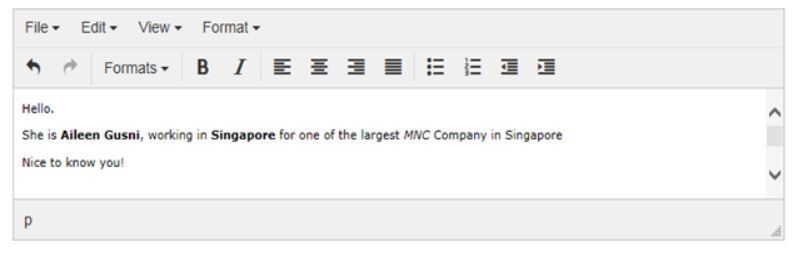
28176.Capture.JPG

I have referred below url's but anyway I dont want to use third party solution.

http://missdynamicscrm.blogspot.com/2015/08/dynamics-crm-rich-text-html-editor-with-tiny-mce-managed-solution.html

http://missdynamicscrm.blogspot.com/2015/08/microsoft-dynamics-crm-tinymce-editor.html

https://community.dynamics.com/crm/f/117/t/171201

Please suggest me if it's possible without using third party solution. Thanks in advance

*This post is locked for comments

I have the same question (0)
  • Verified answer
    gdas Profile Picture
    50,091 Moderator on at

    Hi Pravin ,

    I believe you need to  go with third party library.There is no Such OOB or  inbuilt library  available to achieve this in Dynamics 365.

  • Verified answer
    Kokulan Profile Picture
    18,054 on at

    Building your own Rich Text editor will be a lot of work.  If you don't want to go for full-blown third-party rich text editor, you could think about going for a middle ground, a minimal Rich Editor like the following

    Query TE is an open source library of WYSIWYG model text editor (jQuery HTML Editor Plugin) component.

    [View:https://github.com/jeffijoe/jQuery-TE:750:50]

    One negative side to using an editor like above, you will have to test and find out if it works well with the browsers you want and also if there is any Jquery and other library version conflicts and stuff.

    Like Gautam suggested third-party solution is minimal work but you do dependency on third-party solution.

    If you are flexible in designing your solution, you could consider taking advantage of the new Knowledge Article feature for V9 unified interface. Please see the following screenshot and link below for more details on it.

    6087.ScreenClip-_5B00_62_5D00_.png

    https://docs.microsoft.com/en-us/dynamics365/customer-engagement/customer-service/customer-service-hub-user-guide-knowledge-article

    Hope this helps

Under review

Thank you for your reply! To ensure a great experience for everyone, your content is awaiting approval by our Community Managers. Please check back later.

Helpful resources

Quick Links

Responsible AI policies

As AI tools become more common, we’re introducing a Responsible AI Use…

Neeraj Kumar – Community Spotlight

We are honored to recognize Neeraj Kumar as our Community Spotlight honoree for…

Leaderboard > 🔒一 Microsoft Dynamics CRM (Archived)

#1
SA-08121319-0 Profile Picture

SA-08121319-0 4

#1
Calum MacFarlane Profile Picture

Calum MacFarlane 4

#3
Alex Fun Wei Jie Profile Picture

Alex Fun Wei Jie 2

Last 30 days Overall leaderboard

Featured topics

Product updates

Dynamics 365 release plans
