web
You’re offline. This is a read only version of the page.
close
Skip to main content

Notifications

Announcements

No record found.

Community site session details

Community site session details

Session Id :
Microsoft Dynamics CRM (Archived)

Microsoft Dynamics CRM Reporting Extensions must be installed on SQL Server Reporting Services for reports to work.

(0) ShareShare
ReportReport
Posted on by

I am getting this error even after I have successfully installed the CRM Reporting Extension.
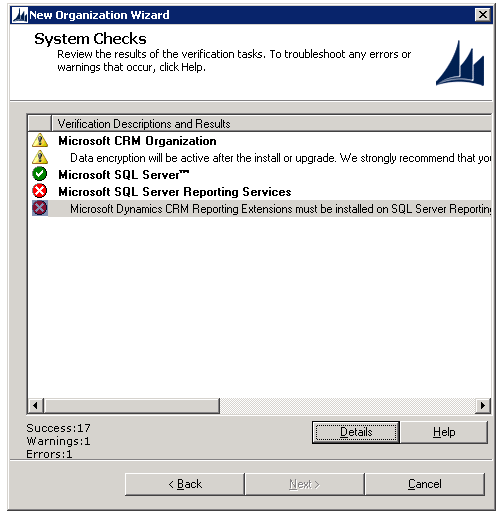
I get this error while I try to make new organization in CRM

Using MS CRM 2013 with MS SQL 2008 SP1

Any Ideas how to solve this?

Thanks,

*This post is locked for comments

I have the same question (0)
  • Suggested answer
    Bruno Lucas Profile Picture
    5,421 on at

    Can you browse your report server url (http://<computername>/reportserver) where you are running this install? What account did you use for your SSRS service?

  • Suggested answer
    Pradeep Pawar Profile Picture
    2,930 on at

    Please verify if you have same Update Rollup for CRM Reporting Extension installed as of CRM Server.

    Pradeep P.

  • Nikhil Kumar Das Profile Picture
    680 on at

    Hi,

    I have also encountered a similar error. At that time I was trying to create a new organization from Deployment manager. I found that my sql server was on a different port, which caused the issue. So I asked my network team to move to the client's port. After hat, the issue was solved.

    Check once if the crm server and sql are in same port. This will give you a cleared picture.

    Note : I am assuming that Reporting extensions have been installed in your server and the Report server URL is working.

  • Community Member Profile Picture
    on at

    @Bruno Lucas I can browse to the report server, and i am using the administrator account to access it

  • Community Member Profile Picture
    on at

    @Pradeep Pawar How do I check that?

  • Community Member Profile Picture
    on at

    Nikhil Kumar Das CRM is running on port 5555 and MS SQL 2008 is on port 1433

    and yes I have installed the MS CRM Reporting extension and I can access the report server using the administrator credentials.

    but still i am not getting what is causing the problem?

  • Nikhil Kumar Das Profile Picture
    680 on at

    It may be that SQL is out of  your client network. Ping the sql server node IP  from CRM server. It should receive packets.

    Please let me know.

  • Community Member Profile Picture
    on at

    Both servers are up and working.

    but is there a way to check if the server is listening on a specific port like 1433?

    I tried ping <server name>:1433 but it doesnt work it says

    Could not find the host, please check the name and try again.

  • Suggested answer
    Pradeep Pawar Profile Picture
    2,930 on at

    You can check it in Control panel -> programs and feature -> Uninstall update -> Check Update rollup for CRM 2013 Server and CRM reporting extensions in the list on respective server.

    Pradeep P.

  • Nikhil Kumar Das Profile Picture
    680 on at

    Hi Waqas,

    This is the same issue, which I encountered. I was also not able to ping the sql server node from Dynamics CRM node. Ask your network team. They will make the changes.

Under review

Thank you for your reply! To ensure a great experience for everyone, your content is awaiting approval by our Community Managers. Please check back later.

Helpful resources

Quick Links

Responsible AI policies

As AI tools become more common, we’re introducing a Responsible AI Use…

Neeraj Kumar – Community Spotlight

We are honored to recognize Neeraj Kumar as our Community Spotlight honoree for…

Leaderboard > 🔒一 Microsoft Dynamics CRM (Archived)

#1
SA-08121319-0 Profile Picture

SA-08121319-0 4

#1
Calum MacFarlane Profile Picture

Calum MacFarlane 4

#3
Alex Fun Wei Jie Profile Picture

Alex Fun Wei Jie 2

Last 30 days Overall leaderboard

Featured topics

Product updates

Dynamics 365 release plans
