web
You’re offline. This is a read only version of the page.
close
Skip to main content

Announcements

No record found.

News and Announcements icon
Community site session details

Community site session details

Session Id :
Microsoft Dynamics CRM (Archived)

When Bulk edit Appointments, some fields are locked/disabled

(0) ShareShare
ReportReport
Posted on by

Good morning,

I have some appointments which I would like to bulk edit, when I try I find that some of the fields are locked/disabled, and can't be edited, though on the form they are editable, beside there are no javascripts that run onchange of these fields

.2018_2D00_01_2D00_26_5F00_081819.png
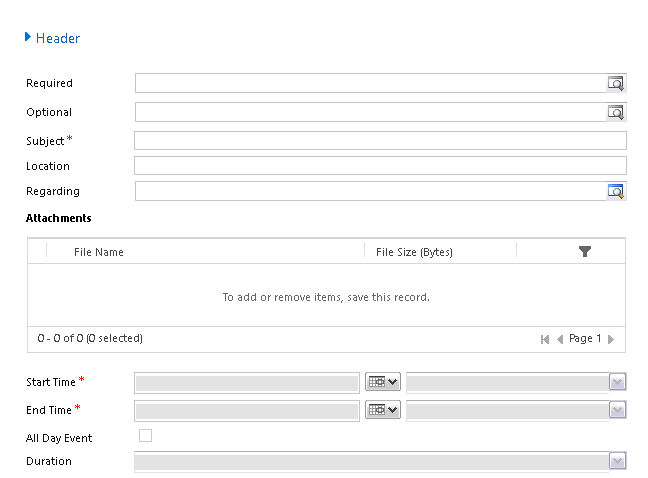
As you can see in the screenshot, the fields Required, Opional, and the bottom section are all locked.

Any ideas would be so much appreciated.

Best regards, Simon

*This post is locked for comments

I have the same question (0)
  • Karsten Wirl Profile Picture
    4,477 on at

    Hi Stemplar.

    This is by design.

    The idea is that a bulk edit of appointments makes no sense, because each appointment is more or less individual.
    This is basic Activity Management.

    Kind regards,

    Karsten

  • Suggested answer
    Community Member Profile Picture
    on at

    Hi,

    if you want to have a nicer bulk edit(i.e. hide those fields), you could set the vsibilty of the fields to false adn add a onLoad function which would show those fields.

  • Suggested answer
    Community Member Profile Picture
    on at

    Hi Stemplar,

    in accordance with entity type, CRM lock/unlock some attribute during multiple editing.

    If multiple edits are used for bulk admin operations, I suggest leaving your form as is.

    However, if multiple edits are used by common users to do bulk operations, I suggest separating editable attributes and locked attributes in two tabs or sections, hiding by default locked attributes tab/section and showing it by javascript on form loading.

    Doing so your tab/section will be hidden in multiple edit form.

    Please let me know if you solve.

    If you found the answer helpful, please mark as Verified 

    Join my network on LinkedIn      Follow me on Twitter 

    Thank You & Best Regards

    Francesco Picchi

    Microsoft Dynamics CRM Consultant, Bologna+Milano, ITALY

    Independent Contractor

    http://www.francescopicchi.com

  • Suggested answer
    Community Member Profile Picture
    on at

    Hi Stemplar,

    If you solved the problem or received help from an answer, please mark it as verified to encourage the community to provide more and more a better support.

    Thank you.

    Francesco

    If you found the answer helpful, please mark as Verified 

    Join my network on LinkedIn      Follow me on Twitter 

    Thank You & Best Regards

    Francesco Picchi

    Microsoft Dynamics CRM Consultant, Bologna+Milano, ITALY

    Independent Contractor

    http://www.francescopicchi.com

Under review

Thank you for your reply! To ensure a great experience for everyone, your content is awaiting approval by our Community Managers. Please check back later.

Helpful resources

Quick Links

Introducing the 2026 Season 1 community Super Users

Congratulations to our 2026 Super Stars!

Meet the Microsoft Dynamics 365 Contact Center Champions

We are thrilled to have these Champions in our Community!

Congratulations to the April Top 10 Community Leaders

These are the community rock stars!

Leaderboard > 🔒一 Microsoft Dynamics CRM (Archived)

Last 30 days Overall leaderboard

Featured topics

Product updates

Dynamics 365 release plans
