web
You’re offline. This is a read only version of the page.
close
Skip to main content

Announcements

No record found.

News and Announcements icon
Community site session details

Community site session details

Session Id :
Microsoft Dynamics CRM (Archived)

Problem inserting a Quick View Form

(0) ShareShare
ReportReport
Posted on by 160

I have repeatedly tried to insert a quick view form for a new lookup field and have not been able to do so.  I am not a developer so sending me snippets of code or suggesting workarounds, while beneficial for others, won't help me much.  I don't know what I'm doing wrong because it seems pretty straight forward.  Any advice or assistance would be greatly appreciated.

*This post is locked for comments

I have the same question (0)
  • smavis Profile Picture
    160 on at

    TBH, I didn't do anything.  A quick view form was already included on the form that I'm customizing.  I want to add an additional one for another lookup field.  What am I missing?

  • Suggested answer
    Mamatha Swamy Profile Picture
    5,426 on at

    Quick view forms are specific for entity. For the lookup field that you want to show quick view you first have to create it if it doesn't already exist.

    Check this www.powerobjects.com/.../exploring-quick-view-forms-in-crm-2013

    technet.microsoft.com/.../dn531145.aspx

  • Aileen Gusni Profile Picture
    44,524 on at

    Smavis,

    There is no custom code...

    As long as you have the lookup field to the entity and that lookup entity have quick view form so it would be fine.

    For example:

    Entity Project (child) and Entity Account (Parent)

    You want to have a quick view form to the Entity Account.

    How to do?

    Make sure Entity Project and Account are having N:1 Relationship,
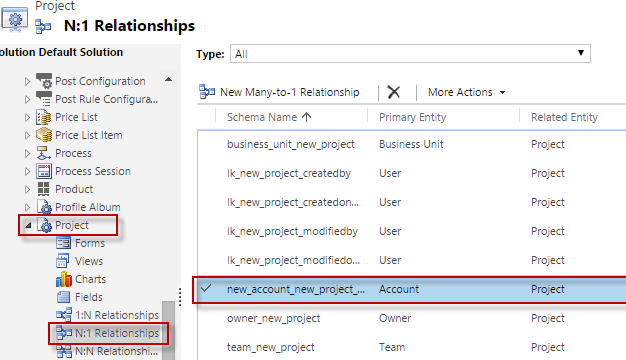
    0184.quickviewform5.png

    it does mean if you go to Entity Project Form, you can see the lookup field to the Account there, if not, you need to have this lookup field to Account first.

    Because you need to see the Account detail from the related Account through the lookup field right.


    You go to the Entity Account, Customization -> Entities -> Account -> Form -> create a quick view form (Account might have out of the box quick view form, but you might add another one).
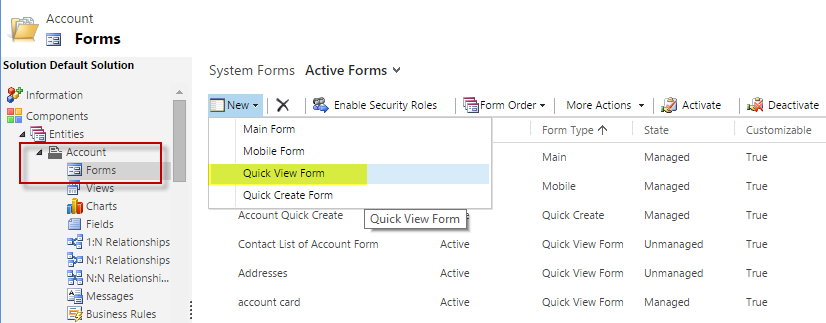
    4774.quickviewform6.png

    Include your detailed field

    And do not forget to save it.

    Until you can see your newly created Form.
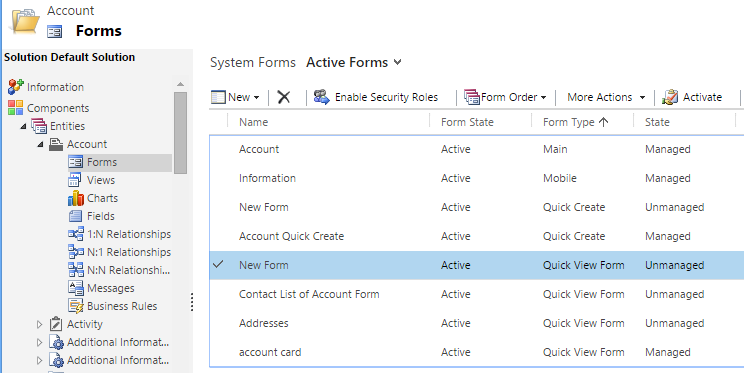
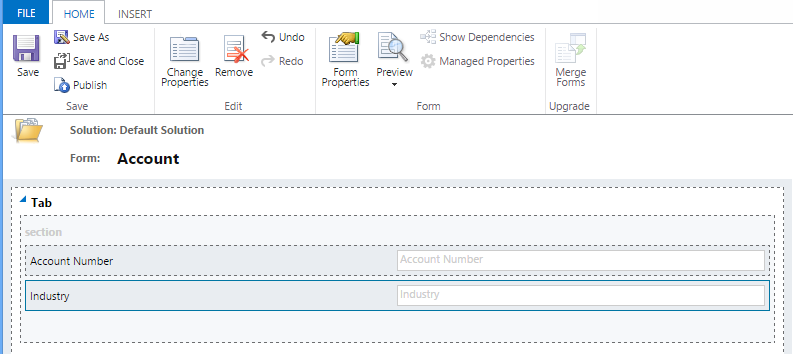
    *You can rename your Form, Edit it and go to Form properties -> Display
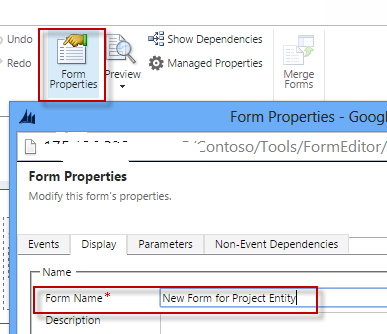
    Do not forget to save it first and publish also recommended


    Then you go to the Entity Project, Customization ->Entities -> Project -> Form

    Modify one of your Main Form, then you put the lookup field, then choose the space you want to place the form, then insert the Quick View form.

    Choose your lookup field name - in this case is Account Id
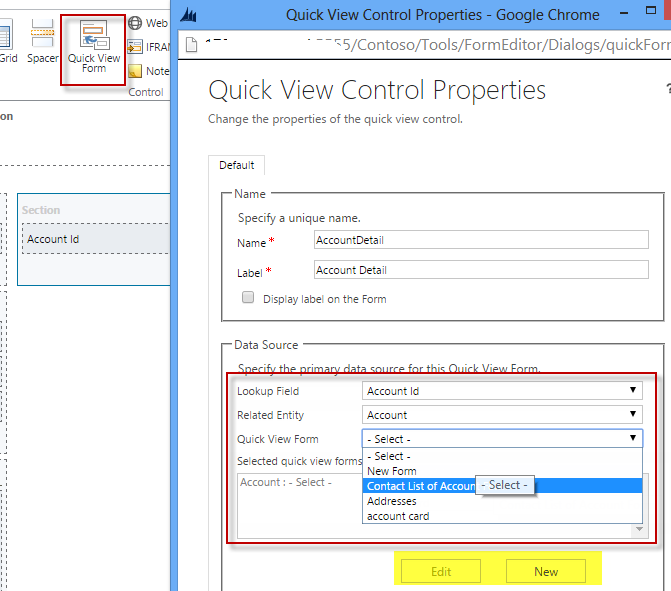
    Choose the Quick View form (you can see your newly created Account QV Form).

    Save it and publish all.

    Hope this helps.

    Thanks.


  • smavis Profile Picture
    160 on at

    Hi Aileen,

    I've verified the relationships between the entities.  I have my lookup field created and my Quick View Form created.  I can see my Quick View form.  However, when I click OK, it doesn't appear in my form.  It doesn't change anything.

    I should see the Quick View Form "field" correct?  It doesn't appear anywhere.

    Thanks,

    Shanna

  • Suggested answer
    Mamatha Swamy Profile Picture
    5,426 on at

    Shanna,

    Just to rule out the possibility... have you saved and published the form?

  • smavis Profile Picture
    160 on at

    Yes, I have saved and published the form (Quick View and Main) --numerous times.  What's interesting is that when I try to insert the quick view, it does nothing and I can exit without saving and it doesn't give me the warning indicating there were changes.  It's like the OK button is not working.  It exits the Quick View Control Properties but does not insert the Quick View Form field.

  • Verified answer
    Mithilesh Kumar Profile Picture
    10,047 on at

    Hi Smavis,

    May I know which browser you have been using for your Customizations. If you are using IE, please do let us know the version.

    Have you installed windows update KB3008923 (IE 11 fix), if yes please uninstall it and try again.

    This fix has lot of other issue with Dynamics CRM. It may sometimes prevent you from inserting JScript files also.

    Hope that helps

    Thanks

    Please mark my post as verified if you found it helpful

  • Verified answer
    Aileen Gusni Profile Picture
    44,524 on at

    Shanna,

    However, when I click OK, it doesn't appear in my form.  It doesn't change anything.

    I should see the Quick View Form "field" correct?  It doesn't appear anywhere.

    --> It seems browser problem, are you using Chrome?

    If chrome then you may refer to these articles:

    ledgeviewpartners.com/quick-tip-fix-google-chrome-crm-2011-2013

    www.crmanswers.net/.../google-chrome-registry-fix-for-dynamics.html

    community.dynamics.com/.../crm-2013-2015-google-chrome-issues-fixes.aspx

    If you are using IE, you can use previous suggestion.

    Thank you.

  • smavis Profile Picture
    160 on at

    Thank you!  I felt like an idiot when I read your response because I knew it should have been working--but alas I was in Chrome as mentioned by Aileen below.  Once I switched to IE, it worked as designed.

Under review

Thank you for your reply! To ensure a great experience for everyone, your content is awaiting approval by our Community Managers. Please check back later.

Helpful resources

Quick Links

Introducing the 2026 Season 1 community Super Users

Congratulations to our 2026 Super Stars!

Meet the Microsoft Dynamics 365 Contact Center Champions

We are thrilled to have these Champions in our Community!

Congratulations to the March Top 10 Community Leaders

These are the community rock stars!

Leaderboard > 🔒一 Microsoft Dynamics CRM (Archived)

#1
JS-09031509-0 Profile Picture

JS-09031509-0 3

#2
AS-17030037-0 Profile Picture

AS-17030037-0 2

#2
Mark Eckert Profile Picture

Mark Eckert 2

Last 30 days Overall leaderboard

Featured topics

Product updates

Dynamics 365 release plans