There is constantly users stuck in the POST batch.
They may/may not even be in logged into GP at the time, but their user ID’s are all locked on that batch… any idea why this all the sudden started happening?? It’s constantly happening lately.
There are loads of users getting stuck in the SY00800 table that are not trying to access the batch
The first 8 Batch’s in the table below with SERIES = 0 are missing in GP (see second screenshot).
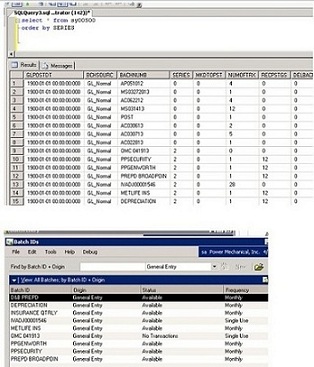
However the transactions do existing when you lookup in Transaction Entry.
1). The missing batch ID’s are WIP batch’s and I am not sure how they are created.
2). I tried Reconciling Financial Batch’s and it did nothing.
sidenote: the customer knows of the below, but this wasnt necessary so frequently before:
To run the script, follow these steps:
1. Make sure that you have a current backup of the company database, and ask all users to exit Microsoft Dynamics GP
1. View the contents of the following tables to verify that all users are logged off: DYNAMICS..ACTIVITY, DYNAMICS..SY00800, DYNAMICS..SY00801, TEMPDB..DEX_LOCK, and TEMPDB..DEX_SESSION. To do this, run the following script.
2. SELECT * FROM DYNAMICS..ACTIVITY
3. SELECT * FROM DYNAMICS..SY00800
4. SELECT * FROM DYNAMICS..SY00801
5. SELECT * FROM TEMPDB..DEX_LOCK
SELECT * FROM TEMPDB..DEX_SESSION
Note When all users are logged off from Microsoft Dynamics GP, these tables will not have any records in them.
6. If no results are returned, go to 'Step 4'. Otherwise, clear the stuck records by using any of the following appropriate scripts.
7. DELETE DYNAMICS..ACTIVITY
8. DELETE DYNAMICS..SY00800
9. DELETE DYNAMICS..SY00801
10. DELETE TEMPDB..DEX_LOCK
DELETE TEMPDB..DEX_SESSION
11. Run the following script against the company database. Replace XXX with the batch number or the name of the batch that you are trying to post or select in Microsoft Dynamics GP.
UPDATE SY00500 SET MKDTOPST=0, BCHSTTUS=0 where BACHNUMB='XXX'
Note The value of BACHNUMB is the same as the value of the Batch ID window in Microsoft Dynamics GP.
12. Verify the accuracy of the transactions.
13. Verify that you can edit and post the batches.


