web
You’re offline. This is a read only version of the page.
close
Skip to main content

Announcements

No record found.

News and Announcements icon
Community site session details

Community site session details

Session Id :
Microsoft Dynamics CRM (Archived)

Error while importing solution on CRM Online - The requested record was not found or you do not have sufficient permissions to view it.

(0) ShareShare
ReportReport
Posted on by 5,237

I am trying to import solution (Unmanged) on CRM online, but somehow it gives me error as:

The requested record was not found or you do not have sufficient permissions to view it. : 

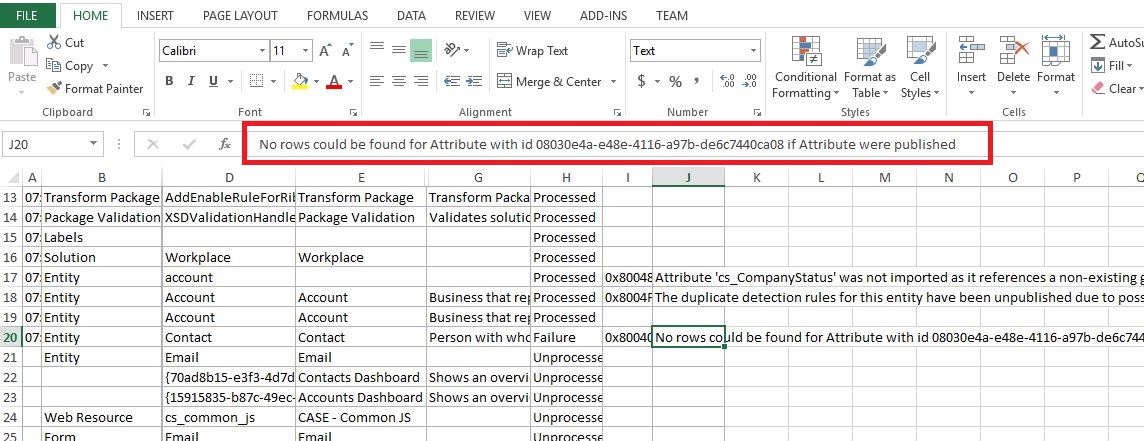
I can see error details in component section as:

No rows could be found for Attribute with id 08030e4a-e48e-4116-a97b-de6c7440ca08 if Attribute were published.
 

164206.Capture.JPG

Can anybody help me to sort out issue ?

*This post is locked for comments

I have the same question (0)
  • Suggested answer
    Community Member Profile Picture
    on at

    Hi,

    do you have syst admin rights?

    Are you the owner of all worklfows contained in the imported solution? If not you need to be it.

  • Suggested answer
    RaviKashyap Profile Picture
    55,410 Moderator on at

    Hi Pravin,

    It is mentioned something about attribute publish. You could try publish all customization and see if it works.

    If not, then remove the Contact entity from the solution and just try the contact entity. You need to isolate where exactly it is failing for which field and then see if there is anything related to that field.

  • Pawar Pravin Profile Picture
    5,237 on at

    I don't have any workflow in same solution.

  • Suggested answer
    gdas Profile Picture
    50,091 Moderator on at

    Hi Pravin,

    Can you please check in the event viewer  what error you are getting?

    Please put the log here.

  • Pawar Pravin Profile Picture
    5,237 on at

    Ravi, let me check if it working or not

  • RaviKashyap Profile Picture
    55,410 Moderator on at

    Hi Pravin,

    I just saw another thread with tge same issue and it looks like a bug when yiu mive drom 8.2 to V9.

    Are you also exporting from 8.2 and importing on v9?

  • Pawar Pravin Profile Picture
    5,237 on at

    Hi Ravi,

    No, actually I am importing solution from v9 to v9 only.

  • Nikesh Das Profile Picture
    105 on at

    I literally just faced the same issue and it was on the Contact entity too in V9 but got it working.

    Follow the steps below:

    - Make sure that the Regional Format settings under System Settings are the same. Our target environment was set to "English (United States)" and our source environment was "English (United Kingdom)"

    - Publish All Customizations in both environments

    - Export Solution and re-import

    Let me know how you get on

  • Verified answer
    tcapeqi Profile Picture
    on at

    Hello

    I had same issue

    What I did, is I isolated the entity giving the error into 1 specific solution.

    And imported this solution with the tool "Import Solution" from XRMToolbow, and it worked fine.

    Kr

  • tcapeqi Profile Picture
    on at

    It's XRMToolBox sorry for the type...

Under review

Thank you for your reply! To ensure a great experience for everyone, your content is awaiting approval by our Community Managers. Please check back later.

Helpful resources

Quick Links

Introducing the 2026 Season 1 community Super Users

Congratulations to our 2026 Super Stars!

Meet the Microsoft Dynamics 365 Contact Center Champions

We are thrilled to have these Champions in our Community!

Congratulations to the April Top 10 Community Leaders

These are the community rock stars!

Leaderboard > 🔒一 Microsoft Dynamics CRM (Archived)

Last 30 days Overall leaderboard

Featured topics

Product updates

Dynamics 365 release plans
