web
You’re offline. This is a read only version of the page.
close
Skip to main content

Announcements

No record found.

News and Announcements icon
Community site session details

Community site session details

Session Id :
Microsoft Dynamics CRM (Archived)
Suggested Answer

Business Rules in 365 - Set Field to a calculated value

(0) ShareShare
ReportReport
Posted on by

Hi,

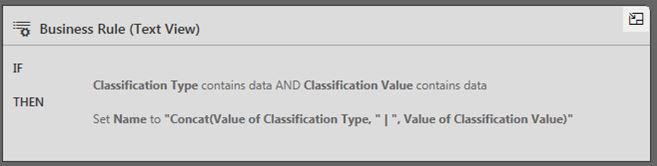
   I am using business rules to set a value of an attribute as a concatenated string of two fields of which one is a option set and the other is a string.   This feature was available in 2015 as in the first image.  However in 365 without a text editor I am unable to.  Any suggestions before coding in JS.

D365-BU-1.JPG

D365-BU-2.JPG

Thanks in advance.

*This post is locked for comments

I have the same question (0)
  • Suggested answer
    Gopalan Bhuvanesh Profile Picture
    11,401 on at

    It does not allow to add two fields

  • Suggested answer
    Community Member Profile Picture
    on at

    I know that this is an old post, but I thought I would post an answer for people that find this in a search like I did.

    This is possible, but you have to create a calculated field first. Use Concat() for the action.

    pastedimage1570025999267v1.png

    Publish the field, then create your business rule to copy the value of the calculated field to the field you want to set.

    pastedimage1570026076799v2.png

    pastedimage1570026109158v3.png

    I did this to automatically fill in the new_name field of a custom entity based on two attributes of the entity.

Under review

Thank you for your reply! To ensure a great experience for everyone, your content is awaiting approval by our Community Managers. Please check back later.

Helpful resources

Quick Links

Introducing the 2026 Season 1 community Super Users

Congratulations to our 2026 Super Stars!

Congratulations to our 2025 Community Spotlights

Thanks to all of our 2025 Community Spotlight stars!

Leaderboard > 🔒一 Microsoft Dynamics CRM (Archived)

#1
Varsha deshpande Profile Picture

Varsha deshpande 5

#2
JS-09031509-0 Profile Picture

JS-09031509-0 3

#3
Ciprian  P Profile Picture

Ciprian P 2

Last 30 days Overall leaderboard

Featured topics

Product updates

Dynamics 365 release plans