web
You’re offline. This is a read only version of the page.
close
Skip to main content

Announcements

No record found.

News and Announcements icon
Community site session details

Community site session details

Session Id :
Microsoft Dynamics 365 | Integration, Dataverse...
Suggested Answer

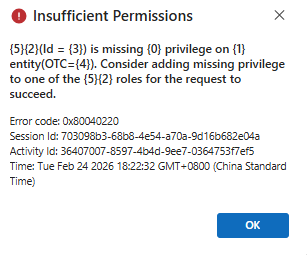
Users cannot use the "Open in Excel Online" function "Insufficient Permissions"

(3) ShareShare
ReportReport
Posted on by 6
 

Insufficient Permissions

 
{
    "error": {
        "code": "0x80040220",
        "message": "Principal user (Id=b06e8494-999f-f011-b41c-00224804a1a8, type=8, roleCount=8, privilegeCount=420, accessMode='0 Read-Write', AADObjectId='d3433988-17f9-40af-ba77-412705aaed0f', MetadataCachePrivilegesCount=12471, businessUnitId=e56c78fa-ad25-f011-8c4e-000d3a34767f), is missing prvReadOfficeDocument privilege (Id=a4986ba0-6c85-40a9-bb00-fd6000ac0f55) on OTC=4490 for entity 'officedocument' (LocalizedName='Office Document'). context.Caller=b06e8494-999f-f011-b41c-00224804a1a8. Consider adding missed privilege to one of the principal (user/team) roles.",
        "@Microsoft.PowerApps.CDS.ErrorDetails.ApiExceptionSourceKey": "Plugin/Microsoft.Crm.ObjectModel.ExcelService",
        "@Microsoft.PowerApps.CDS.ErrorDetails.ApiStepKey": "9edf2c3a-95f2-4d79-b623-beabe0d0d934",
        "@Microsoft.PowerApps.CDS.ErrorDetails.ApiDepthKey": "1",
        "@Microsoft.PowerApps.CDS.ErrorDetails.ApiActivityIdKey": "3b0e2f0a-ec39-4e7b-8c70-3b60baf87514",
        "@Microsoft.PowerApps.CDS.ErrorDetails.ApiPluginSolutionNameKey": "System",
        "@Microsoft.PowerApps.CDS.ErrorDetails.ApiStepSolutionNameKey": "System",
        "@Microsoft.PowerApps.CDS.ErrorDetails.ApiExceptionCategory": "ClientError",
        "@Microsoft.PowerApps.CDS.ErrorDetails.ApiExceptionMessageName": "PrivilegeDenied",
        "@Microsoft.PowerApps.CDS.ErrorDetails.ApiExceptionHttpStatusCode": "403",
        "@Microsoft.PowerApps.CDS.ErrorDetails.0": "prvReadOfficeDocument",
        "@Microsoft.PowerApps.CDS.ErrorDetails.1": "Office Document",
        "@Microsoft.PowerApps.CDS.ErrorDetails.2": "user",
        "@Microsoft.PowerApps.CDS.ErrorDetails.3": "b06e8494-999f-f011-b41c-00224804a1a8",
        "@Microsoft.PowerApps.CDS.ErrorDetails.4": "4490",
        "@Microsoft.PowerApps.CDS.ErrorDetails.5": "Caller",
        "@Microsoft.PowerApps.CDS.HelpLink": "http://go.microsoft.com/fwlink/?LinkID=398563&error=Microsoft.Crm.CrmException%3a80040220&client=platform",
        "@Microsoft.PowerApps.CDS.InnerError.Message": "Principal user (Id=b06e8494-999f-f011-b41c-00224804a1a8, type=8, roleCount=8, privilegeCount=420, accessMode='0 Read-Write', AADObjectId='d3433988-17f9-40af-ba77-412705aaed0f', MetadataCachePrivilegesCount=12471, businessUnitId=e56c78fa-ad25-f011-8c4e-000d3a34767f), is missing prvReadOfficeDocument privilege (Id=a4986ba0-6c85-40a9-bb00-fd6000ac0f55) on OTC=4490 for entity 'officedocument' (LocalizedName='Office Document'). context.Caller=b06e8494-999f-f011-b41c-00224804a1a8. Consider adding missed privilege to one of the principal (user/team) roles."
    }
}
 
Categories:
I have the same question (0)
  • Suggested answer
    Tom_Gioielli Profile Picture
    3,086 Super User 2026 Season 1 on at
    Try adding read permissions to the table "Office Document" to the user security role. I believe this comes with the OOB security roles, so if you did not copy one of these while creating a custom role you might not have grabbed it.
     
     
    Here is the section of the error that outlines this (hard to find in there sometimes).
     
    "Principal user (Id=b06e8494-999f-f011-b41c-00224804a1a8, type=8, roleCount=8, privilegeCount=420, accessMode='0 Read-Write', AADObjectId='d3433988-17f9-40af-ba77-412705aaed0f',
     MetadataCachePrivilegesCount=12471, businessUnitId=e56c78fa-ad25-f011-8c4e-000d3a34767f), is missing prvReadOfficeDocument 
    privilege (Id=a4986ba0-6c85-40a9-bb00-fd6000ac0f55) on OTC=4490 for entity 'officedocument' (LocalizedName='Office Document').
     
  • Suggested answer
    Pedro Cadavez de Freitas Profile Picture
    Microsoft Employee on at
    I believe this was a recent security fix deployed 2 weeks ago which now properly enforces excel privileges:
     
    Resolution:

    Add those privileges for the officedocument entity for the security roles that have issue.
    <RolePrivilege name="prvCreateofficedocument" level="Basic" />
    <RolePrivilege name="prvReadofficedocument" level="Basic" />
    <RolePrivilege name="prvWriteofficedocument" level="Basic" />
    <RolePrivilege name="prvAppendofficedocument" level="Basic" />
    <RolePrivilege name="prvAppendToofficedocument" level="Basic" />

Under review

Thank you for your reply! To ensure a great experience for everyone, your content is awaiting approval by our Community Managers. Please check back later.

Helpful resources

Quick Links

Introducing the 2026 Season 1 community Super Users

Congratulations to our 2026 Super Stars!

Meet the Microsoft Dynamics 365 Contact Center Champions

We are thrilled to have these Champions in our Community!

Congratulations to the April Top 10 Community Leaders

These are the community rock stars!

Leaderboard > Microsoft Dynamics 365 | Integration, Dataverse, and general topics

#1
11manish Profile Picture

11manish 91

#2
André Arnaud de Calavon Profile Picture

André Arnaud de Cal... 78 Super User 2026 Season 1

#3
Martin Dráb Profile Picture

Martin Dráb 55 Most Valuable Professional

Last 30 days Overall leaderboard

Product updates

Dynamics 365 release plans
