web
You’re offline. This is a read only version of the page.
close
Skip to main content

Announcements

No record found.

News and Announcements icon
Community site session details

Community site session details

Session Id :
Microsoft Dynamics 365 | Integration, Dataverse...
Unanswered

ProForma Confirmation based on purchase lines

(0) ShareShare
ReportReport
Posted on by 90
Hi All,
 
I have a requirement where in I need to generate pro forma confirmation based on purchase lines split by brands.
 
For Example I have a purchase order which has two lines and both the lines have same delivery address as shown
 
 
We have done one more customization in which the addresses of each line will be changed based on the brands of the items.
Say First line has the Brand as ASH and Second Item has the brand has AURA, for these brands there would be address setup under the warehouse where the delivery names would be exactly same as Brand names assigned to items.

We have a custom button on click of that button if there is an brand attached to the item the respective delivery address would be updated for each line of a purchase order.
 
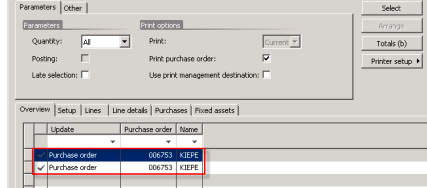
After the address updates for each line when they click on Proforma confirmation it should automatically create  lines in the purchedit lines based on no of lines in purchase order
for eg: if PO has two lines and the address has been split based on brands as explained above the records needs to be created as shown below and first record is for first purch line and second record is for second purchline and the report also generates accordingly.
 
Can anyone please let me know how this can be achieved, if it can be done by any setup functionally or how it can be achieved technically.
 
Thanks in Advance
 
 
I have the same question (0)
  • RudyZhang Profile Picture
    Microsoft Employee on at
    Hi,
     
    Based on the information you have given, our team guesses that you are using Dynamics 365 Supply Chain.
    we recommend you to post this question in Dynamics 365 Supply Chain  forum, where your problem will be noticed by many experts in the field and you will get a more effective solution.
    The link to the forum is as follows
    Microsoft Supply Chain Center Forum (dynamics.com)


    Best Regards,
    Rudy Zhang
  • CU27040927-10 Profile Picture
    4 on at
    If you want a more thorough response, you should ask this topic in the Dynamics 365 Supply Chain forum. There, a large number of knowledgeable people will see it and be able to help you out.  
     

Under review

Thank you for your reply! To ensure a great experience for everyone, your content is awaiting approval by our Community Managers. Please check back later.

Helpful resources

Quick Links

Introducing the 2026 Season 1 community Super Users

Congratulations to our 2026 Super Stars!

Meet the Microsoft Dynamics 365 Contact Center Champions

We are thrilled to have these Champions in our Community!

Congratulations to the April Top 10 Community Leaders

These are the community rock stars!

Leaderboard > Microsoft Dynamics 365 | Integration, Dataverse, and general topics

#1
11manish Profile Picture

11manish 89

#2
André Arnaud de Calavon Profile Picture

André Arnaud de Cal... 78 Super User 2026 Season 1

#3
Martin Dráb Profile Picture

Martin Dráb 53 Most Valuable Professional

Last 30 days Overall leaderboard

Product updates

Dynamics 365 release plans
