web
You’re offline. This is a read only version of the page.
close
Skip to main content

Notifications

Announcements

No record found.

Community site session details

Community site session details

Session Id :
Small and medium business | Business Central, N...
Suggested Answer

Mass Import Customer Document Layouts

(0) ShareShare
ReportReport
Posted on by 1,204

We want to update hundreds of customer records with a specific document layout.  Can this be done?  

I have the same question (0)
  • Roi.Amouyal Profile Picture
    10 on at

    Hi,

    Unfortunately this cannot be done. I see it at as a real shortcoming of Business Central that I hope will be corrected soon.

  • Suggested answer
    YUN ZHU Profile Picture
    95,679 Super User 2025 Season 2 on at

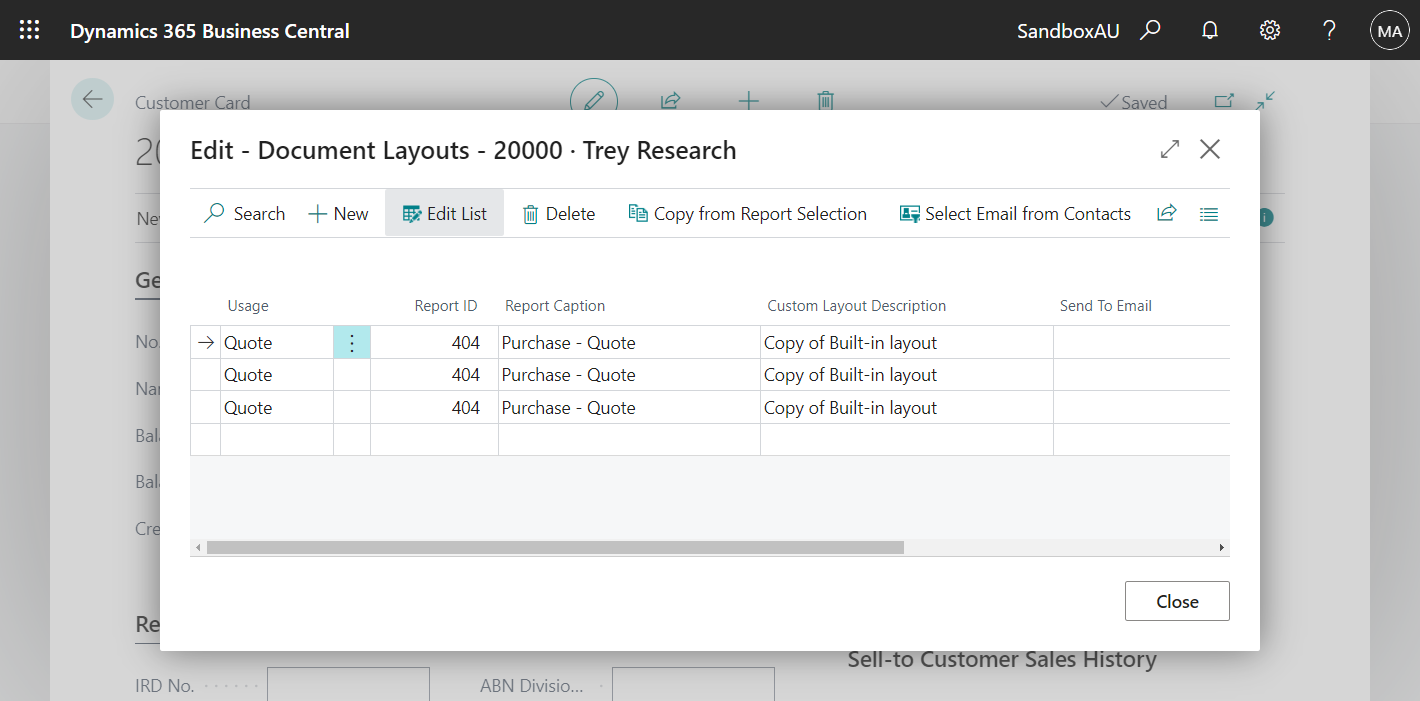
    Hi, if you are talking about Document Layouts for customers.

    pastedimage1647992467970v1.png

    I think you can try to use Configuration Package.

    pastedimage1647992527700v2.png

    The only thing to pay attention to is the Custom Layout Code.

    pastedimage1647992719442v5.png

    You can find Custom Layout Code in the Custom Report Layout table.

    pastedimage1647992655212v4.png

    Hope this will help.

    Thanks.

    ZHU

  • Roi.Amouyal Profile Picture
    10 on at

    Hi Zhu,

    Thank you for the reply an suggestion. Generally speaking using the Configuration Packages can work for this although I am having some issues with it. Btw, I'm using Version: AU Business Central 19.5.

    The issues are:

    1. There's no Custom Report Layout Code table in the config package. Table 7 is Standard Text.

    2. I was struggling at first with some of the columns, but managed to work through it. 

    Tip: Need to sort the table by the Sequence column then add new entries at the bottom and assign an increasing values in the Sequence column.  

    Thanks again, your help on this is much appreciated.

    Roi

  • Suggested answer
    YUN ZHU Profile Picture
    95,679 Super User 2025 Season 2 on at

    Hi, I just confirmed in the AU version. This part looks no different from the W1.

    pastedimage1647999065894v1.png

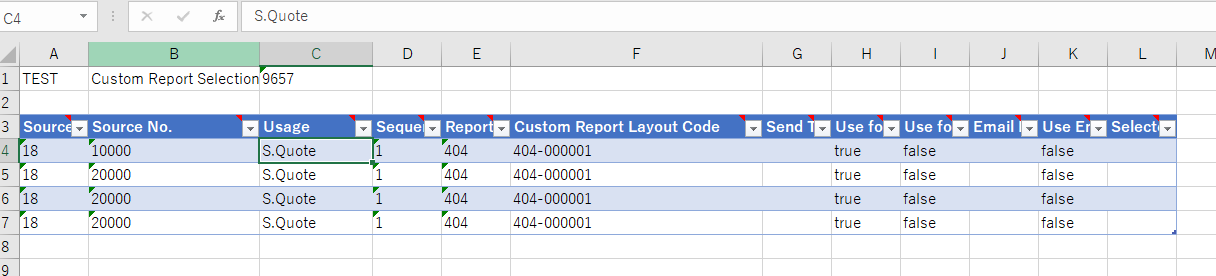
    Custom Report Selection (9657)

    pastedimage1647999235708v2.png

    pastedimage1647999299144v3.png

    pastedimage1647999672633v4.png

    Some point:

    1. Source Type is the table ID, 18 is the number of customer table.

    2. Source No. is customer number. (It depends on Source Type)

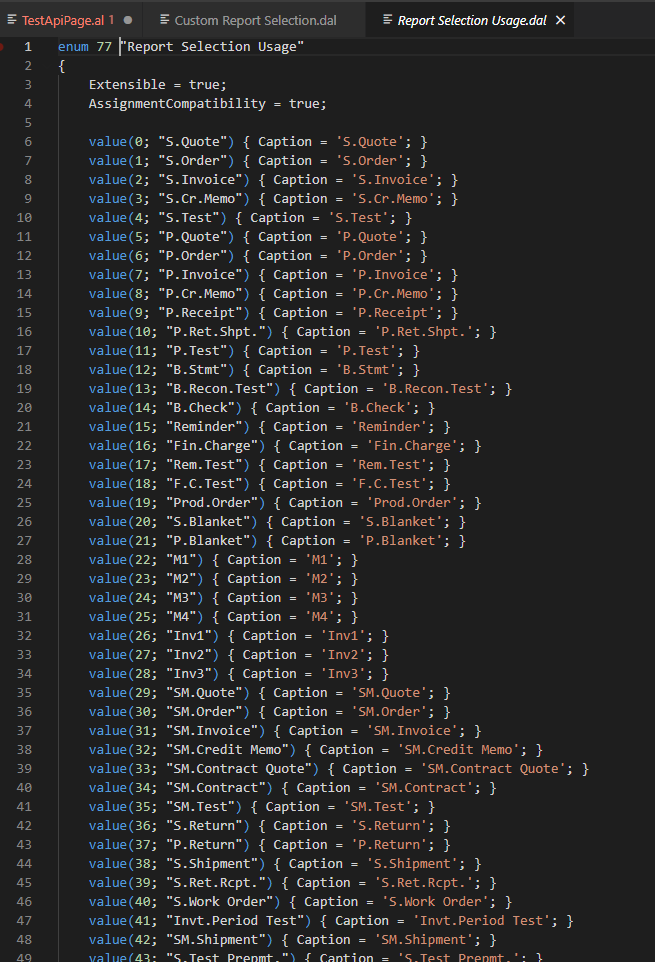
    3. Usage:
    pastedimage1647999817223v5.png

    4. Sequence: Execution order when you set multiple Reports for the same Usage, Default can be set to 1.

    5. Custom Report Layout Code: in table 9650, you can download the data from configuration package, or run directly from browser by adding ?table=9650 to the url.

    pastedimage1647999961618v6.png

    pastedimage1648000050205v7.png

    For example, import -> Apply

    pastedimage1648000169493v8.png

    pastedimage1648000242851v9.png

    pastedimage1648000267523v10.png

    Hope this will help.

    Thanks.

    ZHU

  • Redman Profile Picture
    9 on at

    Hi, 

    We are trying to use the config package and can update all the Document Layout fields except for the "Send To Email" - it seems to import random contact emails..

    We just want to set the Customer primary contact email as the "Send To Email" 
    Any suggestion on how to do this?

Under review

Thank you for your reply! To ensure a great experience for everyone, your content is awaiting approval by our Community Managers. Please check back later.

Helpful resources

Quick Links

Responsible AI policies

As AI tools become more common, we’re introducing a Responsible AI Use…

Neeraj Kumar – Community Spotlight

We are honored to recognize Neeraj Kumar as our Community Spotlight honoree for…

Leaderboard > Small and medium business | Business Central, NAV, RMS

#1
OussamaSabbouh Profile Picture

OussamaSabbouh 2,577

#2
YUN ZHU Profile Picture

YUN ZHU 888 Super User 2025 Season 2

#3
Jainam M. Kothari Profile Picture

Jainam M. Kothari 778 Super User 2025 Season 2

Last 30 days Overall leaderboard

Featured topics

Product updates

Dynamics 365 release plans