web
You’re offline. This is a read only version of the page.
close
Skip to main content

Notifications

Announcements

No record found.

Community site session details

Community site session details

Session Id :
Small and medium business | Business Central, N...
Suggested Answer

Fixed Asset Disposal - error related to dimensions

(0) ShareShare
ReportReport
Posted on by 9,146

Hi

I have set fixed assets up to use allocations and dimensions for the P&L accounts (depreciation, gains, losses). Over the chart of accounts, we want dimensions defined for the P&L accounts and not for Balance Sheet, so BS accounts are set to No Code.

If I try to post a disposal that activates a gain or loss, I get the following message:
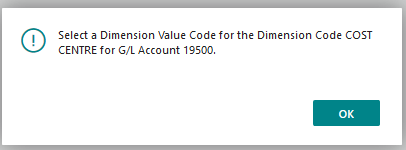
FA1.png

I have set up the allocations which are working fine for depreciation:
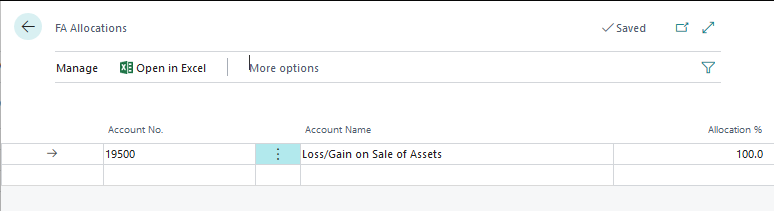
FA2.png

FA3.png

So if I define the code on the disposal line, I then get an error because I don't want the dimension against the Balance Sheet account.

Am I missing something?

Cheers

Heather

I have the same question (0)
  • Suggested answer
    Dirk Profile Picture
    on at

    Hi Heather,

    I am not 100% sure I understand you correctly.

    But yes, there can be situations where you have conflicting setting on different G/L Accounts.

    I understand that you want 100% dimension coverage for P&L accounts.

    I also understand that you don't want dimensions on Balance Sheet accounts.

    Questions I have are:

    - how do you look at dimesions?

    - what is the negative effect for you having dimensions on balance accounts?

    - can't you simply leave out the balance sheet accounts when looking at dimensions in cost accouting or on account schedules?

  • Community Member Profile Picture
    on at

    Heather,

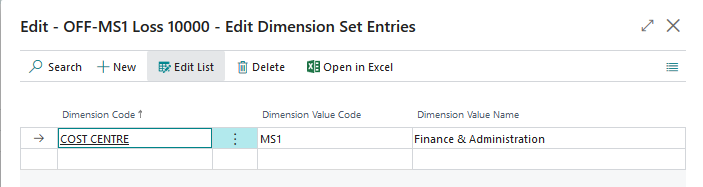
    Good Day. I have to concur with Dirk. I see the setup you made on Account 19500 and setup the Dimension = COST CENTRE to MS1, hence the message when booking the Disposal Type entry. Dirk questions are spot on. Read them and reply back.

    Steve

  • Community Member Profile Picture
    on at

    Heather - Checking in to see if we can help more with this? Can you supply more information to the questions posed by Dirk.

    Steve

  • Heather Roggeveen Profile Picture
    9,146 on at

    Hi

    Sorry for the delay in response.  Had a break over Christmas.

    I will define the dimension on the BS account if I need to - it would not be the end of the world.  It was more whether I was missing anything.

    The set up noted above works perfectly for Depreciation (debit expense account with the defined dimension, credit balance sheet with no dimension).

    But the exact same setup for disposals throws the error.

    So I don't believe it is working as it should.  For now, I will just allow dimensions on the BS account.

    Cheers

    Heather

Under review

Thank you for your reply! To ensure a great experience for everyone, your content is awaiting approval by our Community Managers. Please check back later.

Helpful resources

Quick Links

Responsible AI policies

As AI tools become more common, we’re introducing a Responsible AI Use…

Neeraj Kumar – Community Spotlight

We are honored to recognize Neeraj Kumar as our Community Spotlight honoree for…

Leaderboard > Small and medium business | Business Central, NAV, RMS

#1
OussamaSabbouh Profile Picture

OussamaSabbouh 2,092

#2
YUN ZHU Profile Picture

YUN ZHU 663 Super User 2025 Season 2

#3
Sumit Singh Profile Picture

Sumit Singh 515

Last 30 days Overall leaderboard

Featured topics

Product updates

Dynamics 365 release plans