web
You’re offline. This is a read only version of the page.
close
Skip to main content

Announcements

No record found.

News and Announcements icon
Community site session details

Community site session details

Session Id :
Small and medium business | Business Central, N...
Suggested Answer

The time is not valid in the current time zone

(2) ShareShare
ReportReport
Posted on by 44

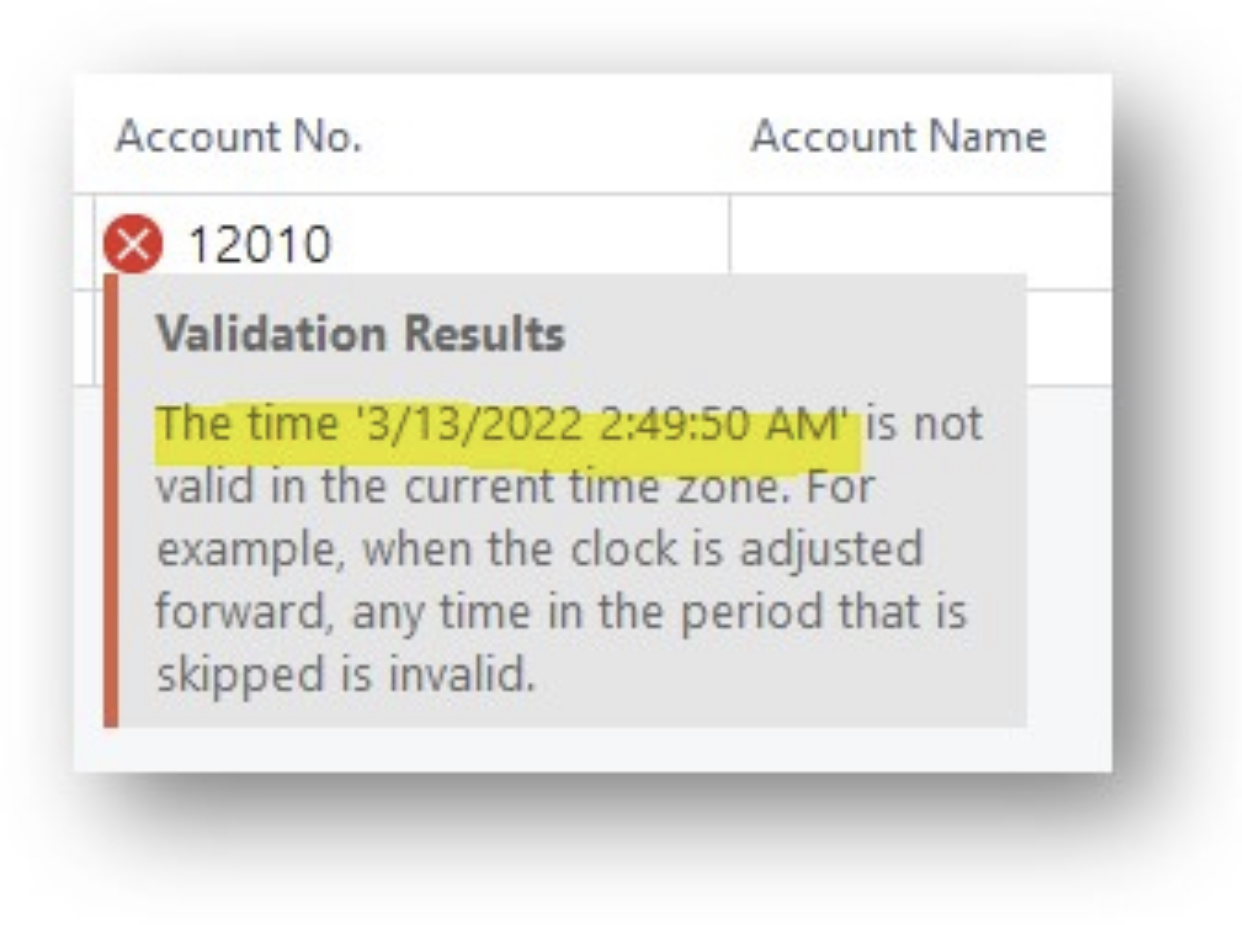
Our customer who is in US experiencing an error that is stating “The time is not valid in the current time zone. For example, when the clock is adjusted forward, any time in the period that is skipped is invalid.” while keying in General Journals.

is this something to do with daylight savings time?

Customer subscribed to BC SaaS and current version got updated is 19.4.
Please se the error screenshot below. Kindly advise.
2BB5BDAA_2D00_AA82_2D00_43E9_2D00_A2BF_2D00_683078F594EF.jpeg

I have the same question (0)
  • Suggested answer
    IB-29041624-0 Profile Picture
    1,177 Moderator on at

    This has probably something to do with DST.

    I would suggest you raise a support ticket with Microsoft around this to get their explanation for it.

    And if you do so, please share the result here.

  • Suggested answer
    YUN ZHU Profile Picture
    100,278 Super User 2026 Season 1 on at

    Hi, you can check the settings of My Setting again, this appears to be an issue with the regional or language settings. And you can debug it in your environment first.

    pastedimage1647220031825v1.png

    But if there was no problem last week and there is a problem this week, it's probably a DTS problem. As far as I know the DST was adjusted just in time from this week.

    Hope this info will help.

    Thanks

    ZHU

  • Joyce NAMC Profile Picture
    10 on at

    We are experiencing the same error with our email logging Job Queue. It began only after the time change.

    pastedimage1647370365159v1.png

    I have checked my admin settings and everything looks correct.

    pastedimage1647370530289v2.png

    Can someone please explain to my what DTS is? Thank you. Joyce

  • Ajay Jain Profile Picture
    229 on at
    I am getting the same error, any solution?
     
  • NW-01041524-0 Profile Picture
    2 on at
    Same error - originally seen on 26.x, we've since updated to 27.5. I've cleared the job queue log, and even tried setting up entirely new job queues as well, same results... The only workaround we've found is to set the time zone of the user running the job queue entries to Marquesas Islands (UTC -9:30), which of course triggers the jobs to run 3.5 hour late.
     
    Error text:
    Job finished executing.
    Status: Error
    Error: The time '3/8/2026 2:25:09 AM' is not valid in the current time zone. For example, when the clock is adjusted forward, any time in the period that is skipped is invalid.

Under review

Thank you for your reply! To ensure a great experience for everyone, your content is awaiting approval by our Community Managers. Please check back later.

Helpful resources

Quick Links

Introducing the 2026 Season 1 community Super Users

Congratulations to our 2026 Super Stars!

Meet the Microsoft Dynamics 365 Contact Center Champions

We are thrilled to have these Champions in our Community!

Congratulations to the April Top 10 Community Leaders

These are the community rock stars!

Leaderboard > Small and medium business | Business Central, NAV, RMS

#1
OussamaSabbouh Profile Picture

OussamaSabbouh 1,892 Super User 2026 Season 1

#2
YUN ZHU Profile Picture

YUN ZHU 927 Super User 2026 Season 1

#3
Teagen Boll Profile Picture

Teagen Boll 566 Super User 2026 Season 1

Last 30 days Overall leaderboard

Featured topics

Product updates

Dynamics 365 release plans
