web
You’re offline. This is a read only version of the page.
close
Skip to main content

Notifications

Announcements

No record found.

Community site session details

Community site session details

Session Id :
Small and medium business | Business Central, N...
Suggested Answer

Power BI in Business Central

(1) ShareShare
ReportReport
Posted on by

Hi,
I have Business Central 14 on premise and I want to be able to view my Power BI reports in Business Central.

I set up Azure Active directory using this method: https://www.linkedin.com/pulse/setting-up-power-bi-embedded-microsoft-dynamics-nav-2017-olafusi

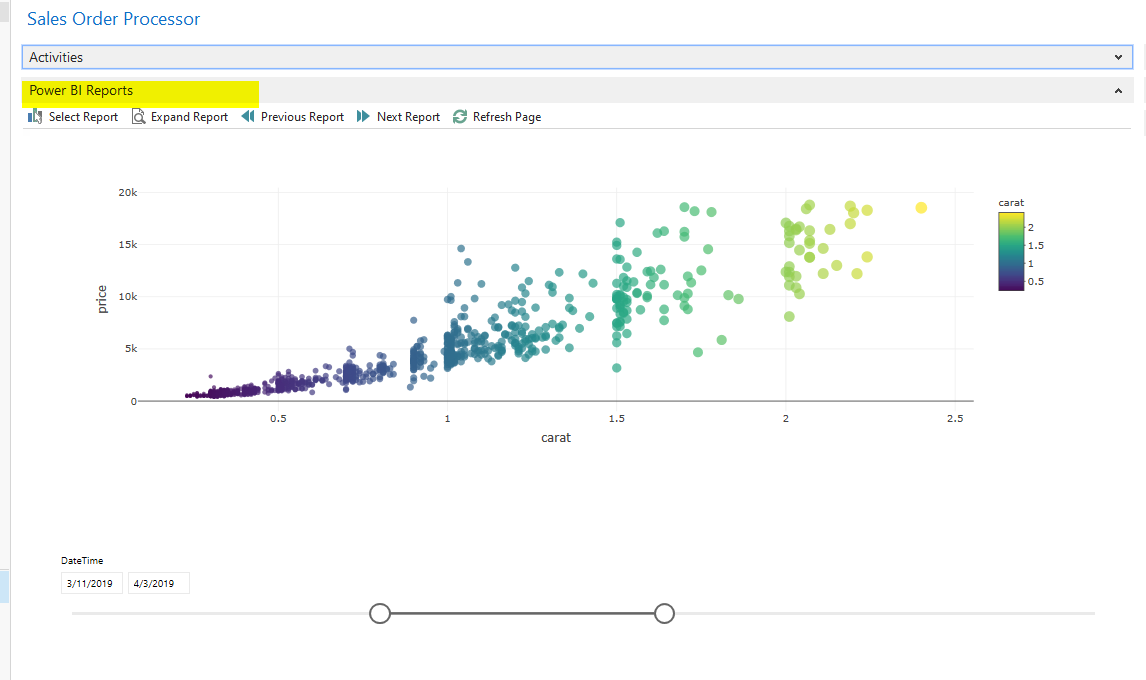
After that I was able to connect to my Power BI service account and view report in Business Central:
PBIinBC.png
The problem is the performance is terrible: it takes around 1.5 minute to load the report in Business Central (it takes around 1 second to load the same report in Power BI service).

Do you have any experience with this? What can be the reason that the reports are so slow? How can I improve the performance?

Thanks in advance for all your suggestions?

I have the same question (0)
  • Marco Mels Profile Picture
    on at

    Hello,

    Does this happen for all reports and / or the standard reports that Microsoft did ship with the product?

    Thanks.

  • Community Member Profile Picture
    on at

    Hi Marco,

    Thanks for your reply.

    I´m using custom reports that I created (not the reports created by Microsoft).

    Kind regards,

    Lukasz

  • Suggested answer
    Marco Mels Profile Picture
    on at

    Hi,

    Does this issue also happen with the standard reports?

  • Suggested answer
    Robert B. Profile Picture
    257 on at

    Hi LucaszB,

      Have you tried to clean your datasets?

      For example if you build a report with PowerBI by using an oData feed which exposes 20 fields of a table, try to reduce that to only the fields that you actually need, presumably 3 fields for that scatter chart.

      Let me know how it goes, I am curious if that sorts your problem.

    Cheers,

    Robert

    Please verify my answer, if you find it useful, that way others can find this solution easier!

  • Community Member Profile Picture
    on at

    Hi,

    We are using simple reports with small data sets that it should not be the issue.

    We asked Microsoft support to help with this issue - I will let you know when it is resolved

    Lukasz

  • Suggested answer
    Olister Rumao Profile Picture
    3,967 on at

    Hi Lucas,

    You can probably try getting your data using Web services OData V4 into PowerBI.

    Hope this makes it better

  • Suggested answer
    Robert B. Profile Picture
    257 on at

    Of course as mentioned above using API's with Odata feeds (V4 of course gives you best performance) is always better if you have the option.

    I was curious and also created a PBI report myself with a direct SQL connection and already see there are limitations when you use DirectQuery. If you really need to, another option I see is transforming direct query to Import your data if this is not large.

    As you are already in contact with Microsoft, I hope any of these suggestions will help clarify it with them, but keep us posted on what was the issue of your context and also the solution 

    Cheers,

    Robert

    Please verify my answer, if you find it useful, that way others can find this solution easier!

  • Arif_Zai Profile Picture
    10 on at

    Thank you for this tutorial, I really appreciate your efforts sir, it really helped but I have few queries such as.

    1. about home page URL, reply URL and redirect URL what URL we have to put here.

    2. in order to use power bi inside business central users have to login business central on premises with office 365 credentials or they can use the windows authentication to login in business central

    3. as you mention this " Copied the sign-on URL from the NAV reply URL (in the setup dialog box). Ignore the 8080 showing up in mine, it was the result of following a wrong instruction online, I had to verbatim copy the Reply URL value here before I could get it to work." 

    so do we have to leave 8080 port while entering URL ... 

    and last thing that should we use /OAuthLanding.htm or should we use /sing-on 

    please reply on this

Under review

Thank you for your reply! To ensure a great experience for everyone, your content is awaiting approval by our Community Managers. Please check back later.

Helpful resources

Quick Links

Responsible AI policies

As AI tools become more common, we’re introducing a Responsible AI Use…

Neeraj Kumar – Community Spotlight

We are honored to recognize Neeraj Kumar as our Community Spotlight honoree for…

Leaderboard > Small and medium business | Business Central, NAV, RMS

#1
OussamaSabbouh Profile Picture

OussamaSabbouh 3,143

#2
Jainam M. Kothari Profile Picture

Jainam M. Kothari 1,694 Super User 2025 Season 2

#3
YUN ZHU Profile Picture

YUN ZHU 1,067 Super User 2025 Season 2

Last 30 days Overall leaderboard

Featured topics

Product updates

Dynamics 365 release plans
