web
You’re offline. This is a read only version of the page.
close
Skip to main content

Notifications

Announcements

No record found.

Community site session details

Community site session details

Session Id :
Supply chain | Supply Chain Management, Commerce
Suggested Answer

Purchase Order receive, auto generate batch numbers - Problem with multiple inventory transactions

(0) ShareShare
ReportReport
Posted on by 270

Hi,

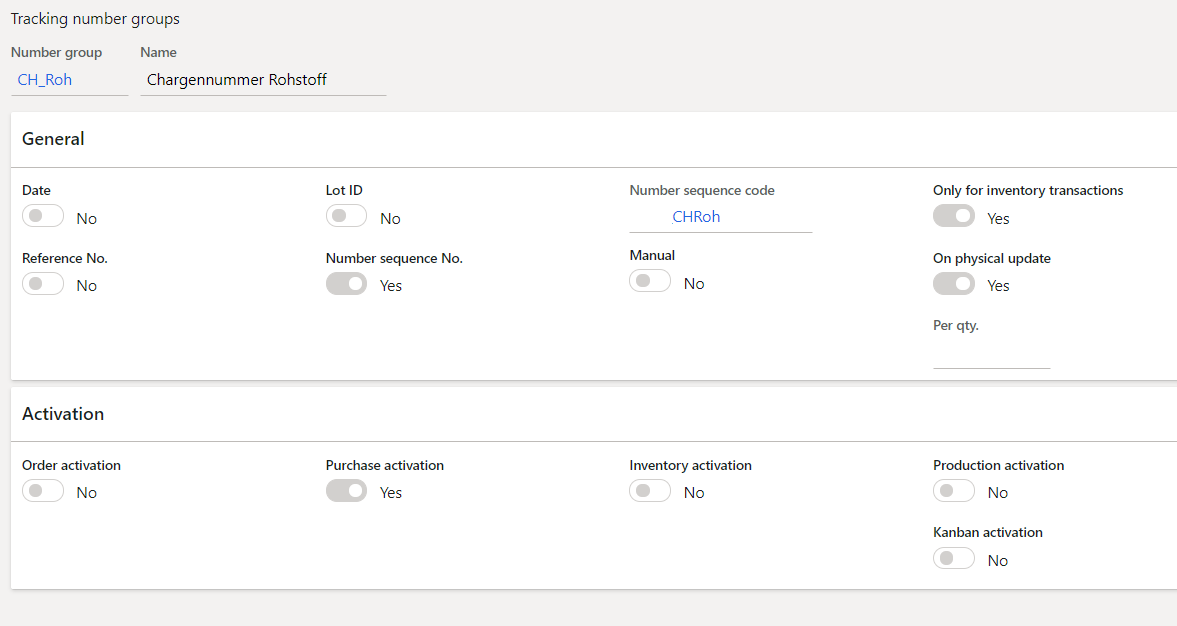
we have set up a Tracking Number Group for our Items that are Batch Tracked in order to automatically generate the Batch Number on purchase order receive.
Unbenannt.png

We have seem that after converting planned purchase orders from master planing it could happen that one purchase order line as several inventory transactions, probably in order for master plan to be able to follow up. 

If we make a receipt of this purchase order, several batch numbers will be generated althoug we only have only 1 purchase order line but several inventory transactions in status "ordered" are linked to this purchase order line. 

There is a way to assure that the system only generated 1 batch number for the purchase order line and not 1 batch number per inventory transaction associated to the purchase order line on product receipt?

Thanks 

I have the same question (0)
  • Pedro-Rodriguez Profile Picture
    270 on at

    When I select Marking "None" when firming the Planned Purchase Order, I do not get several inventory transactions generated on the purchase order lines. That would work for me but I unknown which consequences would have not to have marking on the generated purchase order line (Option Standard). 

  • Suggested answer
    André Arnaud de Calavon Profile Picture
    301,130 Super User 2025 Season 2 on at

    Hi Pedro,

    You can also check the Inventory parameter 'Automatic addition'. If this is disabled, it will more easily create multiple different inventory transactions. When you enable this parameter, it will sum up the inventory transactions by physical voucher, date, financial voucher, date and inventory dimensions.

  • Pedro-Rodriguez Profile Picture
    270 on at

    Thanks André but we had this already activated. I think the cause is that some planned purchase lines have diverse sources of demand in the MRP as I can see in pegged transactions. When using Marking "Standard" diverse tx are created so probably the system can follow up. With Marking "None" seems solved but I have to check if that have inconveniences later in automatic reservation.

  • Dolores Young Profile Picture
    on at

    Hi,

    How is  'On physical update' set in the batch number group?

    Thanks

    Dolores

  • Pedro-Rodriguez Profile Picture
    270 on at

    We found the cause of the problem. The purchase orders come from planned purchase orders that were pegged to multiple transactions. If we use standard marking, the system creates the purchase order lines with so many inventory transactions as pegged transactions. For each transaction will be created a batch number. Not ideal. We are going to avoid marking for this purchase orders, not sure if later we get problems with automatic reservation.

Under review

Thank you for your reply! To ensure a great experience for everyone, your content is awaiting approval by our Community Managers. Please check back later.

Helpful resources

Quick Links

Responsible AI policies

As AI tools become more common, we’re introducing a Responsible AI Use…

Neeraj Kumar – Community Spotlight

We are honored to recognize Neeraj Kumar as our Community Spotlight honoree for…

Leaderboard > Supply chain | Supply Chain Management, Commerce

#1
Laurens vd Tang Profile Picture

Laurens vd Tang 301 Super User 2025 Season 2

#2
André Arnaud de Calavon Profile Picture

André Arnaud de Cal... 120 Super User 2025 Season 2

#3
Siv Sagar Profile Picture

Siv Sagar 105 Super User 2025 Season 2

Last 30 days Overall leaderboard

Product updates

Dynamics 365 release plans
