web
You’re offline. This is a read only version of the page.
close
Skip to main content

Announcements

No record found.

News and Announcements icon
Community site session details

Community site session details

Session Id :
Microsoft Dynamics CRM (Archived)

Auto number by workflow is not working

(0) ShareShare
ReportReport
Posted on by 1,821

Hi,

I have requirement, there is unique number for each opportunity as Opportunity reference number in opportunity entity. when user create new opportunity next number will be updated on this opportunity.  I want to do this in CRM 2016 SP 1 version by using workflow. I did the following for updating this.  Please find the details with picture.

Opportunity reference number is not updating from AutoNumber entity.  Kindly help me to solve this issue.

I got many solution from google search for workflow but I do not know why the reference number is not updating from AutoNumber entity

I think the problem is with relationship, please check   Field new_RefNumberId of opportunity entity is not updating value from AutoNumber entity as part of 1: N relationship with AutoNumber and opportunity

1. Created custom entity called AutoNumber and Opportunity ref number is the field to store the next number.
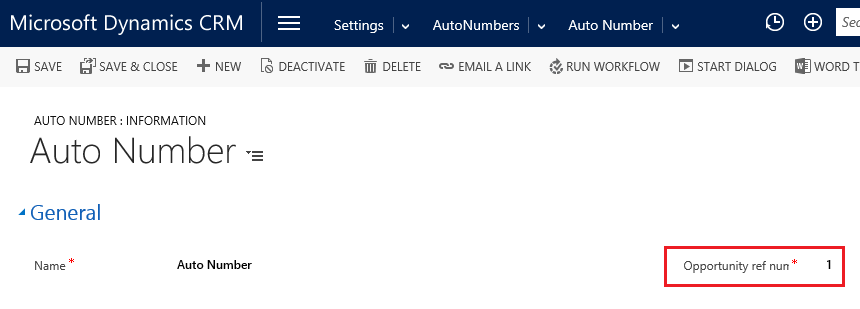
   p61.png

2.  Created 1: N relation ship with AutoNumber and opportunity as shown below screen. 1: N relationship from Autonumber entity to Opportunity entity
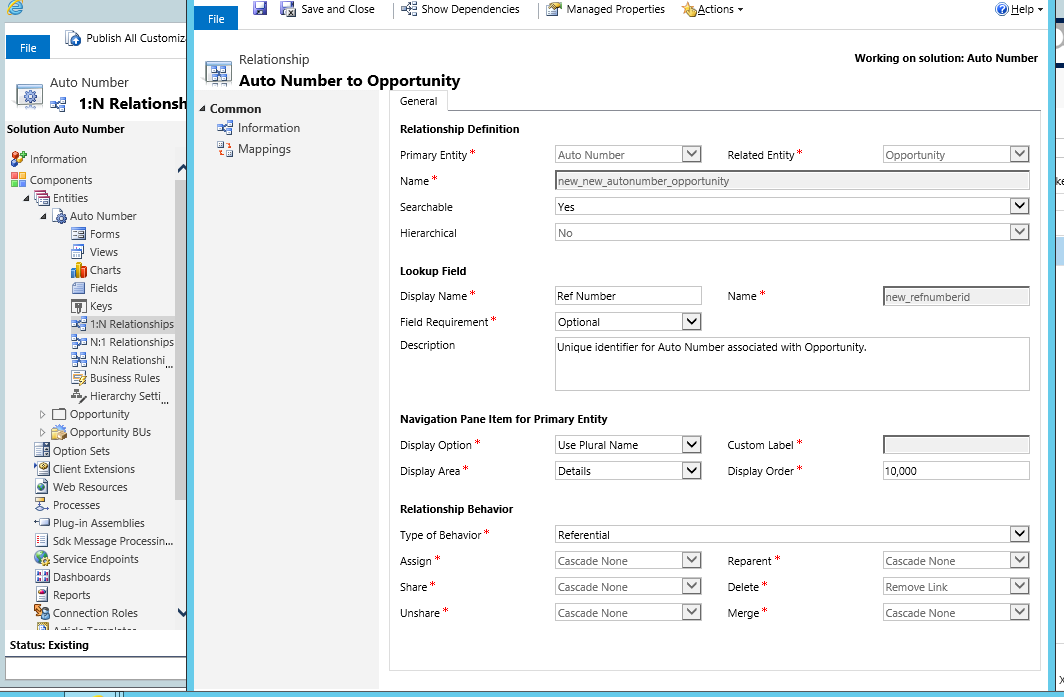
p62.png

3. Create Workflow to update reference number and update auto number
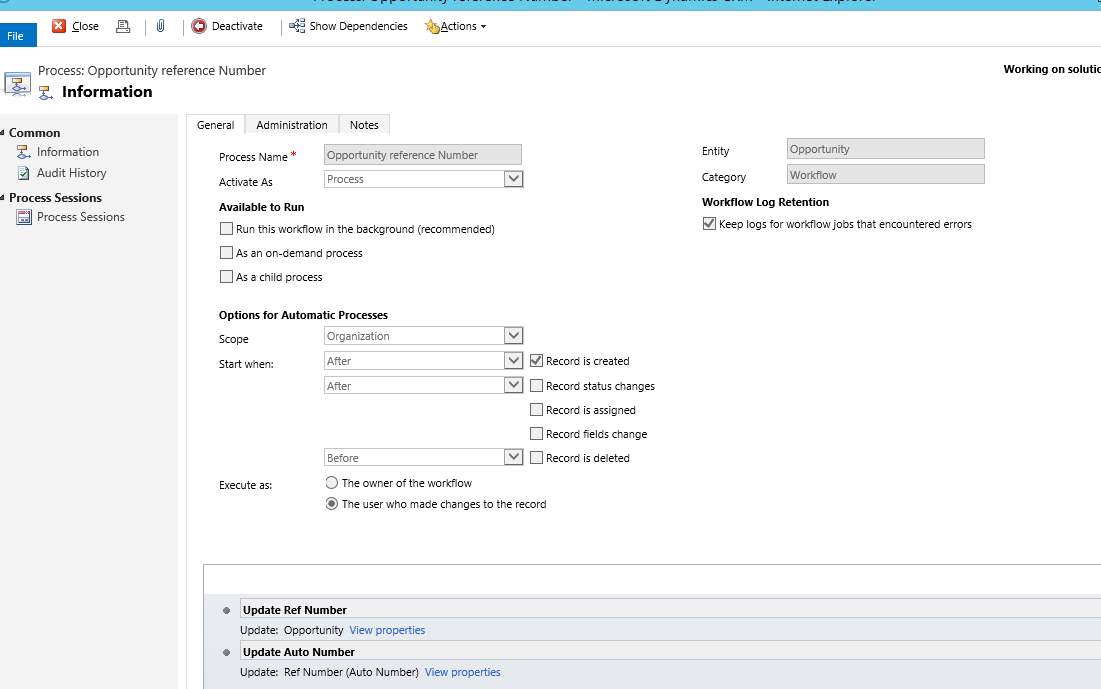
1460.63.png

4. Created workflow to update Reference number field of opportunity entity by Opportunity ref number field of Autonumber entity as shown below screen
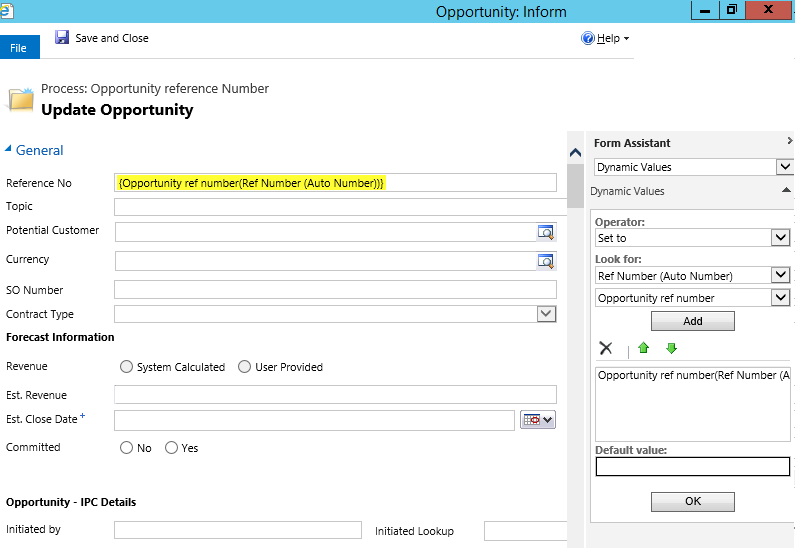
3644.64.png

5.  Created workflow to increase and update opportunity ref number as shown below screen.
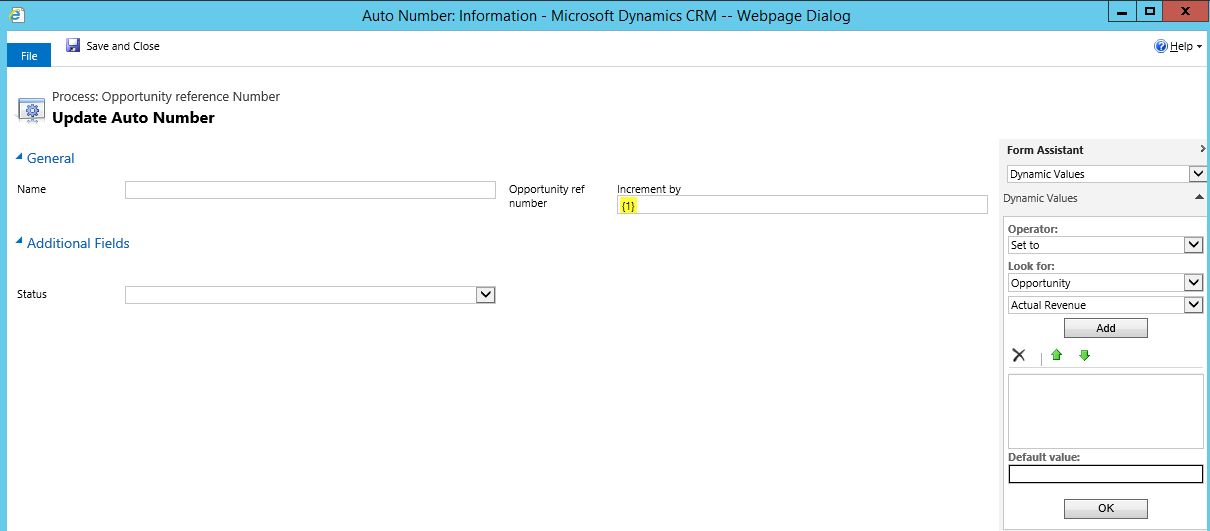
6708.65.png

*This post is locked for comments

I have the same question (0)
  • ashlega Profile Picture
    34,477 on at

    Hi,

     first of all, I think there are autonumbering solutions for Dynamics you might use instead. Here is just one example:

    crm2015autonumber.codeplex.com

     As for the worklows, could you clarify what actually triggers those two workflows? And, also, where/when/how do you set "Ref Number" lookup field on the opportunity?

  • P NOUSHAD Profile Picture
    1,821 on at

    HI,

    I am looking for simple solution.  I need only one auto number without suffix or prefix.  can we do changes on this forms any other changes.  I do not want to depends on the for any upgrade.  Please inform any other solution.  Can we do this by using java script (odata and json).  Please help me.

    Regards,

    Noushad

  • MNarmeen Profile Picture
    1,848 on at

    Hi,

    This link will give you desired result. Just ignore prefix and suffix requirements mentioned in the blog. I think there is some problem with your workflow steps. The following solution is tested and working.

    Link : www.encorebusiness.com/.../dynamics-crm-auto-number-entities

  • P NOUSHAD Profile Picture
    1,821 on at

    Hi,

    Thanks for your reply and help.  It is not clear the first workflow based on the link you provided.  Please find below image for your reference.  What is step of this workflow doing.  Can I get details. image of the step is not available in the link you provided. 

    When do 1:N relationship, will the primary key of the Autonumber will be updated automatically to related entity or we have to update by using workflow.  please give details.

    image13a.png

  • Inogic Profile Picture
    764 on at

    Go to this link and download the ADXstudio Productivity pack.


    This ADXstudio productivity pack provide the entity structure for Auto numbering and base for the Auto-Numbering but for setting that number in the field we have to either create a plugin or a workflow, as mentioned in the below blog.


    https://community.adxstudio.com/products/adxstudio-productivity-features/documentation/adxstudio-auto-numbering-workflow-helper/


    If this answered your question, please make sure to Mark this as an Answer.

    Thanks,

  • Suggested answer
    Gary Letter Profile Picture
    1,267 on at

    1. See Step 10 of the blog that Mehak referenced. It's not enough to establish the relationship between Opportunity and Auto-Number. You also need to create a lookup field from the Opportunity to the Auto-Number record. The "Create the relationship..." step populates the lookup field with the name of the Auto-Number record.

    2. You may need to use two different workflows: one to populate the lookup, and another to set the Auto-Number value on the Opportunity and increment it on the Auto-Number record. If the first workflow calls the second workflow as a child workflow, then you can ensure that the Opportunity has already been linked to the Auto-Number record, and therefore will be able to retrieve and increment the Auto-Number values. Do not use the "Record is Created" trigger for the second workflow; it should only run when called by the first workflow.

    3. Make sure that the users running the workflows have privileges to read and update the Auto-Number record.

  • P NOUSHAD Profile Picture
    1,821 on at

    Hi,

    Thanks for your reply.

    10. Create a step to update the quote and set the Quote AutoNumber lookup to the value of the record you created (Defaults).

    I have added the lookup field in opportunity form and created workflow to update this filed.

    But the lookup field not update automatically after run work flow.

    I can find the data when I click on lookup field of opportunity as shown below screen.


    5001.W1.png

    Please find the workflow to update the auto number

    3343.w2.png


  • Suggested answer
    Gary Letter Profile Picture
    1,267 on at

    In your Update Opportunity workflow, the Opt Ref Number field is set to update to a dynamic value (highlighted in yellow), which is incorrect. Change this step to populate the Opt Ref Number field with Name of the Auto Number record, which is "Auto Number". This is a static value, just the same as if you were looking it up manually on the form.

  • Verified answer
    P NOUSHAD Profile Picture
    1,821 on at

    Thanks.  It is working now

  • Gary Letter Profile Picture
    1,267 on at

    Glad to help. If this solved the problem, please mark the answer as verified.

    Thanks,

    Gary Letter

Under review

Thank you for your reply! To ensure a great experience for everyone, your content is awaiting approval by our Community Managers. Please check back later.

Helpful resources

Quick Links

Introducing the 2026 Season 1 community Super Users

Congratulations to our 2026 Super Stars!

Meet the Microsoft Dynamics 365 Contact Center Champions

We are thrilled to have these Champions in our Community!

Congratulations to the April Top 10 Community Leaders

These are the community rock stars!

Leaderboard > 🔒一 Microsoft Dynamics CRM (Archived)

#1
ScottDurow Profile Picture

ScottDurow 2

#2
GJones Profile Picture

GJones 1

Last 30 days Overall leaderboard

Featured topics

Product updates

Dynamics 365 release plans
