web
You’re offline. This is a read only version of the page.
close
Skip to main content

Announcements

No record found.

News and Announcements icon
Community site session details

Community site session details

Session Id :
Microsoft Dynamics 365 | Integration, Dataverse...
Suggested Answer

install d365 archive by dataverse long term retention

(1) ShareShare
ReportReport
Posted on by 8
I am getting the following error when I try to install an app in PPAC (Dynamics 365 Archive with Dataverse Long Term Retention).
We have two different projects in our LCS (two different solutions - each D365 project has its own production, UAT, etc.).
The error I am getting is different for each solution.
From one of the solutions, I am getting the following error:
Raw code
Failed to validate if retention is enabled for FnO VE: GeneralJournalAccountEntryBIEntity. Error Message: FnO VE entity: GeneralJournalAccountEntryBIEntity is not eligible for archival. Error code -2147220970
From another project, the error is about the activation of the configuration key for the call center in the Retail module, even though the configuration key is active.
Does anybody know anything about this?
 
Br,
Savci
I have the same question (0)
  • Suggested answer
    whitebeard Profile Picture
    97 on at

    Hi @SA-23121343-0,

    I have encountered these specific errors before. They are known installation blockers documented in the Archive with Dataverse Long Term Retention FAQ. Here is how to fix both:

    1. Fix for "GeneralJournalAccountEntryBIEntity is not eligible for archival"
    This error occurs because the Virtual Entity metadata in Dataverse is stale or the entity hasn't been flagged as "Refreshed" yet.

    • Go to the Power Apps Maker Portal (https://www.google.com/search?q=make.powerapps.com) and select the Dataverse environment linked to your F&O.

    • Go to Tables > All.

    • Search for the table "Available Finance and Operations Entity" (mserp_availablefinanceandoperationsentity).

    • Open the data (Edit) for this table.

    • Search for GeneralJournalAccountEntryBIEntity in the Name column.

    • Change the Refresh column value to Yes (or ensure the record exists and is active). This forces Dataverse to re-sync the entity properties from F&O, recognizing it as eligible for archival.

    2. Fix for "Call center in the Retail module" error
    The installation script checks if Change Tracking can be enabled for the MCRSalesTableBiEntity. This entity has a hard dependency on the Call Center configuration key.

    • Even if you have the "Retail" module active, the specific sub-key might be off.

    • In F&O, go to System Administration > Setup > License configuration.

    • Expand Retail > Retail Channels.

    • Ensure the checkbox for Call Center is explicitly checked.

    Once both are done, retry the installation in PPAC.
     

    Source Information

    The errors you are seeing are explicitly listed in the Microsoft Dynamics 365 GitHub documentation for "Common installation failure cases."

    Source: Finance and operations apps archive with Dataverse long term retention FAQ


    Hope this helps!

  • SA-23121343-0 Profile Picture
    8 on at
     Hi Iampranjal
     
    I appreciate your answer. In our Power App portal /Tables/All a table with name "Available Finance and Operations Entity" (mserp_availablefinanceandoperationsentity). does not exist. But I can find the entity GeneralJournalAccountEntryBIEntity  directly in /Tables/All
     
    The error I am getting is still the same. 


  • Suggested answer
    whitebeard Profile Picture
    97 on at
     
    in your screenshot check the checkbox for Enable long term retention and save and then publish table.

     
    Once this is enabled. You can go back and try again it will start working.
     
    Hope this helps!
  • SA-23121343-0 Profile Picture
    8 on at
    Unfortunately. I did, of course, that. But when I marked it and tried to save it. I am getting this error : (
    
    Failed to validate if retention is enabled for FnO VE : GeneralJournalAccountEntryBiEntity, Error Message : FnO VE entity : GeneralJournalAccountEntryBiEntity is not eligible for archival..)
     
  • whitebeard Profile Picture
    97 on at
    Hi @SA-23121343-0,
     

    Use the "Classic" Advanced Find

    If the modern Power Apps table view still hides the record, use the classic interface:

    In Power Apps, click the Gear Icon (top right) $\rightarrow$ Advanced Settings.

    Click the Funnel Icon (Advanced Find) in the top right.

    In the Look for dropdown, select Available Finance and Operations Entities.
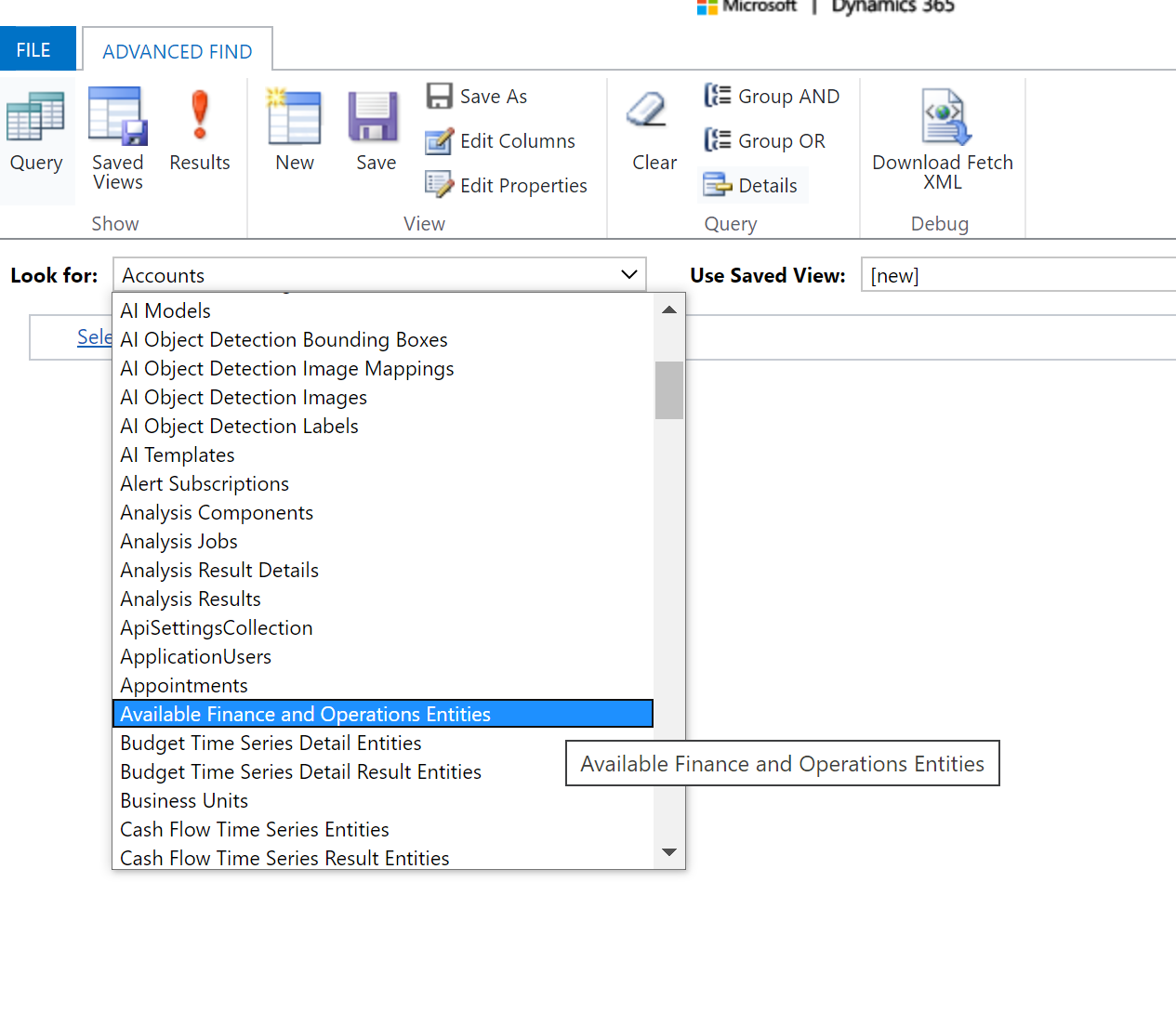
    In the criteria, set Name equals GeneralJournalAccountEntryBiEntity.

    Click Results.

    If found, open the record and verify the Visible box is checked.

    Change the Refresh column value to Yes (or ensure the record exists and is active). This forces Dataverse to re-sync the entity properties from F&O, recognizing it as eligible for archival.

    Alternate Approach - 

    Use the below url to open the table Available Finance and Operations Entity-
     
    https://[YourEnvironmentURL]/main.aspx?pagetype=entitylist&etn=mserp_availablefinanceandoperationsentity
     
    Replace YourEnvironmentURL to your crm URL e,g. org64d7a60d.crm8.dynamics.com once it is open 


    Search for GeneralJournalAccountEntryBIEntity in the Name column.

    If found, open the record and verify the Visible box is checked.

    Change the Refresh column value to Yes (or ensure the record exists and is active). This forces Dataverse to re-sync the entity properties from F&O, recognizing it as eligible for archival.

    Let me know if this works or not.


  • SA-23121343-0 Profile Picture
    8 on at
    Hi again
     
    You are absolutely right. I couldn't find entity  Available Finance and Operations Entities in the table at first. I made a mistake by retrieving the entity 'GeneralJournalAccountEntry' directly from the tables. The fact that the same entity is found in two different lists under the table is confusing. However, I finally managed to complete the task thanks to you. :-)
     
    Br,
    Savci
  • whitebeard Profile Picture
    97 on at
     
    Its good hear that it worked.
     
    Kindly marked the reply as verified so it also helps others as well.


Under review

Thank you for your reply! To ensure a great experience for everyone, your content is awaiting approval by our Community Managers. Please check back later.

Helpful resources

Quick Links

Introducing the 2026 Season 1 community Super Users

Congratulations to our 2026 Super Stars!

Congratulations to our 2025 Community Spotlights

Thanks to all of our 2025 Community Spotlight stars!

Leaderboard > Microsoft Dynamics 365 | Integration, Dataverse, and general topics

#1
11manish Profile Picture

11manish 166

#2
ManoVerse Profile Picture

ManoVerse 54 Super User 2026 Season 1

#3
Niki Patel Profile Picture

Niki Patel 40

Last 30 days Overall leaderboard

Product updates

Dynamics 365 release plans
