web
You’re offline. This is a read only version of the page.
close
Skip to main content

Announcements

No record found.

News and Announcements icon
Community site session details

Community site session details

Session Id :
Supply chain | Supply Chain Management, Commerce
Suggested Answer

On Hand Empty in net requirements

(0) ShareShare
ReportReport
Posted on by 584

Hi all

Running F&O 10.0.0.23

I have an item with 66K on hand, when I go to Net requirements it shows On-Hand is empty. If I run Update -> Master Planning in the Net Requirement screen, it suddenly shows the 66K

Can anyone explain why it show no on-hand until I update master planning? I assumed it would always just show current on-hand

pastedimage1642106566128v1.png

I have the same question (0)
  • Suggested answer
    huijij Profile Picture
    19,813 on at

    Hi markmj,

    Please check the link to see if it helps:

    www.dynamicsuser.net/.../66492

  • markmj Profile Picture
    584 on at
    [quote user="Judy Jee"]

    Hi markmj,

    Please check the link to see if it helps:

    www.dynamicsuser.net/.../66492

    [/quote]

    Hi Judy

    I checked that thread, but didn't see any kind of solution (other then running update) or reason it happens

  • Suggested answer
    Danny Bilodeau Profile Picture
    4,934 Super User 2026 Season 1 on at

    Hello markmj,

    I found that the behavior depends on which Plan is identified as the 'Current Dynamics Master Plan' in the Master Planning Parameters (General tab).

    In my Demo environment, with the 'Master Plan' defined as the 'Dynamic Master Plan , the Summary tab will show the current on-hand.

    Any adjustment to the quantity will be reflected in that field without running the Master Plan.  On the other had, the StaticPlan will only show the on-hand for the last time the StaticPlan was run and will only be updated when the StaticPlan is recalculated.  

    If I change the 'Dynamic Plan' to be the StaticPlan, after running an initial calculation of the Static Plan, the behavior is reversed and the Summary On-Hand for the Static Plan reflects the current on-hand without having to run the calculation.

    Hope it helps!

  • markmj Profile Picture
    584 on at
    [quote user="Danny365"]

    Hello markmj,

    I found that the behavior depends on which Plan is identified as the 'Current Dynamics Master Plan' in the Master Planning Parameters (General tab).

    In my Demo environment, with the 'Master Plan' defined as the 'Dynamic Master Plan , the Summary tab will show the current on-hand.

    Any adjustment to the quantity will be reflected in that field without running the Master Plan.  On the other had, the StaticPlan will only show the on-hand for the last time the StaticPlan was run and will only be updated when the StaticPlan is recalculated.  

    If I change the 'Dynamic Plan' to be the StaticPlan, after running an initial calculation of the Static Plan, the behavior is reversed and the Summary On-Hand for the Static Plan reflects the current on-hand without having to run the calculation.

    Hope it helps!

    [/quote]

    Hi Danny 

    Thanks for suggestion. Right now we do have the static plan configured for both

    Best

    mark

  • StuartMorgan Profile Picture
    10 on at

    Hi Mark,

    Did you find a resolution to this in the end?

    Stuart

  • markmj Profile Picture
    584 on at
    [quote user="StuartMorgan"]

    Hi Mark,

    Did you find a resolution to this in the end?

    Stuart

    [/quote]

    Unfortunately not

  • Suggested answer
    StuartMorgan Profile Picture
    10 on at

    Mark, 

    It would be worth checking these two options in Master planning parameters.

    If they're switched on, Master planning will not update the net requirements screen if there's no direct demand for a particular item. If these options are switched off, Master planning will calculate and present information in the new requirements screen for every item whether there's direct demand or not.

    pastedimage1649153374661v2.png

    It would be great to hear if this solves your problem.

    Stuart 

  • InferiFi Support Profile Picture
    85 on at

    Hi,

    Static Master plan uses the current data to generate a net requirement, so if there is any update in the Master data it will not be reflected in the static master plan unless you recalculate/ rerun it.

    Please refer to below mention link:

    docs.microsoft.com/.../master-planning-setup

    Example:

    A new product is created, and net requirement process is run. Refer to below results:

    It shows empty
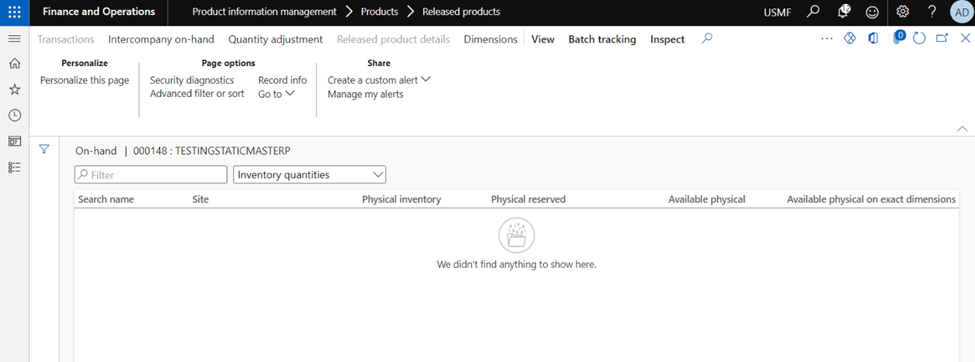
    pastedimage1653044145486v1.png

    Static Master Plan on Hand:

    It shows empty.
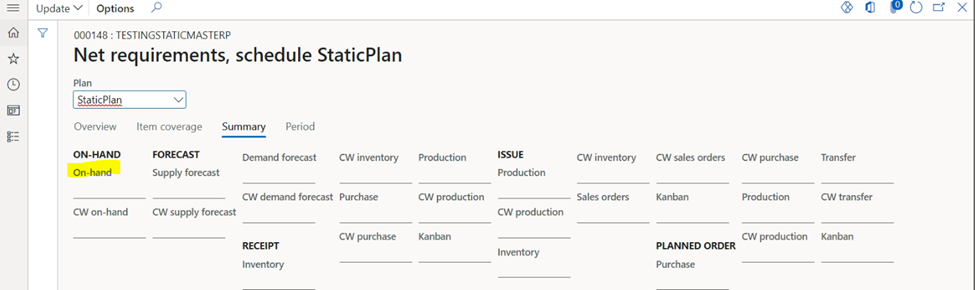
    pastedimage1653044167261v2.png

    Now Inventory is adjusted to 66,128 as show on the post:
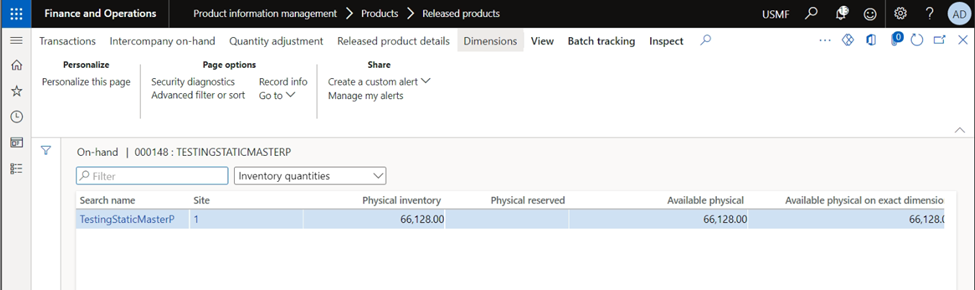
    pastedimage1653044188016v3.png

    Static Master Showing the same on Hand:


    Finally Updated Static Master Planning (Rerun):

    Quantity has been adjusted to the on-hand inventory.
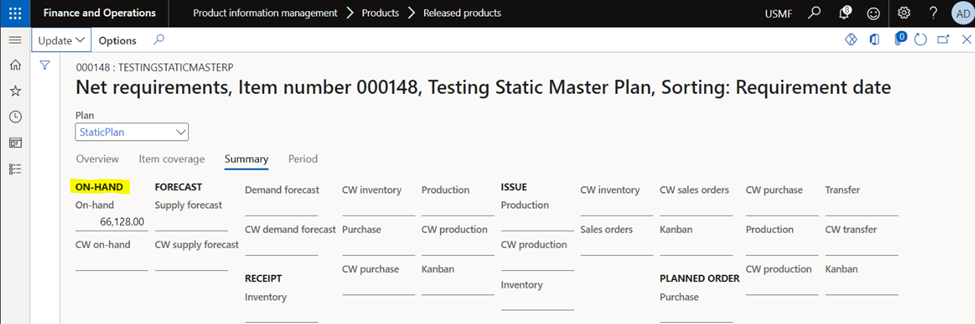
    pastedimage1653044214490v4.png

    Please mark the the answer as verified, if it resolves your query.

    Thanks,

    Inferifi LLC

Under review

Thank you for your reply! To ensure a great experience for everyone, your content is awaiting approval by our Community Managers. Please check back later.

Helpful resources

Quick Links

Introducing the 2026 Season 1 community Super Users

Congratulations to our 2026 Super Stars!

Meet the Microsoft Dynamics 365 Contact Center Champions

We are thrilled to have these Champions in our Community!

Congratulations to the April Top 10 Community Leaders

These are the community rock stars!

Leaderboard > Supply chain | Supply Chain Management, Commerce

#1
André Arnaud de Calavon Profile Picture

André Arnaud de Cal... 164 Super User 2026 Season 1

#2
Laurens vd Tang Profile Picture

Laurens vd Tang 105 Super User 2026 Season 1

#3
Zain Mehmood Profile Picture

Zain Mehmood 89 Most Valuable Professional

Last 30 days Overall leaderboard

Product updates

Dynamics 365 release plans
