web
You’re offline. This is a read only version of the page.
close
Skip to main content

Announcements

No record found.

News and Announcements icon
Community site session details

Community site session details

Session Id :
Microsoft Dynamics GP (Archived)

Quantity on Hand balance is wrong in the Purchase Receipts Inquiry Window

(0) ShareShare
ReportReport
Posted on by 1,070

Hi,

I am have an issue where the quantity on hand balance for an item is showing -2 instead 0.

From the Purchase Receipts Inquiry Window, I found that the there are 2 receipt lines for the item as below:-
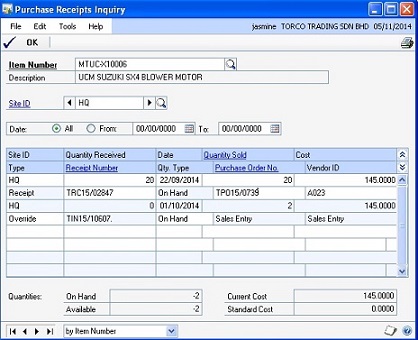
There was a sales invoice with 2 quantity of the item which was entered and subsequently voided. However, it is still shown as sold in the 1st receipt.

The issue seems to be cause by the 2nd line where there is a quantity sold of 2 and quantity received of 0.

How can I correct the inventory balance?

Thanks

*This post is locked for comments

I have the same question (0)
  • Suggested answer
    Mahmoud Saadi Profile Picture
    32,738 on at

    Initially, I would ask you to run the usual prerequisite which are inventory reconciliation and check links, you can as well consider the reconcile script provided on:

    Reconciling Quantity on Hand – SQL Script

    If things are not corrected after considering the above, let us know in order to provide further assistance on how to proceed.

    Your feedback is highly appreciated,

  • Wong Henry Profile Picture
    1,070 on at

    Hi Mahmoud,

    Thank for your reply.

    I have tried running the inventory reconciliation as well check links which both results did not show any error.

    With the link you provided, I executed the SQL script which the results also returned without any results.

    The inventory balance is still -2.

    How should I proceed from here?

    Thanks

  • Suggested answer
    Mahmoud Saadi Profile Picture
    32,738 on at

    Okay we are clear now,

    It seems to me that you voided the sales invoice on the RM level, which corrected the customer balance without correcting the Inventory Balance. You should have done a "return" instead.

    The second purchase receipt layer is an "Override" layer, which allow quantity to be minus. The correction for your case is to do a manual adjustment entry on the inventory level (Dr Inventory, Cr Cost of Goods Sold).

    Your feedback is highly appreciated,

  • Wong Henry Profile Picture
    1,070 on at

    Hi Mahmoud,

    The sales invoice was not voided on the RM level. It was voided in the SOP entry in which the document was printed but found to be wrong.

    Since GP does not allow printed sales invoice to be deleted, the document was instead voided.

    In which I found that the purchase receipt still show the quantity sold on the voided sales invoice. And when another sales invoice is issue, the quantity sold is doubled.

    In the case, how should I proceed after running check links and inventory reconciliation?

    Thanks you.

Under review

Thank you for your reply! To ensure a great experience for everyone, your content is awaiting approval by our Community Managers. Please check back later.

Helpful resources

Quick Links

Introducing the 2026 Season 1 community Super Users

Congratulations to our 2026 Super Stars!

Meet the Microsoft Dynamics 365 Contact Center Champions

We are thrilled to have these Champions in our Community!

Congratulations to the April Top 10 Community Leaders

These are the community rock stars!

Leaderboard > 🔒一 Microsoft Dynamics GP (Archived)

#1
talty09 Profile Picture

talty09 2

#1
Anthony Beatty Profile Picture

Anthony Beatty 2

#3
CP04-islander Profile Picture

CP04-islander 1

Last 30 days Overall leaderboard

Featured topics

Product updates

Dynamics 365 release plans
