web
You’re offline. This is a read only version of the page.
close
Skip to main content

Announcements

No record found.

News and Announcements icon
Community site session details

Community site session details

Session Id :
Microsoft Dynamics CRM (Archived)

Deactivate Public (Default) View

(0) ShareShare
ReportReport
Posted on by 470

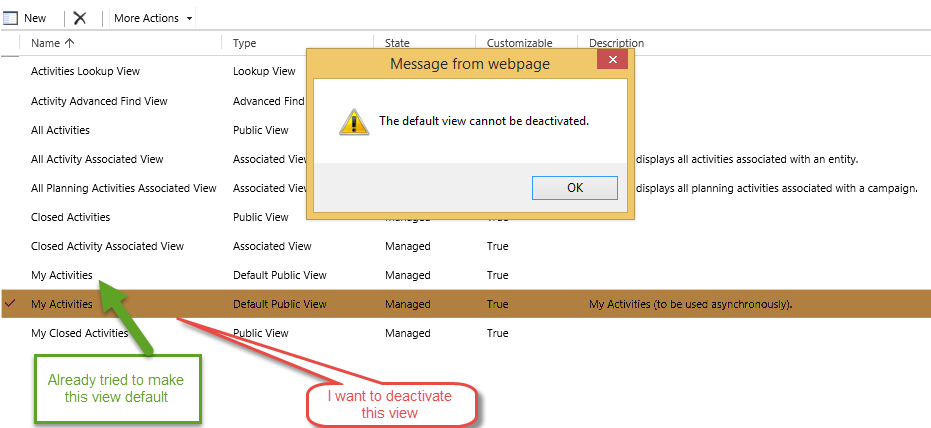
My client has duplicate views on Activity entity which I want to deactivate. However, when I try to deactivate one of "My Activities" view then I get alert, "The default view can not be deactivated", as show by screenshot.

Also I have tried to set another "My Activities" view as a default. 
DeactivateView.png

*This post is locked for comments

I have the same question (0)
  • Suggested answer
    Hamzeh Zawahreh Profile Picture
    3,674 on at

    hi Muhammad Salahuddin

    did you try to Open the view, go to more actions and delete it.

  • Hamzeh Zawahreh Profile Picture
    3,674 on at
  • Muhammad Salahuddin Profile Picture
    470 on at

    It is not supported in Dynamics CRM online 2015. Even mentioned there, it is supported for CRM 2011 when I visited the link.

  • Muhammad Salahuddin Profile Picture
    470 on at

    Yes, I have tried to delete but couldn't.

  • Aileen Gusni Profile Picture
    44,524 on at

    Muhammad,

    Try to set as default public for other view first then disable it.

    It seems there is a corrupted XML for the views

  • ScottDurow Profile Picture
    21 on at

    This looks most unusual! I would recommend creating a support ticket if Aileen's suggestion doesn't work.

  • Muhammad Salahuddin Profile Picture
    470 on at

    Aileen, I tried it but didn't work. Both views are default views as shown in image.

  • Muhammad Salahuddin Profile Picture
    470 on at

    Aileen's suggestion do not work. I'm going to create support ticket.

    Thank you everyone for your valueable response.

  • Daniel Wikell Profile Picture
    2,360 on at

    We've had the exact same problem with the Activity entity in one of our organizations, having that one extra asynchronous view appear as a second default view. This problem came around from the 2011-2013 upgrade I believe.

    Just now I tested the steps in the link from Hamzeh's post and following those steps still works in Dynamics CRM Online 2015. We now only have one default view and were able to deactivate the duplicate one. You should give it another try.

  • Community Member Profile Picture
    on at

    I got the same problem too. It happened after importing a solution in which the default view of "Contact" entity had been changed from "My Active Contacts" to "Active Contacts. It resulted in two Default Public Views after the solution was imported.  Please help.

Under review

Thank you for your reply! To ensure a great experience for everyone, your content is awaiting approval by our Community Managers. Please check back later.

Helpful resources

Quick Links

Introducing the 2026 Season 1 community Super Users

Congratulations to our 2026 Super Stars!

Meet the Microsoft Dynamics 365 Contact Center Champions

We are thrilled to have these Champions in our Community!

Congratulations to the March Top 10 Community Leaders

These are the community rock stars!

Leaderboard > 🔒一 Microsoft Dynamics CRM (Archived)

#1
JS-09031509-0 Profile Picture

JS-09031509-0 3

#2
AS-17030037-0 Profile Picture

AS-17030037-0 2

#2
Mark Eckert Profile Picture

Mark Eckert 2

Last 30 days Overall leaderboard

Featured topics

Product updates

Dynamics 365 release plans
