web
You’re offline. This is a read only version of the page.
close
Skip to main content

Announcements

No record found.

News and Announcements icon
Community site session details

Community site session details

Session Id :
Microsoft Dynamics CRM (Archived)

Unable to Create Work Order from Case

(0) ShareShare
ReportReport
Posted on by

Hello, 

Created New instance and did related setup for Case to WO creation.

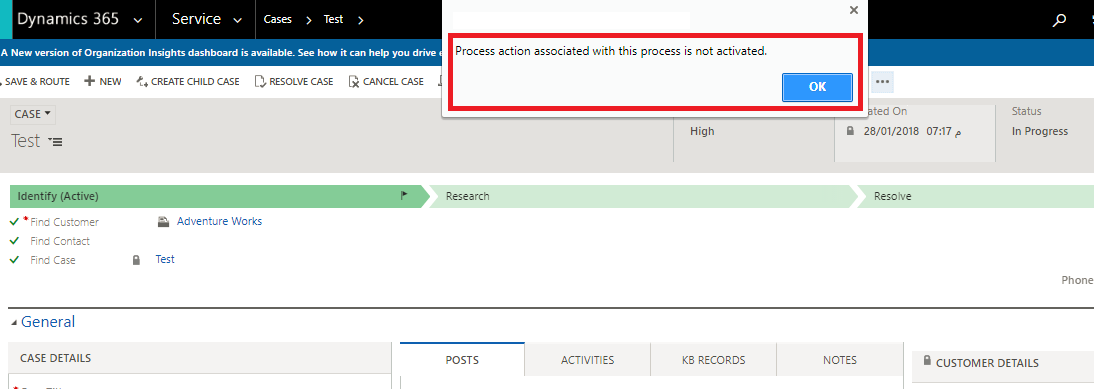
Creating case from CRM portal --> Converting to WO Showing error.

Error: Process action associated with this process is not activated.

Pl help me with this
1780.Untitled.png

Assigned Incident Type to Case before converting to WO.

Assigned Same Price List to Account as of Incident  Type.

Thanks 

*This post is locked for comments

I have the same question (0)
  • Suggested answer
    Community Member Profile Picture
    on at

    Hi Ashish2012,

    probably you have a sub-process (workflow or business process) involved in converting process that is not active.

    Please go to Settings > Process and activate the missing process.

    Please let me know.

    If you found the answer helpful, please mark as Verified 

    Join my network on LinkedIn      Follow me on Twitter 

    Thank You & Best Regards

    Francesco Picchi

    Microsoft Dynamics CRM Consultant, Bologna+Milano, ITALY

    Independent Contractor

    http://www.francescopicchi.com

  • Ashish2012 Profile Picture
    on at

    Hello Francesco,

    Thank for you’re reply,

    Created online trail no customisations done. I think some process incl or in draft stage. Checked all unable to find the relevAnt one to activate.

    Pl suggest me any alternative.

    Having same issue with my another instance fro that created this new, this also have same issue.

    Thanks

  • Suggested answer
    Community Member Profile Picture
    on at

    Hi Ashish2012,

    the error is clear, is a subprocess not activated.

    You need to find it, please check you are using "All processes" view, not "My processes".

    Please let me know.

    If you found the answer helpful, please mark as Verified 

    Join my network on LinkedIn      Follow me on Twitter 

    Thank You & Best Regards

    Francesco Picchi

    Microsoft Dynamics CRM Consultant, Bologna+Milano, ITALY

    Independent Contractor

    http://www.francescopicchi.com

  • ashish201212 Profile Picture
    30 on at

    Hello Francesco, 

    Pl let me know the process name. Tried to search process and unable to find one. 

    Thanks for the help


  • Suggested answer
    Community Member Profile Picture
    on at

    Hi ashish201212,

    I don't know the process name, try to post some screenshot about Processes (All processes view) and workflow/process screnshot.

    If you found the answer helpful, please mark as Verified 

    Join my network on LinkedIn      Follow me on Twitter 

    Thank You & Best Regards

    Francesco Picchi

    Microsoft Dynamics CRM Consultant, Bologna+Milano, ITALY

    Independent Contractor

    http://www.francescopicchi.com

  • ashish201212 Profile Picture
    30 on at

    Hello Francesco,

    Issue still not resolved, I need it to be done asap.

    Thanks

  • Suggested answer
    Community Member Profile Picture
    on at

    Hi ashish201212,

    Please post the screenshot requested, where to see all the process names involved (from form, from processes home page, etc.).

    If you found the answer helpful, please mark as Verified 

    Join my network on LinkedIn      Follow me on Twitter 

    Thank You & Best Regards

    Francesco Picchi

    Microsoft Dynamics CRM Consultant, Bologna+Milano, ITALY

    Independent Contractor

    http://www.francescopicchi.com

  • ashish201212 Profile Picture
    30 on at

    Hello Francesco, 

    Pl find the Attached workflow pictures: 

    WF2.pngWF2.png0250.WF3.png

    Thanks 

  • Suggested answer
    Community Member Profile Picture
    on at

    Hi ashish201212,

    please post also the process name that is called from entity form, I don't know what is.

    Thanks

    If you found the answer helpful, please mark as Verified 

    Join my network on LinkedIn      Follow me on Twitter 

    Thank You & Best Regards

    Francesco Picchi

    Microsoft Dynamics CRM Consultant, Bologna+Milano, ITALY

    Independent Contractor

    http://www.francescopicchi.com

  • Karuna Karan Profile Picture
    1,214 on at

    I have faced this issue in the past. When you provision a new trial some of the Biz Processes are not activated. Field Service Module has lot of issues, we have many open ticket with MS, in fact we are helping them identify these bugs.

    Anyways, how I solved this issue, just go to All Processes View, sort by Draft status and activate all of them. Ideally this is resolve your issue.

    Regards

    KK

Under review

Thank you for your reply! To ensure a great experience for everyone, your content is awaiting approval by our Community Managers. Please check back later.

Helpful resources

Quick Links

Introducing the 2026 Season 1 community Super Users

Congratulations to our 2026 Super Stars!

Congratulations to our 2025 Community Spotlights

Thanks to all of our 2025 Community Spotlight stars!

Leaderboard > 🔒一 Microsoft Dynamics CRM (Archived)

#1
Varsha deshpande Profile Picture

Varsha deshpande 5

#2
NeerajPawar Profile Picture

NeerajPawar 2

#2
jlattimer Profile Picture

jlattimer 2

Last 30 days Overall leaderboard

Featured topics

Product updates

Dynamics 365 release plans
