web
You’re offline. This is a read only version of the page.
close
Skip to main content

Announcements

Community site session details

Community site session details

Session Id :
Small and medium business | Business Central, N...
Unanswered

Disabling pop-up notification for the sender of an approval request with Sales Credit Memos

(0) ShareShare
ReportReport
Posted on by 264
How do I disable the following pop-up notification in BC. 
We send our Sales Credit Memos for approval by selecting them all, Actions - Request Approval - Send Approval Requested for selected lines, this then sends them to the Workflow User Group that need to approve them. The issue is once they are sent for every single credit memo we get the above notification and have to click OK on this. Recently we had a batch of 227 credit memos so had to click on this 227 times. Any suggestions on how to disable this pop-up?
 
I have checked the workflow and don't seem to see where in here I can remove this notification.
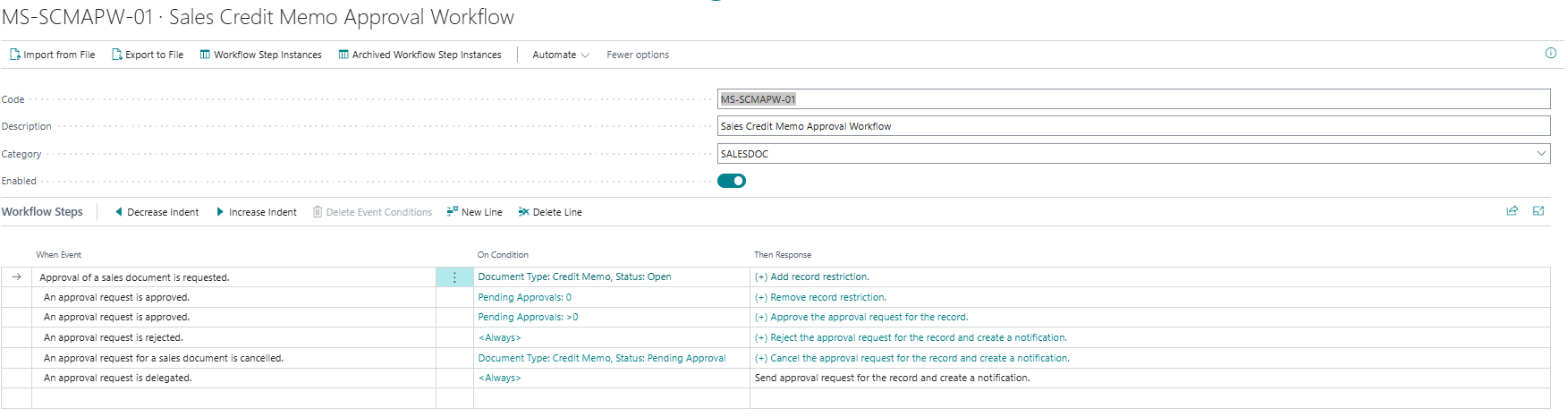
I also can't see that this is in my notifications.
I have the same question (0)

Under review

Thank you for your reply! To ensure a great experience for everyone, your content is awaiting approval by our Community Managers. Please check back later.

Helpful resources

Quick Links

Introducing the 2026 Season 1 community Super Users

Congratulations to our 2026 Super Stars!

Congratulations to our 2025 Community Spotlights

Thanks to all of our 2025 Community Spotlight stars!

Leaderboard > Small and medium business | Business Central, NAV, RMS

#1
OussamaSabbouh Profile Picture

OussamaSabbouh 2,042 Super User 2026 Season 1

#2
Dhiren Nagar Profile Picture

Dhiren Nagar 1,077 Super User 2026 Season 1

#3
YUN ZHU Profile Picture

YUN ZHU 1,068 Super User 2026 Season 1

Last 30 days Overall leaderboard

Featured topics

Product updates

Dynamics 365 release plans
